







Top Up PUBG MOBILE UC on TRADEE
TRADEE uses UID Top-up for PUBG MOBILE. Choose the UC package you need, enter the PUBG MOBILE UID / Player ID requested on the order page, check that the details are correct, and complete your payment.
PUBG MOBILE UC and Bonus UC
TRADEE offers different PUBG MOBILE UC packages. Check the options currently listed on this page and confirm the selected UC amount before paying.
Choose the UC Amount You Need
Select a UC package from the products currently available on TRADEE. Available options may change, so do not rely solely on a previous order or an old screenshot.
Check the Bonus UC Shown on the Product
Some UC packages may display an amount such as 300 + 25 UC. When a product includes bonus UC, refer to the total amount shown on the product page at the time of purchase.
Enjoy battle royale games beyond PUBG MOBILE? TRADEE also has top-ups for other shooters. Try fast-paced survival matches in Free Fire top-ups, or explore another battle royale experience with Knives Out top-ups. For more intense firefights and tactical extraction gameplay, take a look at Blood Strike top-ups and Arena Breakout top-ups.
Check Your PUBG MOBILE ID Before Paying
PUBG MOBILE UID Top-up is processed using the recipient details entered in your order. Before paying, make sure the PUBG MOBILE ID belongs to the account that should receive the UC.
Copy Your ID Carefully
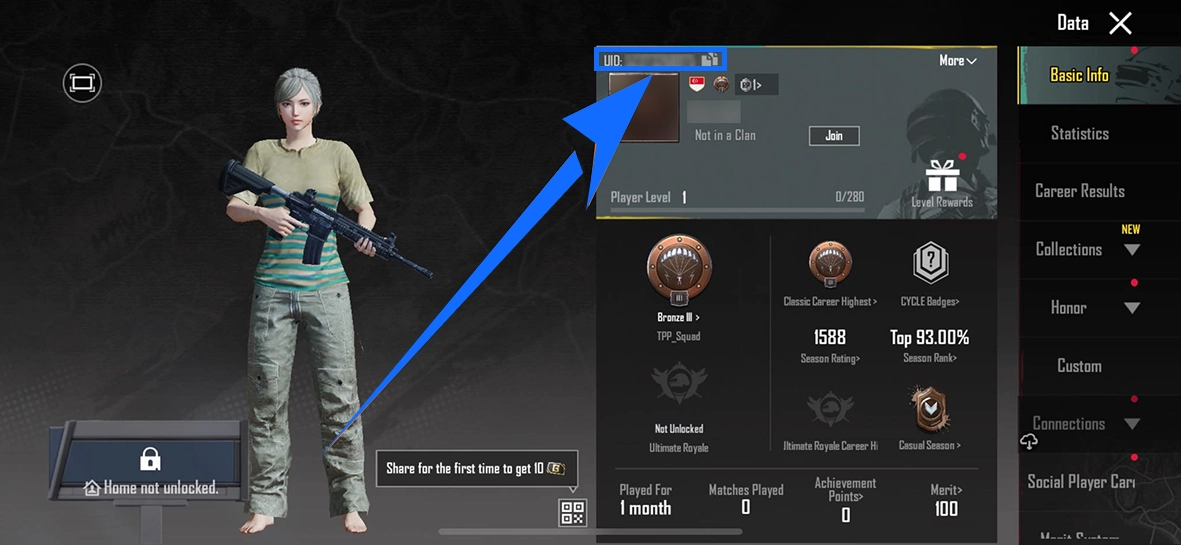
Enter the PUBG MOBILE ID requested on the TRADEE order page. Copying it directly from the game can help reduce manual entry errors.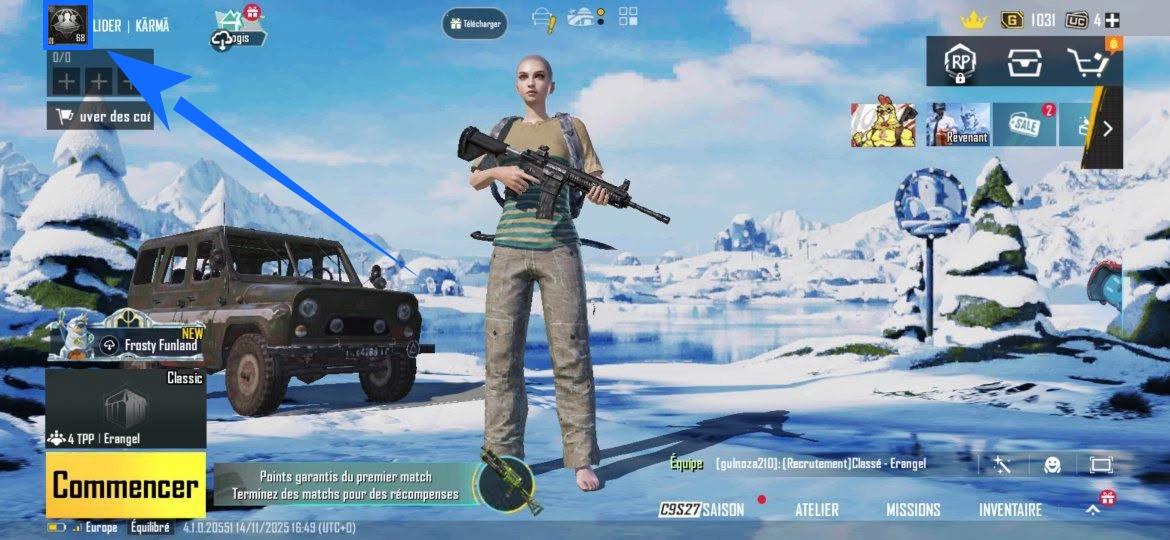
Check Both the Product and Recipient Account
Before proceeding to payment, check the selected UC package and the recipient account ID again. If either detail is incorrect, update the order before completing the purchase.
If you use more than one PUBG MOBILE account, check the recipient ID again before paying to make sure the order is linked to the account that should receive the UC.
PUBG MOBILE UC Top-Up Information
| Top-up Method | UID Top-up |
|---|---|
| Product | PUBG MOBILE UC |
| Required Recipient Details | PUBG MOBILE UID / Player ID requested on the TRADEE order page |
| Before Payment | Check the recipient ID, selected UC package, and final order total |
| After the Order Is Completed | Log in to the PUBG MOBILE account linked to the submitted ID and check the UC balance |
How to Top Up PUBG MOBILE UC
-
Choose a UC Package
Select the amount of UC you need from the PUBG MOBILE products currently available on TRADEE.
-
Enter Your PUBG MOBILE ID
Fill in the UID / Player ID requested on the order page. Make sure it belongs to the PUBG MOBILE account that should receive the UC.
-
Check the UC Amount and Recipient Account
Before continuing, check the selected UC package and the ID you entered. If the product includes bonus UC, confirm the total amount currently displayed on the product card.
-
Click Buy Now and Complete Payment
Click Buy Now, choose from the payment methods currently available at checkout, check the final amount, and complete the transaction.
-
Wait for the Order to Be Completed
Allow the current order to finish processing. Do not immediately place another order for the same purchase.
-
Open PUBG MOBILE and Check Your UC
Once the order is completed, log in to the PUBG MOBILE account linked to the submitted ID and check whether the UC has been credited.
PUBG MOBILE UC Top-Up FAQ
Where can I find the ID required for PUBG MOBILE top-up?
Use the Player / Character ID shown in the PUBG MOBILE account that should receive the UC, and enter it as requested on the TRADEE order page. Check it again before paying.
Do I need to provide my PUBG MOBILE login details for UID Top-up?
The UID Top-up process described on this page uses the PUBG MOBILE ID requested on the TRADEE order page as the recipient information. Do not provide account login details unless the order page explicitly asks for them.
Why do some UC packages show 300 + 25 UC?
Some TRADEE PUBG MOBILE products display the base UC amount together with bonus UC. The actual total depends on the current product listing, so check the UC amount shown when you place your order.
What should I do if the order is complete but the UC is not showing?
First, make sure you are logged in to the PUBG MOBILE account linked to the ID submitted with your order. If the UC is still missing, do not place the same order again. Keep your TRADEE order number and contact customer support so the completed transaction can be checked.
