




Free Fire Diamonds Top Up
Planning to get a new outfit, weapon skin, or save Diamonds for the next Luck Royale event? In Free Fire, Diamonds are the premium currency used to purchase cosmetic items, the Booyah Pass, and selected event content. Checking how many Diamonds you need before making a purchase can help you plan your spending instead of running short when an item you want becomes available.
TRADEE offers Free Fire Diamonds top-up services. Choose a Diamond package based on your account region and purchase needs. The service uses direct UID top-up: simply enter your correct player UID. You do not need to provide your game password or receive Diamonds through an in-game trade. Players who enjoy mobile shooters can also check out PUBG MOBILE top-ups to add resources for a different kind of battlefield.
Check Your Account Region Before Buying Free Fire Diamonds
Free Fire accounts in different regions may use different top-up channels. When buying Diamonds, check not only the package size and price but also whether the selected region matches your game account.
TRADEE's Free Fire products are available for the following regional channels:
- Global
- Malaysia / Singapore
- Brazil
- USA / Latin America
- Indonesia
Select the region linked to your Free Fire account. Do not rely only on your current country, device language, or payment currency. "Global" is the name of one top-up channel; it does not mean that every regional account can use it.
Available packages, prices, and stock may vary by region. Confirm the correct top-up channel first, then compare the Diamond packages available for that region to avoid ordering an incompatible product.
Find Your Free Fire UID Before Placing a Direct Top-Up Order
Your Free Fire UID is the numerical ID used to identify your player account. It is also the key delivery detail required for a direct top-up through TRADEE. Unlike a player nickname, a UID distinguishes your account even when other players have similar names.
How to Find Your Free Fire Player UID
- Open Free Fire on your Android or iOS device and sign in to the account that should receive the Diamonds.
- Tap your player avatar or name in the upper-left corner of the main screen to open your profile.
- Find the Player ID (UID) displayed on your profile. If a copy option is available, use it to copy the complete number.
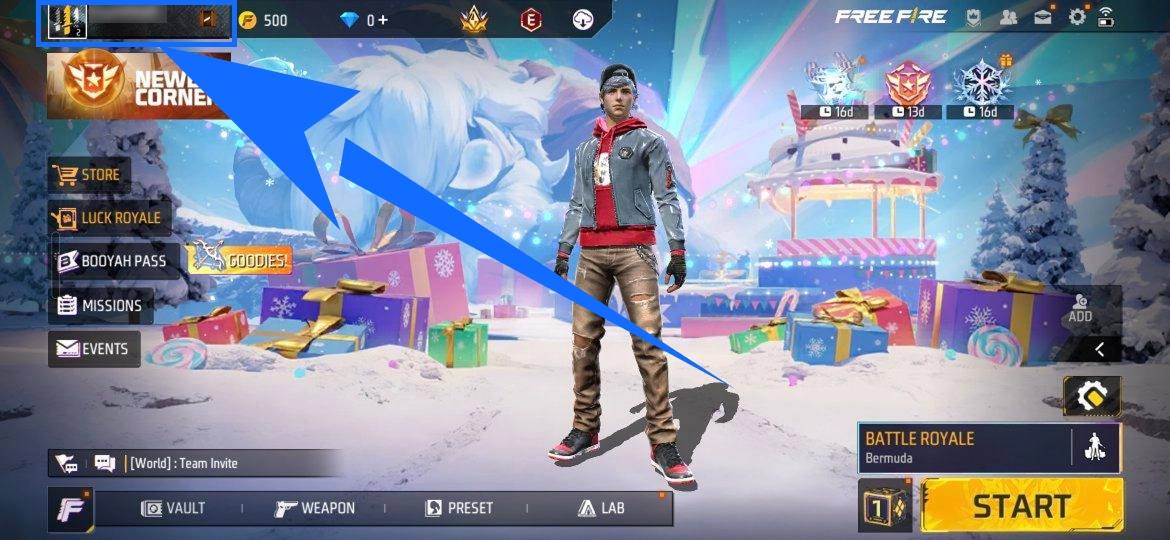
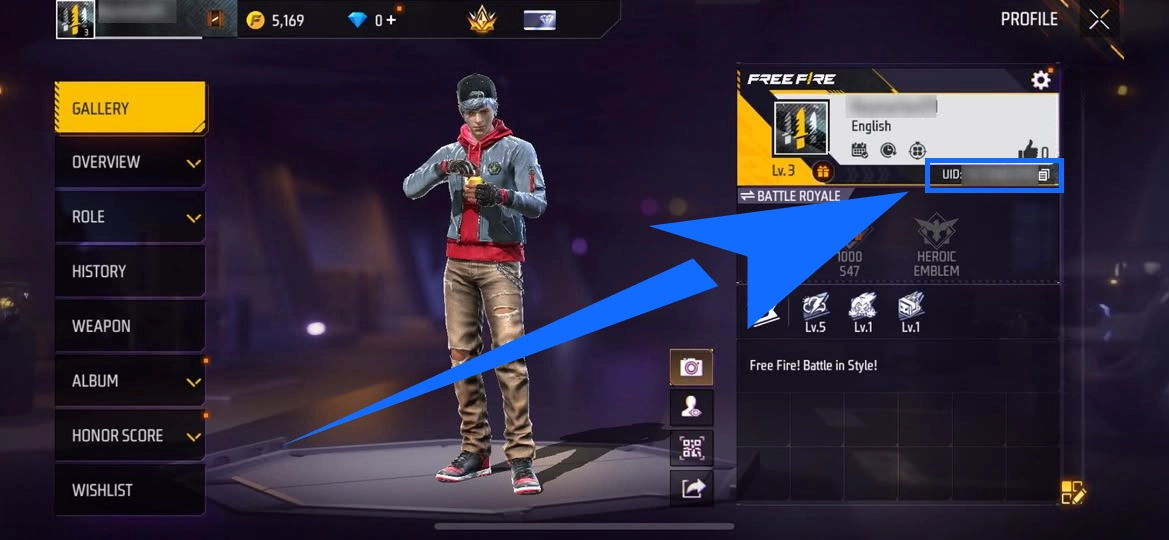
Before entering the UID in your TRADEE order, compare it with the number shown in the game. Check every digit carefully to make sure none are missing.
A UID top-up does not require your Facebook, Google, or other game login password. The service uses your player ID to process the top-up, so no one needs to sign in to your game account.
Diamonds are sent to the UID entered in the order. If the UID is incorrect and the Diamonds have already been credited to another account, the order usually cannot be cancelled or refunded. Check the recipient details carefully before paying. For another fast-paced mobile shooter, you can also explore Blood Strike top-ups and its in-game resources.
How to Top Up Free Fire Diamonds on TRADEE
Once you have the correct UID, you can place an order for the Diamond amount you need. Free Fire uses a direct top-up process, so you do not need to accept an in-game friend invitation or wait for another player to trade items with you.
- Choose a region and Diamond package: Select the top-up channel that matches your account region on TRADEE's Free Fire product page, then choose the Diamond package and quantity you want.
- Enter the recipient UID: Provide the UID of the account receiving the Diamonds. Make sure the number is complete and matches the in-game profile.
- Review the order and pay: Check the Diamond amount, region, listed price, and final total. Then choose one of the payment methods available at checkout.
- Check your Diamond balance in-game: After payment, the order will be processed through UID top-up. Once it is complete, reopen Free Fire and confirm that the Diamond balance has increased on the intended account.
How Long Does It Take to Receive Free Fire Diamonds?
Free Fire Diamond orders are processed automatically and usually arrive within approximately 30 seconds to 5 minutes after payment is confirmed. Actual processing time may vary due to payment verification, order volume, or temporary delays on the game platform. This is an estimate, not a guaranteed delivery time.
If the Diamonds do not appear immediately, check your order status and in-game balance first. Avoid placing another order for the same package straight away, as this could create a duplicate purchase. If the order remains incomplete or the top-up result looks incorrect, contact TRADEE's 24/7 customer support for assistance.
Compare Diamond Prices and Check Event Eligibility Before Paying
TRADEE supports several payment options, including PayPal and credit cards. The payment methods currently available for your order will be shown at checkout. Compare the prices of different Diamond packages and any applicable offers, then choose an amount that fits your budget and in-game spending plans.
If you are buying Diamonds for a first top-up reward or a promotion tied to a specific package, remember that eligibility is not determined solely by the number of Diamonds you purchase this time.
First top-up rewards and other promotions may depend on your account's purchase history, region, promotion period, and eligible products. A package that previously included a bonus does not necessarily offer the same reward on a later purchase. Check the current event details and reward conditions in Free Fire before choosing a package. For another battle royale experience, you can browse Knives Out top-ups. Players who prefer a mix of building and exploration can also check out Fortnite top-ups.
