





Genshin Impact Genesis Crystals on Tradee
Genesis Crystals are the premium currency in Genshin Impact. You can keep them in your game account for eligible in-game purchases or convert them into Primogems when needed.
Planning ahead for a character or weapon Wish? Choose a package based on the amount you still need. For a smaller top-up to cover the remaining cost of a current Wish plan, there is no need to buy more than you intend to use. Genesis Crystals can also be spent on character outfits and other eligible in-game items priced in this currency.
Tradee may offer Genesis Crystals in different amounts. Before placing an order, check the crystal quantity, final price, and any discounts or bonus content displayed on the product page. A top-up does not grant a specific character or weapon; Wish results are still determined by Genshin Impact's in-game rules.
Which Genshin Impact Top-Up Method Should You Choose?
UID Top-Up: Choose this method when the product page asks for your Genshin Impact UID and server. You do not need to provide your game account password.
Account Login Top-Up: Use this method only when it is available on the product page. Enter the required details as instructed during checkout. Account verification may also be required while the order is being processed.
How to Find Your Genshin Impact UID
Your UID is a unique number assigned to each Genshin Impact game profile. It is not your character nickname, email address, login name, or HoYoverse Account ID.
- Launch Genshin Impact and enter the account that will receive the top-up.
- Make sure you are logged in to the server you intend to use.
- Check the bottom-right corner of the game screen to find your UID.
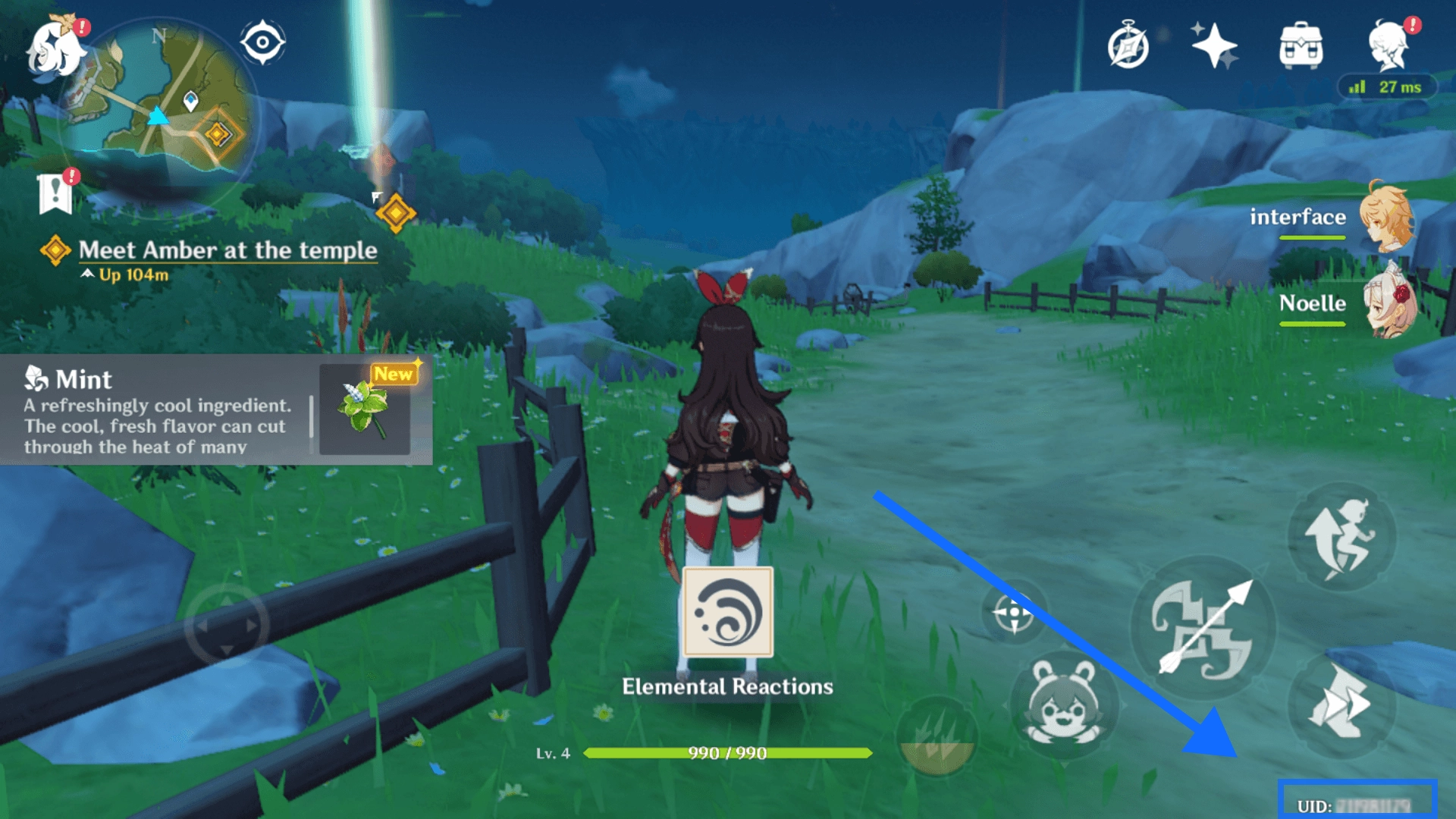
- You can also open the Paimon Menu and find your UID on your profile page.
- Copy the complete number and check every digit against your order details before payment.
Your UID is displayed on PC, mobile, and console versions. If you use more than one server, make sure you enter the UID for the correct one, as game profiles on different servers may have different UIDs.
How to Top Up with a UID
- Select "UID Top-Up" on the Genshin Impact product page.
- Choose the Genesis Crystal amount you need.
- Enter the UID of the game profile that will receive the top-up.
- Select the server associated with that UID.
- Double-check the UID, server, crystal amount, and final price.
- Choose one of the payment methods available on the page and complete your payment.
- Keep your order number until the crystals have been credited.
- Launch the game and check the Genesis Crystal balance on the same game profile.
How to Top Up Through Account Login
- Make sure this option is available, then select "Account Login Top-Up".
- Choose the Genesis Crystal amount you need.
- Enter account details only in the fields provided on the secure order page.
- Complete any account verification required for the order by following the instructions.
- Check the receiving game profile, server, product, and final price.
- Choose one of the payment methods available on the page and complete your payment.
- Wait for processing to finish according to the order status instructions.
- Log in to the intended game profile and check your Genesis Crystal balance.
Account information reminder: Do not send account details through comments, public messages, or unofficial contact channels. Use only the fields provided in the Tradee checkout process.
What Should You Check Before Paying?
- Make sure the UID belongs to the game profile that should receive the top-up.
- Check that the selected server matches that game profile.
- Confirm that you have selected the top-up method you intend to use.
- Check that the Genesis Crystal amount meets your needs.
- Review the final price and any promotional details shown on the product page.
- Save your order number after payment.
How to Check Whether Your Genesis Crystals Have Arrived
Check your order status first, then launch Genshin Impact using the account and server that should receive the top-up. Compare your current Genesis Crystal balance with the amount you had before placing the order. If the order is marked as completed but your balance has not changed, contact Tradee customer support with your order number and the non-sensitive details needed to identify the transaction.
Explore More Game Top-Ups on Tradee
Players who enjoy character building and team composition can also browse Honkai: Star Rail top-ups. For fast-paced action combat and combo-based gameplay, take a look at Zenless Zone Zero top-ups. Those who prefer exploring a wider open world can also find Wuthering Waves top-ups.
Product availability, payment methods, processing requirements, and page promotions may vary by product or region. Check the information shown on the order page at the time of purchase before paying.
