







Top Up Honkai: Star Rail on TRADEE
Need more Oneiric Shards to pull for your next character or Light Cone? TRADEE offers two Honkai: Star Rail top-up options: UID Top-up and Login Top-up. Choose your product and preferred top-up method, then place your order.
Buy Oneiric Shards and the Express Supply Pass
Oneiric Shards are the premium currency in Honkai: Star Rail and can be exchanged for Stellar Jade in-game. TRADEE also offers the Express Supply Pass, a convenient option for players who log in regularly and want to collect Stellar Jade every day. If you enjoy collecting characters, building teams, and managing resources for long-term progression, you can also explore Reverse: 1999 top-ups and Seven Knights Re:BIRTH top-ups. For tactical deployment and character development, take a look at Arknights top-ups.
Oneiric Shards
Choose the amount of Oneiric Shards you need and top them up to your Honkai: Star Rail account. Once credited, you can keep them or exchange them for Stellar Jade in-game.
Express Supply Pass
After purchase, you receive the corresponding Oneiric Shards and can claim Stellar Jade through daily logins during the pass period. It is a practical choice for regular players who prefer building up resources over time instead of topping up a large amount at once.
A top-up only adds the purchased currency or product to your account. It does not grant a limited character or Light Cone directly. Warp results are still determined by the game's rules.
Why Top Up Honkai: Star Rail on TRADEE?
Compare Prices Easily
Compare current Honkai: Star Rail top-up prices and available discounts before placing your order.
Two Top-Up Methods
Choose between UID Top-up and Login Top-up when placing your order.
Efficient Order Processing
Once payment and the required account details have been confirmed, your order can enter the processing queue without unnecessary delays.
Multiple Payment Options
Use the payment methods currently available on the checkout page and review the final amount before paying.
Secure Checkout
Payment and order details are submitted through the TRADEE checkout process. You do not need to share sensitive information in public comments or unofficial communication channels.
Help With Order Issues
Keep your TRADEE order number after payment. If you have questions about payment, processing, or delivery, customer support can use it to locate your order more quickly.
Honkai: Star Rail Top-Up Methods
UID Top-up
Enter your Honkai: Star Rail UID and any other recipient account details requested on the order page. UID Top-up does not require your game account password.
Login Top-up
Enter the account login details requested on the checkout page and complete any verification required for the order. Follow the instructions shown on your TRADEE order page for the exact steps.
Honkai: Star Rail Top-Up Information
| Game | Honkai: Star Rail |
|---|---|
| Main Top-Up Currency | Oneiric Shards |
| Available Products | Oneiric Shards, Express Supply Pass |
| Top-Up Methods | UID Top-up / Login Top-up |
| UID Top-up Requirements | Honkai: Star Rail UID and the recipient account details requested on the order page |
| Login Top-up Requirements | Account login details and verification requested on the checkout page |
| Does UID Top-up Require a Password? | No |
How to Find Your Honkai: Star Rail UID
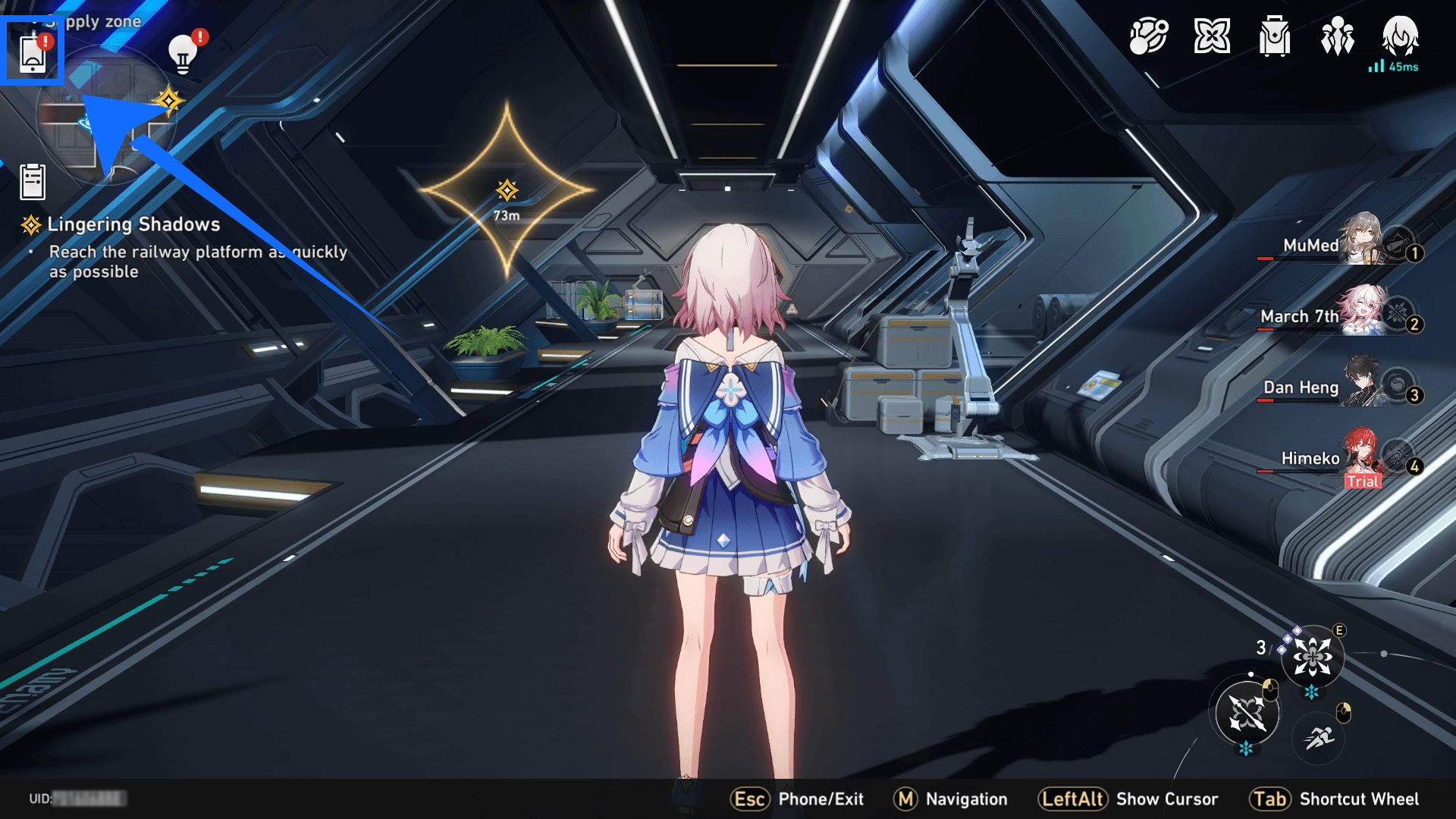
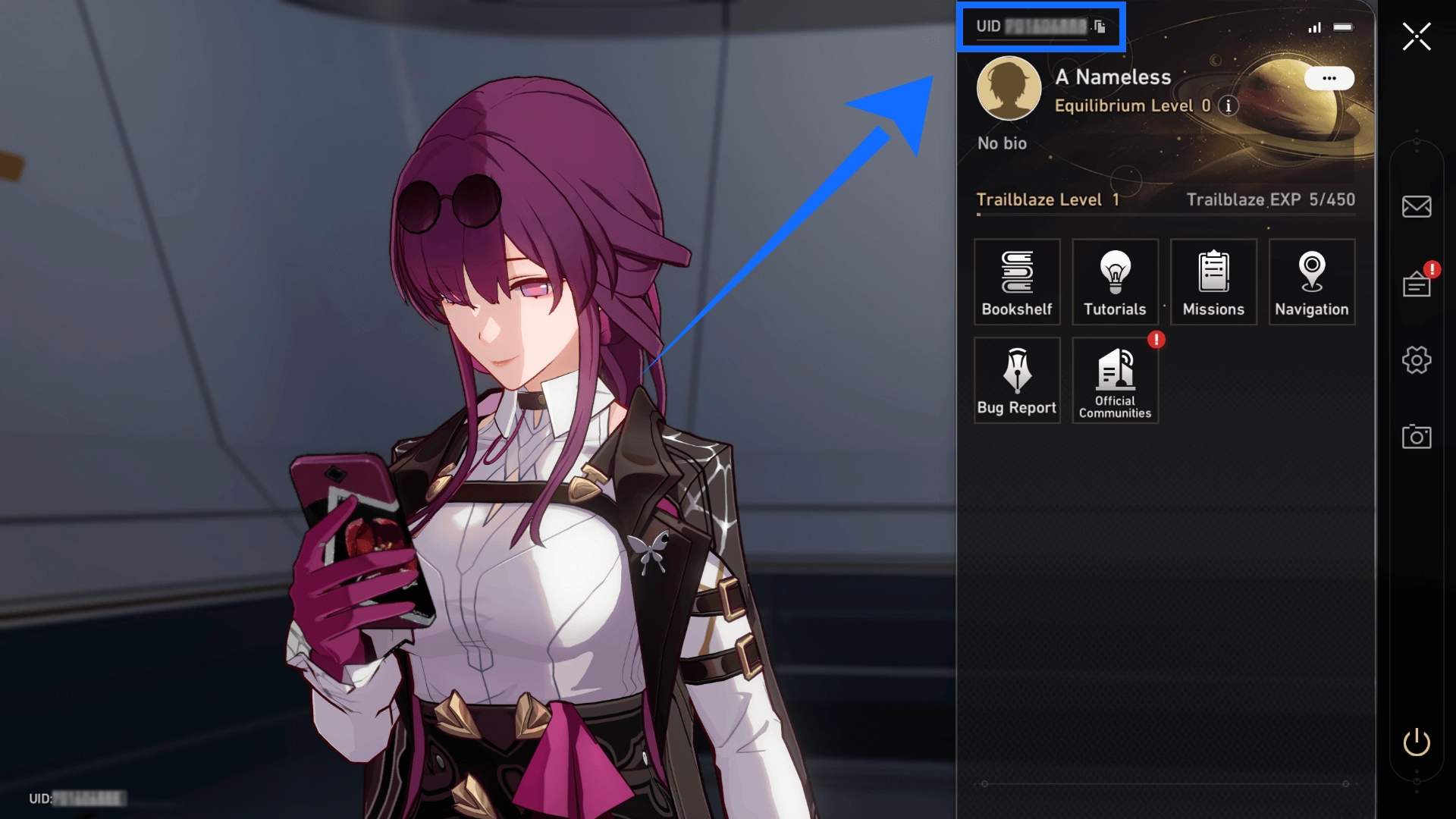
Your UID is the account identifier used to locate the correct game account for a UID Top-up.
- Open Honkai: Star Rail and log in to the account you want to top up.
- Make sure you are viewing the correct game account.
- Find your UID on the game screen or in your profile.
- Copy the full UID and enter it on the TRADEE order page.
- Check that the UID is correct before payment.
How to Use UID Top-up
- Select UID Top-up.
- Choose the Oneiric Shard package or Express Supply Pass you want to purchase.
- Enter the UID of the account you want to receive the top-up.
- Provide any other recipient account details requested on the page.
- Check the product, account details, price, and any discount shown on the page.
- Choose a payment method and click Buy Now.
- Keep your order number until the top-up is complete.
- Open Honkai: Star Rail and check that the product has been credited.
UID Top-up does not require your Honkai: Star Rail account password.
How to Use Login Top-up
- Select Login Top-up.
- Choose the Oneiric Shard package or other product you want to purchase.
- Enter the login details requested on the TRADEE checkout page.
- Complete the account verification required for the order.
- Check the selected product and final price.
- Choose a payment method and click Buy Now.
- Keep your order number while the order is being processed.
- After the order is complete, log in to Honkai: Star Rail and check that the product has been credited.
Provide login details or verification information only through the TRADEE order process. Do not send them in public comments, social media replies, or unofficial communication channels.
Things to Check Before Payment
Account Details
- Make sure the UID or login account details are correct.
- Check that you have selected UID Top-up or Login Top-up as intended.
- Review all required account details before submitting your order.
Product and Price
- Check that the Oneiric Shard amount or Express Supply Pass is correct.
- Review the discounts or offers displayed on the page.
- Confirm the final price before payment.
How to Check Whether Your Top-Up Has Arrived
After your TRADEE order is complete, log in to the recipient account and check your Oneiric Shard balance or confirm that the purchased product has been added.
To view your Oneiric Shard purchase records, open the in-game Phone Menu and go to Bug Report > Account History > Oneiric Shards Record.
If your order is marked as completed but the top-up has not arrived, contact TRADEE customer support and provide your order number.
Honkai: Star Rail Top-Up FAQ
What should I do if I entered the wrong UID or account details?
If you notice an error, contact TRADEE customer support as soon as possible and provide your order number. Whether the details can be changed depends on the current order status. Avoid placing another order until the status of the original order has been checked.
Why does Login Top-up require account verification?
Logging in from a new device or environment may trigger an account security check during a Login Top-up. If verification is required for your order, follow the instructions provided and submit the verification information only through the TRADEE order process.
What should I do if my order is marked as completed but the top-up has not arrived?
First, make sure you are checking the same Honkai: Star Rail account used when placing the order. If the Oneiric Shards or purchased product are still missing, contact TRADEE customer support and provide your order number so the transaction can be checked.
What should I do if my payment was charged but the order status has not updated?
Do not make another payment right away. Keep your order number and payment record, then contact TRADEE customer support to check the payment and order status.
Which payment methods can I use for Honkai: Star Rail top-ups?
Available payment methods are shown on the checkout page, and the options may vary by region. Check the payment method and final amount due before submitting your order.
