







Seven Knights Re:BIRTH Top-Up: How to Choose Rubies and Packs
Looking to get more chances to summon heroes, or have you already decided which in-game item to purchase? In Seven Knights Re:BIRTH, different paid products serve different gameplay needs. Rubies are useful for planning regular summons and other in-game purchases, while monthly packs and other selected products come with their own contents and purchase conditions.
TRADEE offers top-up services for the international mobile version of Seven Knights Re:BIRTH. You can browse the current product selection, check prices and applicable offers, and complete your purchase through an account login process. This service requires your game account login details; it is not a direct top-up method that only requires a UID. Before placing an order, please check your account linking status and game UID.
Choose Paid Products Based on Your Gameplay Goals
Before making a purchase, consider what you need most right now, then compare the product prices and contents. Rather than looking only at the amount, check what resources each product provides and whether they fit your current plans.
| Product Type | Main Use | What to Consider |
|---|---|---|
| Rubies | Used for hero summons and other paid purchases permitted by the game. | Choose an amount based on your current Ruby balance, summoning plans, and budget. |
| Monthly Packs | Provide paid content available for a specified period or under certain conditions. | Review the pack contents, validity period, and reward claim requirements. |
| Other Selected Packs | Purchase specific in-game products that meet a particular goal. | Check the product name and exact contents. Some products may require a screenshot to identify the requested pack. |
If your goal is to build up summoning resources, compare the available Ruby amounts first. If you want a particular item or benefit, check the pack details before purchasing. Product contents and prices may vary, so always refer to the information currently displayed on the product page.
Make Your Seven Knights Re:BIRTH Top-Up Fit Your Purchase Plans
Price is only one factor when choosing in-game products. Whether an item meets your needs, how convenient the payment process is, and whether support is available during order processing can also affect the overall experience.
- Clear Product Prices and Available Offers
Review the available products, listed prices, and applicable offers before choosing what to buy according to your budget. This helps you avoid making a decision based on the denomination alone.
- Flexible Payment Options
TRADEE supports multiple payment methods. Actual available options are shown at checkout. Before paying, you can review your selected product and the order total.
- 24/7 Customer Support When You Need Help
TRADEE provides 24/7 customer support. If you encounter an issue with order processing or product identification, you can contact the support team for assistance. Some selected packs may require a screenshot so the team can identify the product you want to purchase.
This service uses a manual account-login purchase process. Once the required information has been submitted correctly, orders usually take around 30 minutes to process. Actual processing time may vary depending on the order, account details, and current workload.
Service Coverage and Account Requirements
Please review the requirements below before placing an order, especially the supported login methods. Since this service requires access to your game account, checking your account details in advance can help avoid unnecessary delays.
| Supported Platform | Seven Knights Re:BIRTH Mobile Version |
|---|---|
| Supported Server | International Server |
| Top-Up Method | Account Login Top-Up |
| Supported Login Methods | Email, Google, Facebook |
| Currently Unsupported Login Method | Apple ID |
| Required Account Information | Login method, account, password, and game UID |
| Estimated Processing Time | Usually around 30 minutes after the correct information is submitted. Actual processing time may vary. |
Account Preparation: Make sure your Email, Google, or Facebook account is correctly linked to the game data you want to top up. If your account has not been linked yet, complete the account linking process in the game before placing an order.
Account login details are sensitive information. Submit them only through the relevant order page or the support process specified for your order. Do not share your password in public comments or through other unverified channels. During order processing, avoid logging into the game from another device or location, as this may cause a login conflict and interrupt the purchase process.
Two Things to Prepare Before Ordering: Account Linking and UID
Your login method and UID serve different purposes. The login method is used to access the corresponding game account, while the UID identifies your in-game data. Checking both details in advance can help prevent selecting the wrong account or entering incorrect information.
Check Your Linked Login Account
-
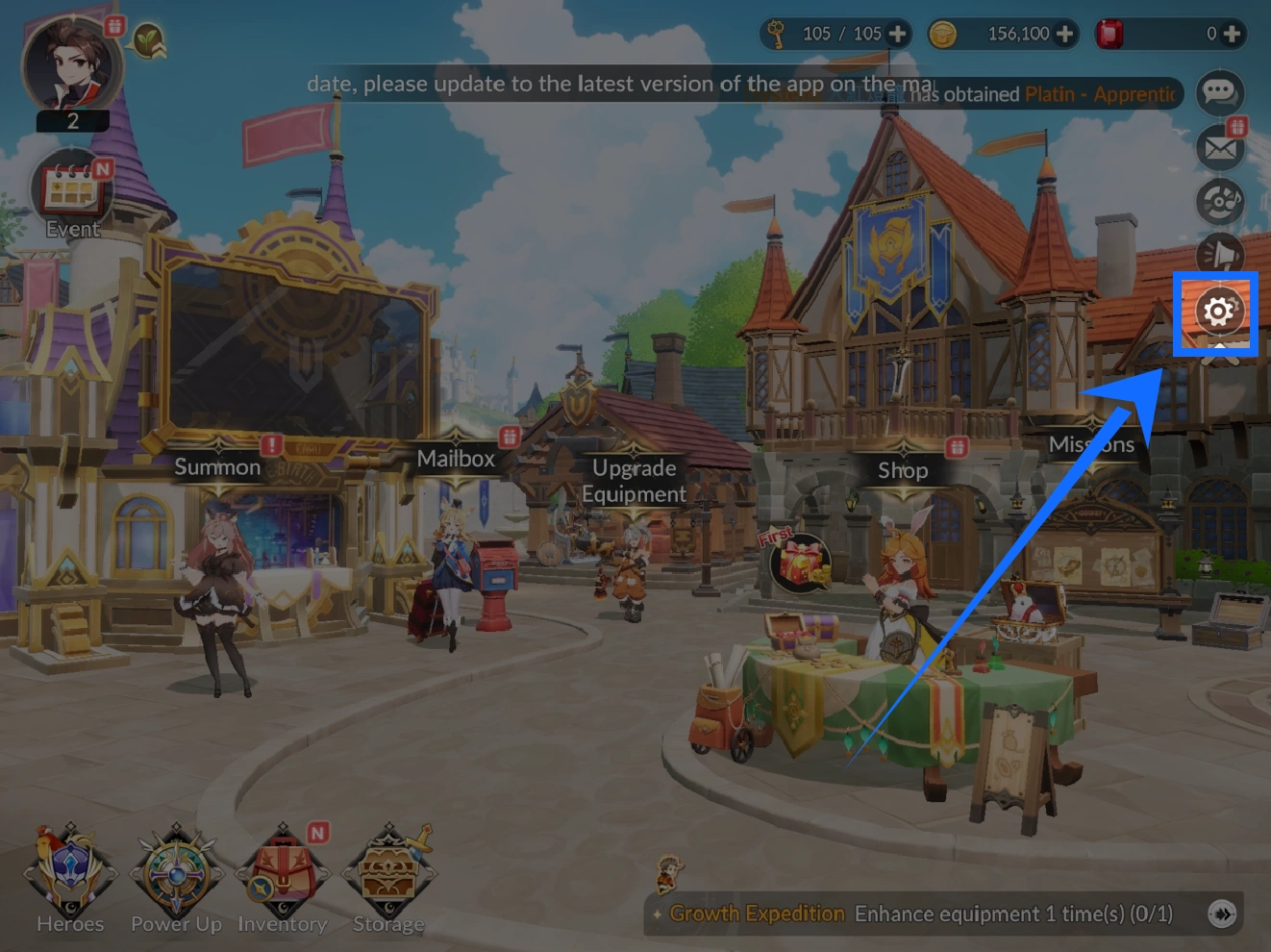
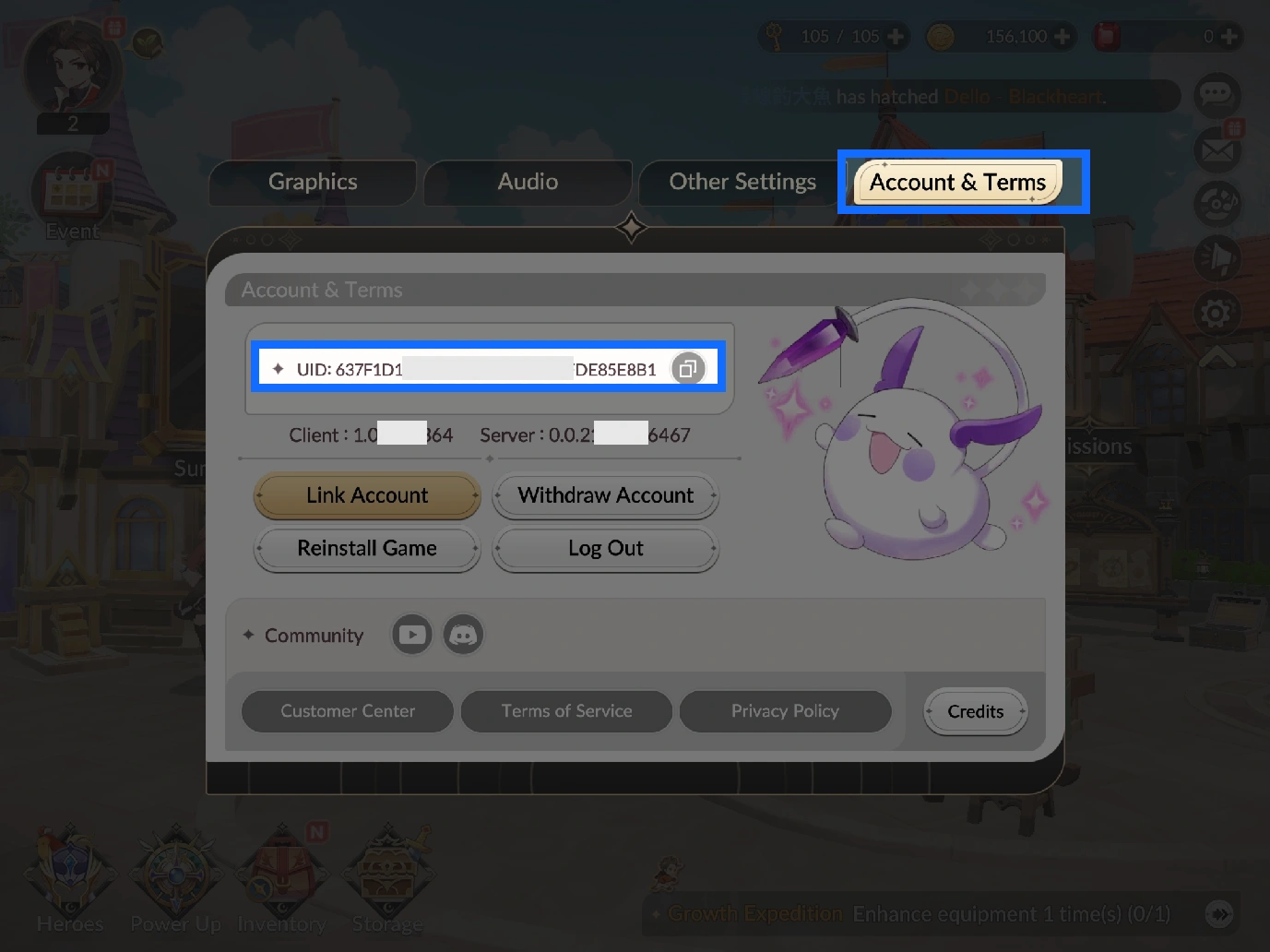
Open Settings from the Seven Knights Re:BIRTH main screen.
-
Go to Account and Terms, then select Link Account.
-
After linking your account, check the Linked Account Status to make sure the selected login method is connected to the correct game data.
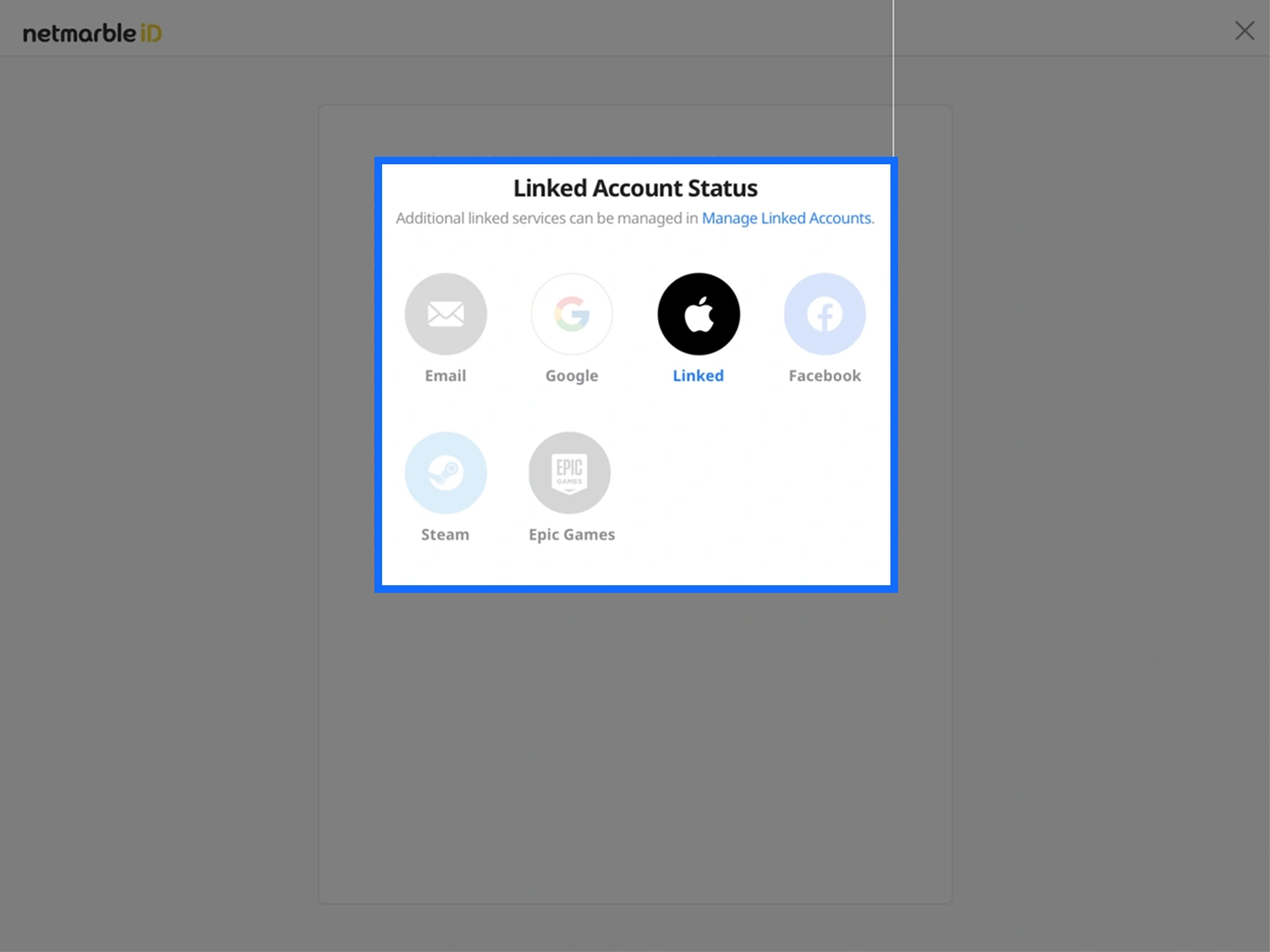
If your account is already linked to Email, Google, or Facebook, prepare the corresponding login details. Apple ID is currently not supported for this login top-up service.
Find and Copy Your Game UID
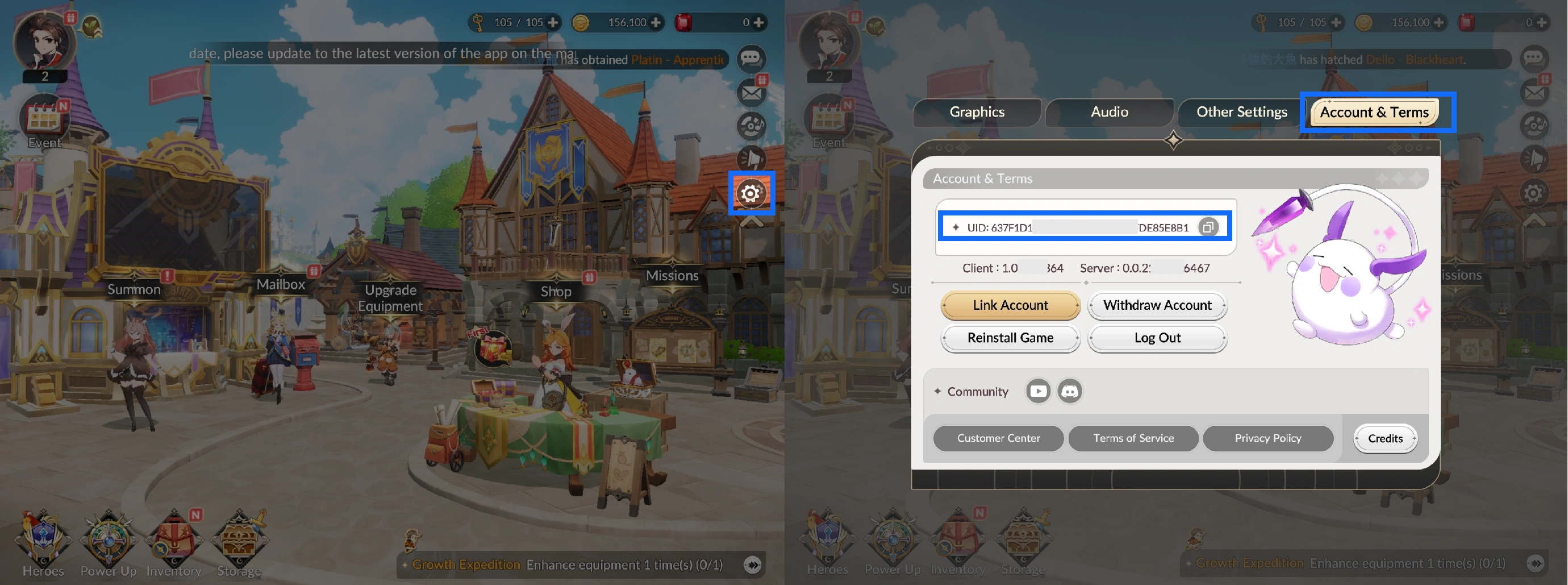
- Open Settings from the game home screen, then go to Account and Terms.
- Find your UID near the top of the page and tap the copy button beside it.
- Enter the UID when placing your order, then check the numbers again to make sure they are correct.
From Product Selection to Top-Up Completion
Once your account details are ready, follow the steps below to complete your purchase. Since this service requires access to your game account, you will need to submit the required information after payment and wait for the purchase process to finish.
- Choose a Product and Check Its Contents
Select the Ruby amount, monthly pack, or another currently available product you need. Check the product contents, price, and applicable offers before proceeding.
- Complete Checkout and Submit Your Details
Choose a payment method available at checkout, then enter the login method, account, password, and UID as requested in the order. If a selected pack requires further identification, submit the relevant screenshot through the support process specified in your order.
- Wait for the Account Login Purchase Process
After receiving the required information, the top-up staff will log in and purchase the selected product. Please do not log into the game during processing, as another active login session may interfere with the ongoing operation.
- Log In to Check the Result
Once the order is complete, log in to the game account you originally provided. For Ruby purchases, check your account's Ruby balance. For pack purchases, verify the corresponding purchased content and its claim status in the game.
Seven Knights Re:BIRTH Top-Up FAQ
Are all monthly pack rewards received at once?
Not necessarily. Pack contents and claim requirements vary. Some monthly products may provide benefits over a specified period. Before purchasing, read the product description and distinguish between the completion of the purchase and the actual delivery of time-based rewards.
Why might some packs require a screenshot?
When a product needs to be identified by its specific contents, a screenshot helps confirm which pack you intend to purchase. Provide an image that clearly shows the target product and submit it according to the instructions for that order. This does not mean that every Ruby or pack order requires an additional screenshot.
Do I need to link my account again if it is already connected to Google or Facebook?
If your existing login method is correctly linked to the game data you want to top up, you generally do not need to link it again just to place an order. Check your account linking status first and prepare the corresponding login details to avoid accessing a different game account.
