



















Reverse: 1999 Top Up — Get Ready for Summons, New Garments, or Another Roaring Month
Just a few summons short of the character you want? Spotted a new garment in the Bank but do not have enough Crystal Drops? Or would you rather build up resources gradually with a monthly card? Reverse: 1999 offers paid products for different needs. Before choosing, it is usually more practical to decide what you want to get this time rather than automatically picking the largest denomination.
TRADEE offers Crystal Drops top-ups, Roaring Month subscriptions, and selected packs and garment products. Timekeepers can compare product contents and prices based on their current summon plans, resource needs, or collection goals, then complete their purchase through an account login top-up.
Your Summon Budget Is Set — TRADEE Makes Shopping Easier
Whether you are preparing to summon a new character, replenishing Crystal Drops, or purchasing Roaring Month, selected packs, or garments, TRADEE offers a range of products to help you choose according to your needs and budget. Product prices and applicable offers are shown on the product page. TRADEE provides a secure payment environment and supports payment methods such as PayPal and Visa. Actual available options are subject to the checkout page. This service uses account login top-up. Please submit the required information according to the order instructions. If you have questions about payment, login verification, or order progress, you can contact TRADEE customer support 24/7.
This Top-Up Requires an Account Login. What Information Should You Prepare?
TRADEE's Reverse: 1999 top-up service is available for the Global server and supports accounts on iOS, Android, and PC. If you use the same game account across different devices, make sure the login details match the game progress that should receive the products.
This service currently uses account login top-up. Our service staff will use the information submitted with your order to log in to the corresponding account and complete the purchase. Please prepare the following information before placing an order:
- Login method: BLUEPOCH or Facebook. Select the method linked to your game account.
- Login account: Provide the account information associated with your selected login method.
- Account password: Required for the manual login top-up process.
- Character name: Enter the name of the character that should receive the products.
- Verification code: Provide the required verification information according to the login process.
Not Sure Where to Find Your Character Name?
Log in to Reverse: 1999 and open the main game screen. Your current character name is displayed in the upper-left corner. Before submitting your order, make sure this is the game account that should receive the purchase. Do not enter details for another character or a different login method by mistake.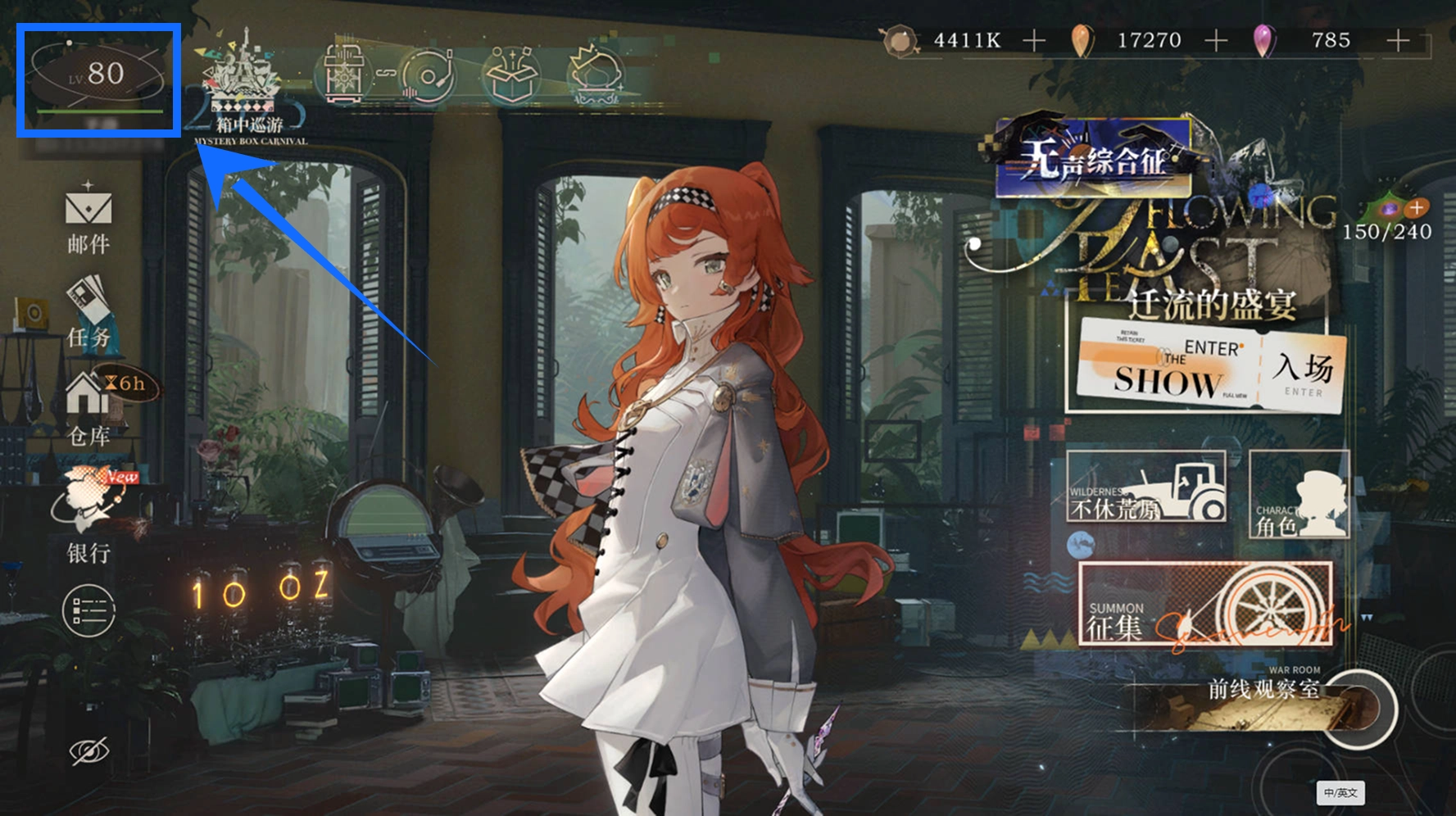
Account information reminder: Passwords and verification codes are sensitive information. Submit them only through the information submission method specified in your TRADEE order. While the manual top-up is being processed, avoid logging in to the same account yourself, as this may cause a login conflict or interrupt the purchase process.
From Selection to Delivery: How Does a Reverse: 1999 Manual Top-Up Work?
Once you have decided to purchase Crystal Drops, Roaring Month, or a selected pack, follow the manual account login top-up process to complete your order.
- Choose the products you need
Visit the Reverse: 1999 top-up page on TRADEE and select a Crystal Drops denomination, Roaring Month, or another currently available product. Review the product contents and price before proceeding.
- Check the total and complete payment
Confirm your selected products and the final amount due, then complete the transaction using a payment method available at checkout.
- Submit your account information and wait for processing
After payment, provide your BLUEPOCH or Facebook login details, character name, and any required verification code according to the order instructions. Once your submission is successful, the order will enter a pending status while our top-up staff complete the in-game purchase.
Do not log in to the same game account on another device while the order is being processed, as this may interfere with the ongoing login or payment operation.
- Check your order status and confirm delivery
Once the manual top-up is complete, the order page will display a successful status. You can also check the processing progress in your purchase history. After confirming that the order is complete, log in to the game to check your Crystal Drops balance, Roaring Month status, or whether the selected packs and garments have been delivered correctly.
Manual top-ups are generally processed within a few minutes under normal conditions. However, login verification, payment checks, game server status, and order volume may affect the actual processing time.
Reverse: 1999 Top-Up FAQ
Will I definitely receive the first-time top-up double bonus when purchasing Crystal Drops?
Not necessarily. Certain Crystal Drops denominations in Reverse: 1999 offer a first-purchase bonus, but eligibility depends on the account's purchase history and may also change with official promotions. You should not assume that every third-party top-up product on TRADEE includes double Crystal Drops. Always check the exact quantity and bonus details listed for the selected product before purchasing.
Are all 30 days of Clear Drops credited at once when I purchase Roaring Month?
No. After purchasing Roaring Month, you receive the corresponding Crystal Drops reward first. Clear Drops and limited-time Picrasma Candy are then distributed through the daily claim system. Keep track of the validity period and daily claim requirements. The rewards for all 30 days are not credited in a single payment.
Will a top-up directly give me a specific 6-star character?
No. Crystal Drops can be converted into Clear Drops to prepare resources for summons, but obtaining a specific character still depends on the relevant in-game summon rules. Purchasing Crystal Drops or a pack containing Unilogs does not mean you are directly purchasing a particular 6-star character.
What should I do if I entered the wrong login account or character name after submitting my order?
Contact TRADEE customer support as soon as possible and provide your order information so the current processing status can be checked. If the order has not been completed, the support team can help review the account details. However, once virtual products have been successfully credited, they may not be transferable to another account. Make sure your login method and character name are correct before submitting your information.
