













Arknights Originite Prime Top-Up – Get Ready for Headhunting and Operator Development
With a new Operator on the way, a favorite outfit returning to the Store, or your next Headhunting target in mind, planning your resources ahead of time gives you more flexibility. TRADEE offers Arknights Originite Prime top-ups, the Monthly Card, Headhunting Packs, and other selected bundles. Doctors can choose the products that best match their current goals and budget.
Originite Prime is a premium currency in Arknights. It can be exchanged for Orundum for Headhunting, used to purchase eligible Operator outfits, or spent to restore Sanity. If you want more Headhunting resources, compare the available Originite Prime denominations. For a more consistent supply of resources, consider the Monthly Card or packs containing Headhunting Permits. Check each product's contents before purchasing to avoid paying for resources you do not need.
Originite Prime, Monthly Card, or Headhunting Packs: Which Should You Choose?
Different products suit different playstyles and goals. TRADEE offers a range of Arknights top-up denominations and selected packs, so you can choose based on the resources you need rather than focusing only on the total amount.
- Originite Prime
A flexible option for players who want to decide how to use their resources. Depending on the options available in-game, it can be exchanged for Orundum, used to purchase outfits, or spent to restore Sanity.
- Monthly Card
A good fit for Doctors who plan to play regularly. The Monthly Card has its own reward distribution schedule and works differently from a standard Originite Prime top-up. Check the product details and validity period before purchasing.
- Headhunting Packs
Useful for players with a specific Headhunting target. Some packs include Headhunting Permits, Orundum, or other in-game resources. Review the listed contents and compare their value with a direct Originite Prime purchase.
- Other Selected Packs
Some products may include Operator development materials, LMD, or other progression resources. Check the exact contents shown on the product page, as different packs may offer different combinations.
First-time purchase bonus: If the game offers a first-time purchase bonus, eligibility may depend on the server, your account's purchase history, and the game's rules. Check whether the selected product qualifies before placing an order. First-time purchase eligibility for different denominations should not be assumed to reset or apply more than once.
Clear Order Details from Product Selection to Completion
The denomination is only one factor when purchasing Originite Prime or a selected pack. Choosing the correct account, matching the product to your server, and completing login verification can all affect the top-up process.
TRADEE displays product options and the corresponding Login Top-Up instructions on the order page. You can review your selection before submitting the account details required for processing. Payment methods include PayPal and Visa, while the options actually available will be shown at checkout.
Product prices, applicable offers, and the final amount payable can be checked before payment. For Monthly Cards and selected packs with purchase limits, check the remaining purchase allowance in-game first. This helps prevent situations where an account is not eligible for a product after payment.
If you encounter issues with login verification, payment, or order progress, you can contact TRADEE's 24/7 customer support team. Preparing the information requested on the order page can also help avoid unnecessary processing delays.
Top Up Through Login Top-Up
TRADEE offers Arknights top-up products for multiple servers, including Global, America, Japan, and Korea. All supported servers use Login Top-Up. A service representative purchases the selected product using the account details submitted with the order, so you do not need to operate the top-up interface yourself.
When placing an order, select the server that matches your game account and choose the product you want. Then submit your login account, password, in-game name, and any required verification details according to the order page. Different account-linking methods may require different verification information, so follow the fields shown for your order.
Supported platforms include iOS, Android, and PC emulators. Keep in mind that platform and server are separate selection criteria. Make sure the server linked to your account matches the product you purchase.
Important: Do not log in to the same game account yourself while the Login Top-Up is being processed, as this may interrupt the active login session.
How to Check Your Arknights Account Details Before Ordering
Login Top-Up requires the correct game account and Operator information. Before submitting an order, check your account-linking method, in-game name, and available verification channel. Providing complete and accurate details can help prevent processing delays.
Find Your In-Game Name and UID
After logging in to Arknights, open your in-game profile to check your current in-game name and UID. Make sure these details belong to the account that should receive the purchase. If the order form asks for a UID, copy the information displayed in-game. Do not confuse your UID with your in-game name or login account.
Check Your Account Binding and Login Method
Open Settings from the main screen and go to the Account Center to review your current account and binding method. Make sure you can access the associated login account and verification channel, especially if your account receives verification codes by email.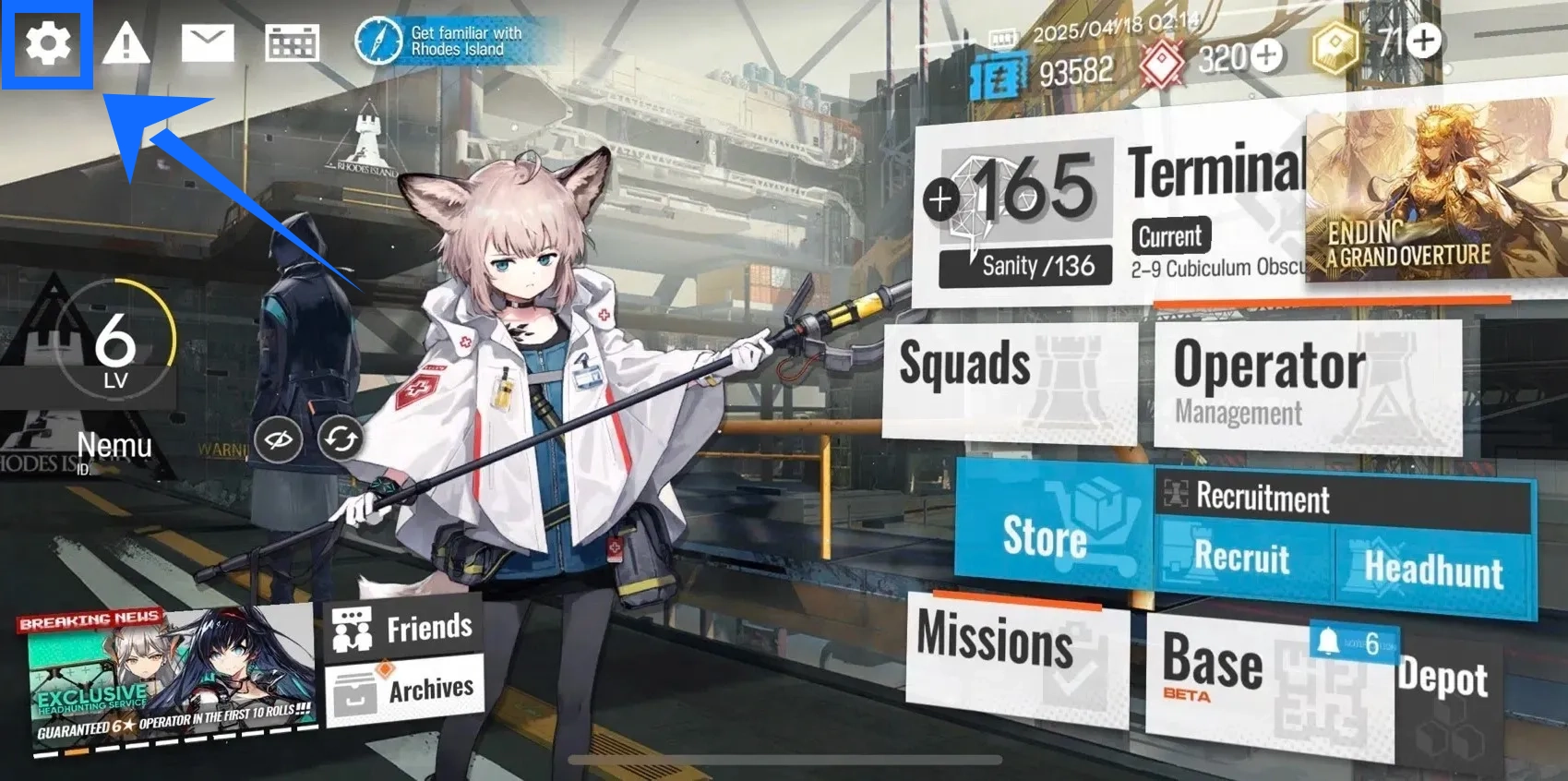
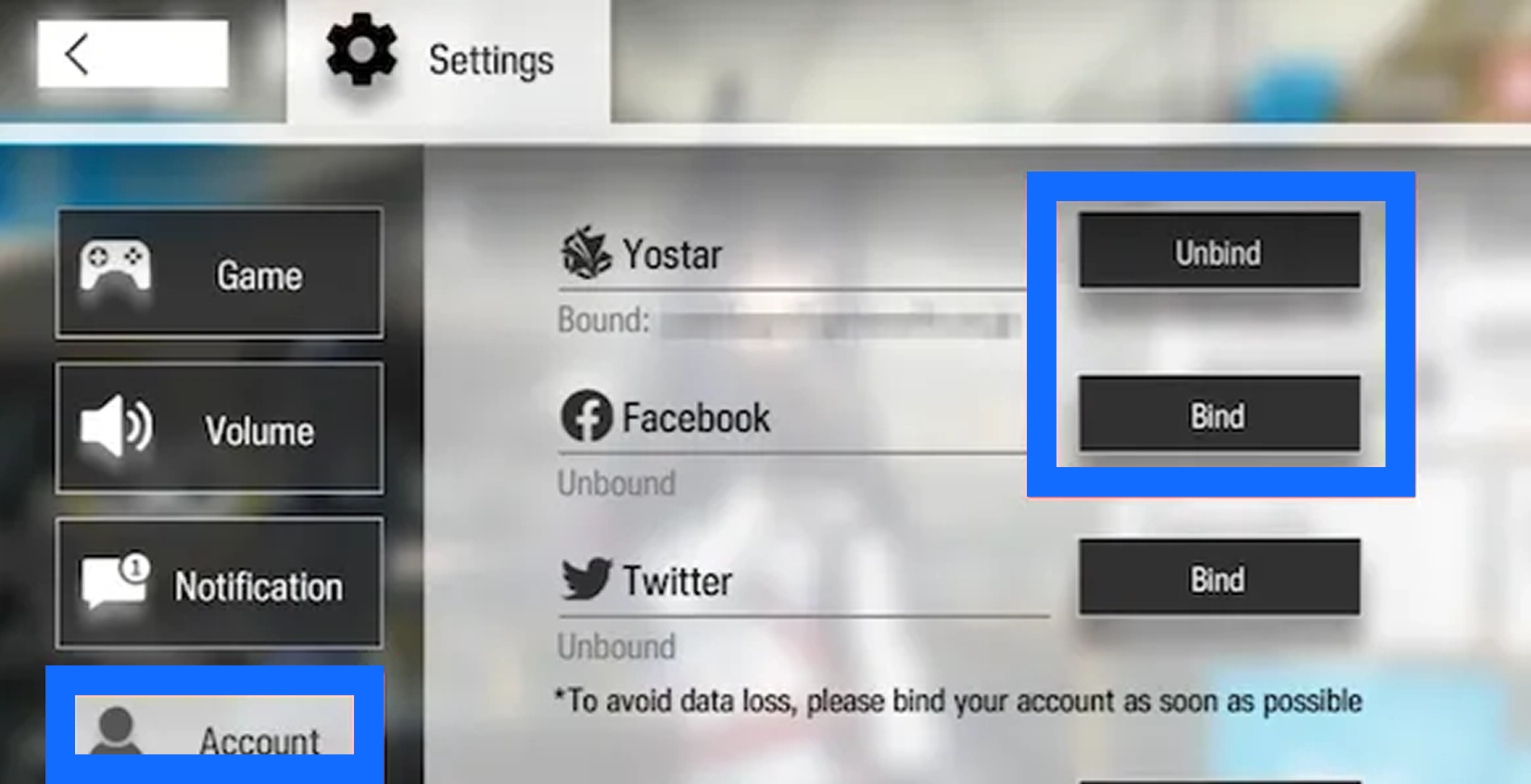
If you use a Yostar account or another linked login method, make sure the details you submit match the account currently used in-game. Verification requirements vary by login method, so provide the information requested in the order form.
Complete Guide to the Arknights Login Top-Up Process
All supported servers use Login Top-Up. After payment, submit the game account details requested in your order. A service representative will then log in to the corresponding account and purchase the selected product. Follow the steps below to complete your order.
- Select Your Server and Product
Visit the Arknights product page on TRADEE and select the server that matches your game account. Choose the Originite Prime denomination, Monthly Card, Headhunting Pack, or other selected bundle you need. Review the product details, specifications, and price, then click "Top Up Now" to proceed to checkout.
- Complete Payment and Open Your Order Page
Choose an available payment method at checkout, review the product and total amount, and complete the payment. Once payment is successful, open the corresponding order page to check the account details and instructions required for Login Top-Up.
- Submit Your Game Account and Operator Details
Fill in the game login account, password, in-game name, and any other required details according to the order form. If the order asks for a UID, check it carefully and enter the correct information.
If you registered using an email address, follow the order form instructions and enter the login verification code in the designated "Password" field when requested. Login requirements may differ depending on your account type, so follow the instructions shown on the order page.
- Complete Login Verification and Wait for Processing
After you submit the details, the service representative will use the order information to log in and purchase the selected product. If additional verification is required, follow the instructions provided for your order. Keep the order page accessible and avoid logging in to the same game account yourself, as this may cause a login conflict or interrupt the current session.
- Wait for the Order to Be Completed
Once the service representative has purchased the selected product, the order status will be updated. Processing time may vary depending on login verification, payment confirmation, order volume, and game server conditions. Check the latest status displayed on your order page.
- Log In to the Game and Confirm Delivery
After the order is marked as completed, log in to the corresponding Arknights account and check whether the Originite Prime balance, Monthly Card status, or selected pack contents have been received correctly. You can also review the order status through Purchase History.
Processing reminder: Make sure your account details are accurate and avoid logging in to the game yourself while the manual top-up is in progress. If your order status has not been updated for an extended period, contact TRADEE customer support for assistance.
