






Delta Force Delta Coins Top-Up: Add Premium Currency to Your Game Account
In Delta Force, Delta Coins are the premium in-game currency used to purchase eligible items from the store, cosmetics, and selected event offers. If you want to add Delta Coins to your existing account, choose a UID top-up and place an order for the amount you need. Players interested in looting, gear management, and extraction-based gameplay may also find similar tactical survival elements in Arena Breakout and Arena Breakout: Infinite, where equipment and supplies are also central to each raid.
TRADEE offers Delta Force Delta Coins top-ups through UID delivery. You only need to enter your player ID (UID) when placing an order; your game account password is not required. Before purchasing, make sure the selected top-up route matches your account, then check the Delta Coins amount and order total.
Delta Coins Top-Up: Add Premium Currency to Your Existing Account
Delta Coins are the premium currency in Delta Force. They can be used to purchase eligible in-game store items and selected event offers. Available items may change with store rotations and event schedules, so check what you want to buy before choosing a top-up amount.
Check Platform Support and Top-Up Routes Separately
Delta Force is available on platforms including PC, iOS, Android, PS5, and Xbox. However, a platform supported by the game is not necessarily supported by every top-up route. When ordering, follow the options currently listed on the TRADEE product page and make sure the selected route matches your account.
| Item to Check | Top-Up Details |
|---|---|
| Game Platforms | The game is available on PC, iOS, Android, PS5, and Xbox. The top-up method you can use must still match the options listed on the product page. |
| Currently Listed Top-Up Routes | Steam and Garena Indonesia. Before ordering, make sure the selected route matches your account login and game environment. |
| Required Information | Player ID (UID) and any other information explicitly requested on the product or checkout page. |
| Is the Game Password Required? | The UID top-up route described on this page does not require your game account password. |
| Typical Processing Time | Supported UID orders are usually processed within 30 seconds to 5 minutes after payment. Actual processing time may vary due to payment checks, network conditions, or order volume. |
How to Find Your UID and Avoid Topping Up the Wrong Account
- Open Delta Force and log in to the game account you want to top up.
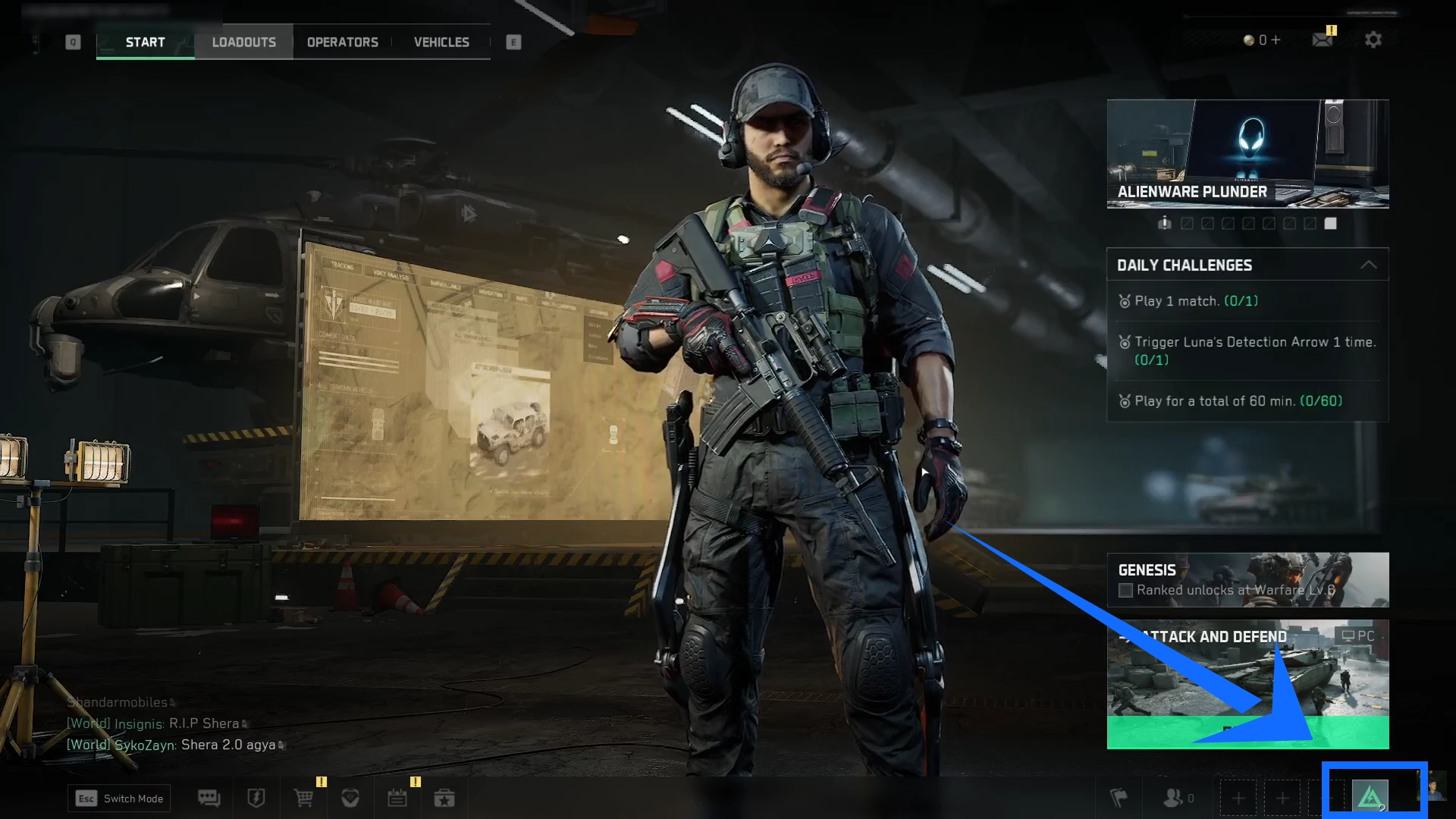
- Enter the game lobby, open the menu, or tap your profile avatar in the lower-right corner.
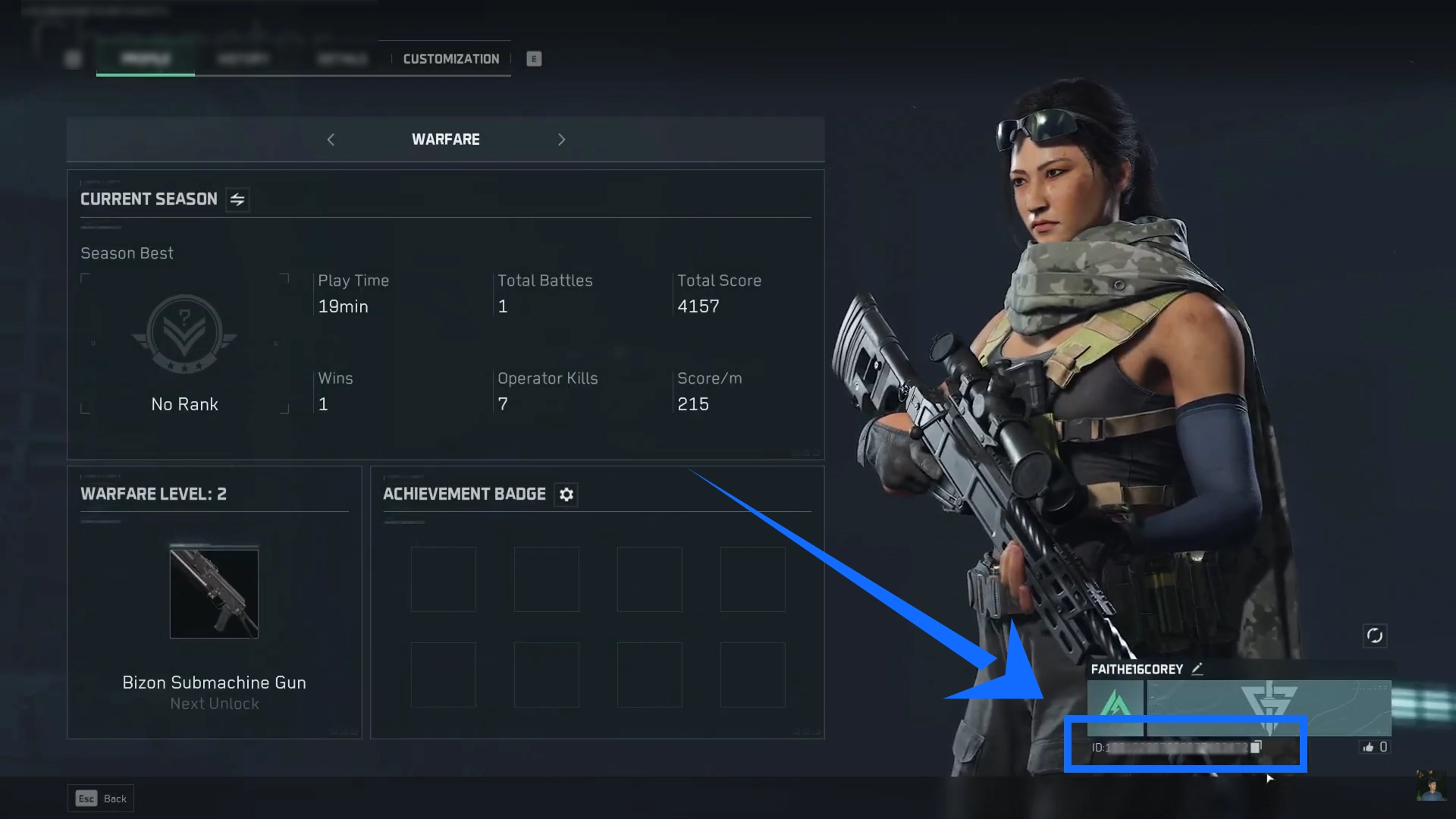
- Find your player ID (UID) on the profile screen. If a copy option is available, use it to avoid missing or mistyping any digits.
- Enter the UID in the order field and double-check that both the ID and top-up route are correct before paying.
Your UID is an essential identifier used to process the top-up. Do not assume an account is correct just because its character name looks similar. If you submit the wrong UID, the order may be processed using the information provided. Once delivery is complete, changing the recipient account or recovering the delivered content may not be possible.
After selecting a top-up route, compare the available Delta Coins amounts, current prices, and applicable offers before choosing what you need. Once payment is complete, wait for the order to be processed and check your in-game Delta Coins balance to confirm that the correct amount has arrived.
Top-Up Prices, Processing Time, and Payment Methods
When purchasing Delta Coins, compare prices while also checking that the top-up route and submitted UID are correct. The TRADEE product page displays the available Delta Coins amounts, prices, and applicable offers, making it easier to choose according to your needs. Other shooters have their own currency top-up options too. For example, Blood Strike offers top-up products suited to its own in-game content and spending needs.
- Clear Product Options and Pricing
The product page lists the available Delta Coins amounts, prices, and applicable offers. Compare the options before ordering, make sure the quantity and content meet your needs, and review the final amount due.
- UID Top-Up Processing
Delta Coins are delivered through UID top-up. Supported UID orders are usually processed within 30 seconds to 5 minutes after payment. Actual processing time may vary due to payment checks, network conditions, or order volume.
- Flexible Payment Methods
TRADEE supports several payment options, including PayPal and Visa. Available methods may vary depending on checkout conditions, so complete your purchase using the options displayed on the payment page.
- Customer Support for Order Issues
TRADEE provides 24/7 customer support. If you have questions about payment status, top-up progress, or UID details, contact support with your order information for assistance.
A Delta Coins UID top-up does not require your game login password. Pay through the standard checkout process and provide only the UID and other information required to complete the order. Carefully check your account ID before payment. Accurate information helps reduce top-up errors, but it does not mean third-party transactions are entirely risk-free.
From Purchase to Verification: Delta Coins UID Top-Up Steps
- Choose the top-up route and Delta Coins amount that match your account.
- Find your UID on the in-game profile page, enter it accurately in the required order field, and provide any other information needed at checkout.
- Check the top-up route, Delta Coins amount, and order total, then complete the payment using an available method.
- Wait for the order to be processed and check your in-game Delta Coins balance to confirm the amount received.
Delta Force Delta Coins Top-Up FAQ
Can Delta Coins, Delta Tickets, and Haavk Coins Be Used Interchangeably?
No. They are different in-game currencies and should not be treated as interchangeable. Delta Coins are used for eligible premium store items. Delta Tickets are a separate in-game currency, while Haavk Coins are mainly used for equipment, supplies, and related economic activities in Operations. Check the currency name on the product before purchasing to avoid choosing the wrong type. For another extraction shooter built around loot and currency trading, see Escape from Tarkov Roubles and browse currency options based on your in-game economy needs.
Do I Need to Provide My Game Account Password to Buy Delta Coins?
The UID top-up route described on this page does not require your game account password. Submit only the UID and other necessary information requested by the product and checkout pages. Double-check your UID before payment.
How Can I Confirm That My Delta Coins Have Been Credited After Payment?
After the order has been processed, log in to the corresponding Delta Force account and check your in-game Delta Coins balance. Make sure the amount received matches your order. If the currency has not arrived or the amount is incorrect, keep your order number and relevant details, then contact TRADEE customer support for assistance.
