









Pokémon GO PokéCoins and GO Pass Top-Up Service
Whether you need more PokéCoins or want to unlock additional GO Pass rewards, you can choose the product that best matches your current gameplay needs. TRADEE offers Pokémon GO PokéCoins and selected GO Pass products, with both self-service and login top-up options. Choose the available method based on your order status and the options currently offered.
This service supports iOS and Android mobile devices and the global server. Before placing an order, check the product denomination, game account, and top-up method to avoid delays caused by selecting the wrong product or submitting incorrect details.
Available Pokémon GO Products
PokéCoins
PokéCoins are the premium in-game currency in Pokémon GO. They can be used in the in-game shop to purchase items and storage upgrades. Choose a denomination based on your progress and resource needs, whether you want to cover everyday expenses or buy specific shop items. Players who also enjoy collecting cards and building their collections can explore Pokémon TCG Pocket top-ups to add more resources to their card collection.
PokéCoins can be used to purchase in-game items and upgrades such as:
- Premium Battle Passes
- Incubators and Super Incubators
- Lucky Eggs and Incense
- Lure Modules
- Poké Balls and other shop items
- Item Bag upgrades
- Pokémon Storage upgrades
GO Pass and GO Pass Deluxe
GO Pass is a limited-time reward track. Complete designated event tasks to earn progress and unlock rewards along the way. In addition to the standard version, GO Pass Deluxe includes extra rewards for players looking to obtain more event resources. Players who also enjoy pet collecting and raising experiences in Roblox can visit TRADEE to browse Roblox Robux top-ups for the virtual currency they need in-game.
Before purchasing, check the GO Pass product and included content shown in your order, as well as the availability period of the current GO Pass in-game. Rewards and active dates may vary between editions, so refer to the information displayed in the game.
Two Top-Up Methods to Match Your Order
Pokémon GO products support both self-service and login top-ups. The two methods follow different procedures, so select an option that is available on your order page. If self-service top-up is temporarily unavailable due to system maintenance or an upgrade, you can choose login top-up instead.
Self-Service Top-Up
With self-service top-up, you sign in to your game account through a dedicated interface and complete the in-game purchase according to your order. No staff member needs to carry out the purchase for you after payment. However, make sure to check the in-game product and denomination carefully so they match your order.
- Open your order: After payment, go to “Purchase History” in your TRADEE account and find the relevant Pokémon GO order.
- Enter the self-service interface: Open the order, select “Self-Service Top-Up,” and follow the on-screen instructions to access the dedicated interface.
- Sign in to your game account: Log in using the sign-in method linked to your Pokémon GO account.
- Select the matching product: Open the Pokémon GO shop or the designated GO Pass purchase page and choose the item that matches the denomination and product requirements in your order. Some orders specify a particular in-game item rather than a direct increase to your regular PokéCoins balance. Check that the item name and displayed value match your order.
- Review and complete the purchase: Check the in-game purchase details again and submit once everything is correct. Keep the self-service interface open during the process, and do not sign in to the same Pokémon GO account on another device.
- Check the result: Follow the instructions on the result page to complete the process, then leave the page. The system will automatically clear the submitted login details. You can then return to the game to check whether the product has been credited correctly.
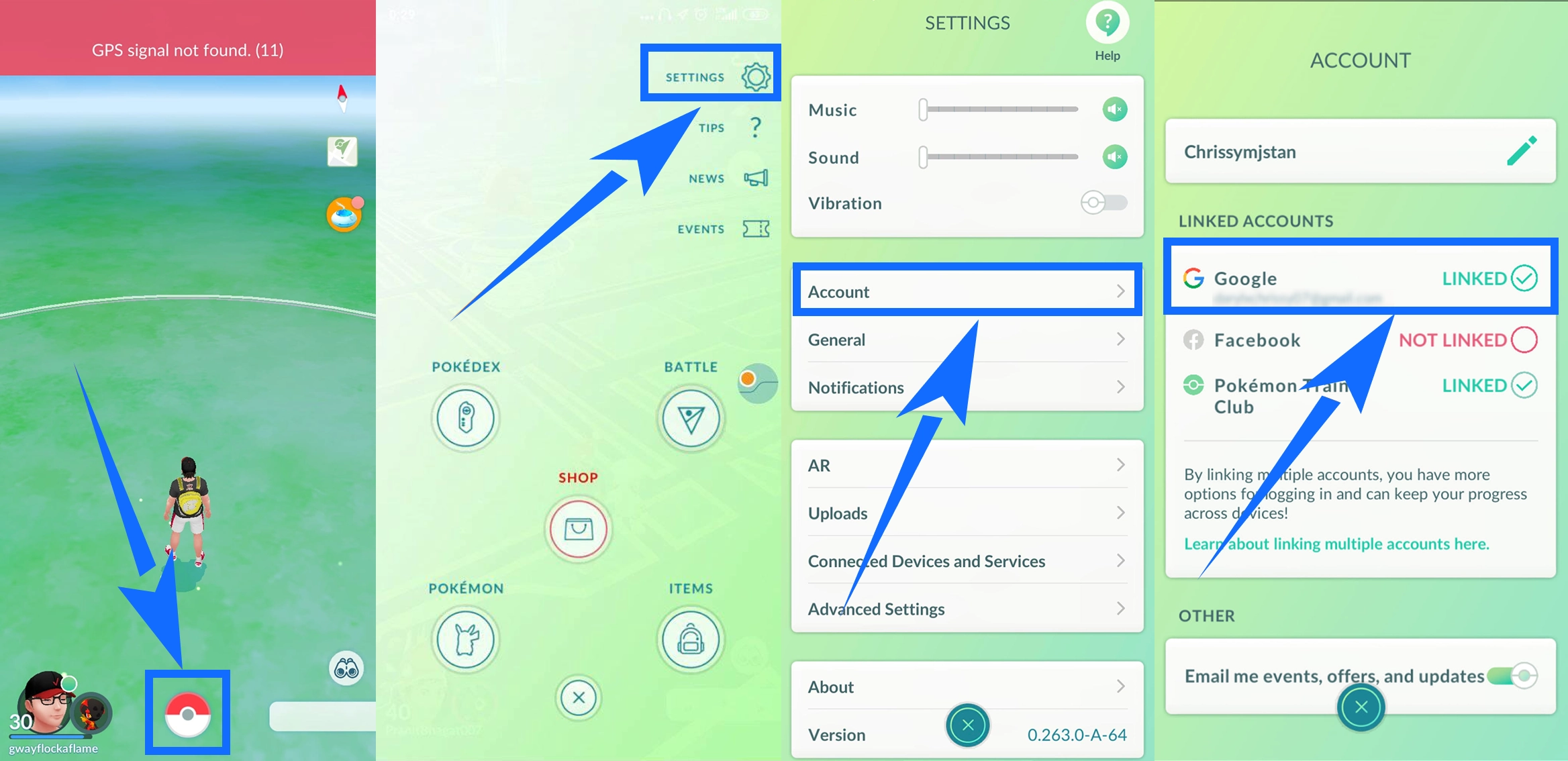
PTC login reminder: If you plan to sign in with Pokémon Trainer Club (PTC) but have not linked your PTC account to Pokémon GO, complete the linking process in the game first. Go to “Main Menu” > “Settings” > “Account,” find the “Not Linked” option for Pokémon Trainer Club, and follow the on-screen instructions.
Login Top-Up
With login top-up, a top-up specialist signs in to your game account using the details provided with your order and purchases the selected product for you. This option is available when self-service top-up is temporarily unavailable due to system maintenance or an upgrade. Before submitting your details, make sure your login method and account information are correct to avoid delays.
The following details are required for login top-up:
- Login method: PTC, Google, or Facebook
- Account and password: The account credentials for your selected login method
- Trainer name: Your in-game Pokémon GO Trainer name
Enter the details in the fields provided on the order page, and make sure your account, password, and Trainer name are correct. After submission, your order will enter the processing queue. Do not sign in to the Pokémon GO account yourself while the order is being processed, as this may interfere with the top-up.
- Choose a product: Select the PokéCoins denomination or GO Pass product you need, then place and pay for your order.
- Submit your login details: Select PTC, Google, or Facebook in the designated order field and provide the corresponding account, password, and Trainer name.
- Wait for order processing: After submitting your details, the system will direct you to a waiting page. A top-up specialist will sign in and complete the purchase according to your order. Processing time may vary.
- Check the completion status: Once processing is complete, the page will display the successful top-up status. You can also check the latest order status under “Purchase History.”
- Log in and verify: After the order is marked as completed, sign in to Pokémon GO and check that the selected product has been credited correctly.
Before Placing an Order
- Check the product and denomination: Before paying, make sure the PokéCoins amount or GO Pass product matches your needs. For self-service top-ups, you must select the in-game item that matches the order denomination and specified value. Do not substitute another item.
- Verify your login details: For login top-ups, enter the correct login method, account, password, and Trainer name. Incorrect details may affect order processing.
- Follow login restrictions during processing: For self-service top-ups, keep the dedicated interface open and do not sign in to the same account on another device. For login top-ups, do not access the game yourself while the order is being processed.
- Confirm the product has been credited: Once the order is marked as completed, enter the game and check that the PokéCoins or specified GO Pass product has been received correctly.
- Understand the virtual product policy: Check the product details and account information before payment. Virtual products cannot be refunded or exchanged once successfully credited.
Beyond Pokémon collecting in Pokémon GO, players who enjoy raising pets and collecting different creatures can also browse Adopt Me! items on TRADEE or explore Creatures of Sonaria items for a different collecting and raising experience.
