





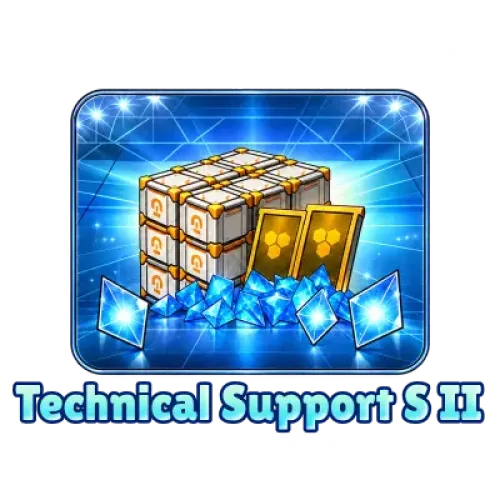



GODDESS OF VICTORY: NIKKE Gems Top-Up and In-Game Bundles
Planning to recruit a newly released Nikke but running short on Gems? Or looking to purchase a monthly supply and build up recruitment and character development resources over time? In GODDESS OF VICTORY: NIKKE, Gems, Recruit Vouchers, and in-game bundles serve different purposes. Check your goals and the resources you need before ordering to make sure you choose the right product.
TRADEE offers NIKKE Gems top-ups, monthly supplies, and selected in-game bundles. Depending on the product, you can choose between UID top-up and account login top-up. Before placing an order, check the product details, account server, and required information to find the option that suits your needs.
How to Choose Between Gems, Monthly Supplies, and In-Game Bundles
GODDESS OF VICTORY: NIKKE combines cover-based shooting, character progression, and squad building. Different paid products meet different resource needs, so rather than comparing prices alone, first decide whether you need recruitment resources or a bundle with additional rewards. Players who enjoy collecting characters, planning squads, and building up progression resources may also want to explore Zenless Zone Zero top-ups and Honkai: Star Rail top-ups.
Before purchasing, review your current Gems, Advanced Recruit Vouchers, and Gold Mileage Tickets. Then choose a product based on the Nikke you want to recruit and your budget. A top-up adds resources, but it does not guarantee that recruitment will give you a specific Nikke.
NIKKE Top-Up Methods and Supported Servers
TRADEE offers UID top-up or account login top-up depending on the NIKKE product. Each method requires different information, so check the delivery method shown on the selected product page before preparing your details.
| Top-Up Method | Required Information | Estimated Processing Time |
|---|---|---|
| UID Top-Up | Game UID, Commander name, server, and any other details required by the product | Usually around 3–5 minutes |
| Account Login Top-Up | Game login details and any required account verification information | Usually around 15 minutes |
These times are estimates, not guaranteed delivery times. Payment confirmation, account verification, and order processing conditions may affect the actual completion time.
Supported Platforms and Servers
- Supported platforms: iOS, Android, PC client
- Supported servers: Global, North America (NA), Japan (JP), Korea (KR), Southeast Asia (SEA)
- Product types: Gems, monthly supplies, and selected in-game bundles
- Delivery methods: UID top-up or account login top-up, depending on the selected product
When selecting a server, use the server linked to the Commander account receiving the product. Do not choose based only on your current country or payment currency. UID top-up does not require your game login password. For account login top-up, follow the information requirements shown on the selected product page.
How to Find Your GODDESS OF VICTORY: NIKKE UID
For UID top-up, prepare your game UID, Commander name, and server. Your UID identifies your game account and is different from your Commander name. Always use the information displayed in the game. 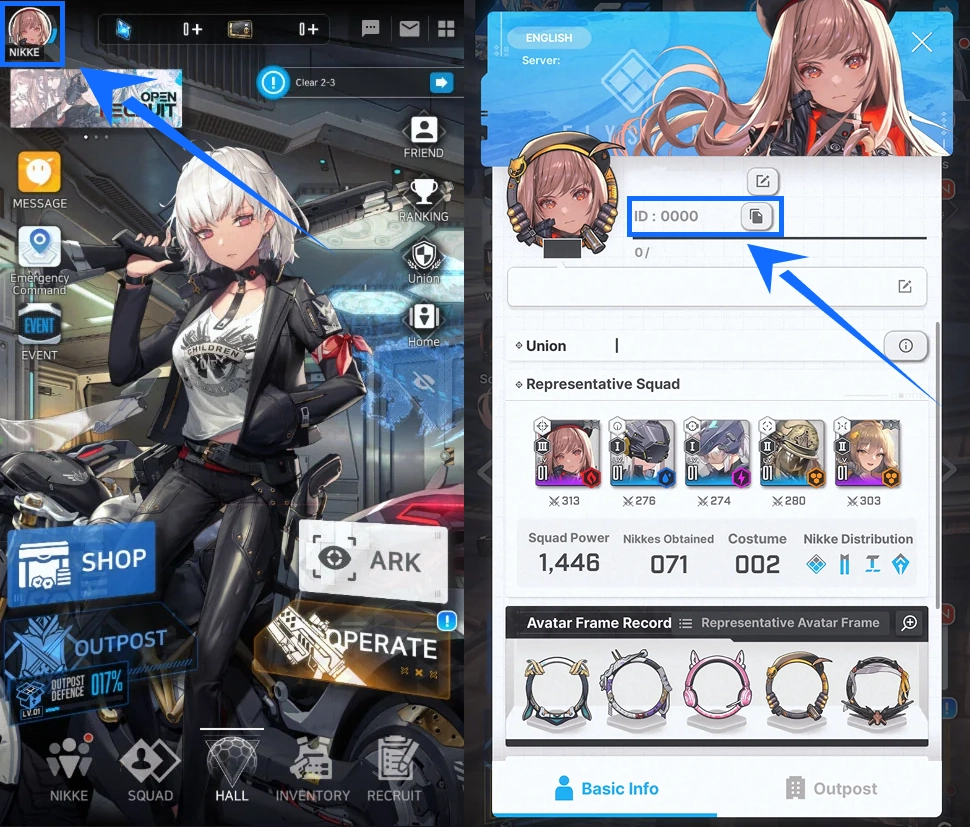
- Open your in-game profile: Log in to the GODDESS OF VICTORY: NIKKE account you want to top up. From the lobby, tap the Commander avatar in the upper-left corner.
- Find your UID: Locate the UID on your profile page and use the on-screen copy function to copy the full number.
- Verify your account details: Make sure the UID, Commander name, and server match, then enter the information requested on the TRADEE product page.
Check your delivery details again before payment. If you notice an incorrect UID or server, do not place a duplicate order. If the order has already been submitted, keep your order number and contact TRADEE customer support promptly to check its status.
How to Buy NIKKE Gems and Bundles on TRADEE
TRADEE supports payment methods such as PayPal and credit cards. The options available for your order are shown at checkout. After confirming the product details, server, and final amount, complete your order according to the selected delivery method.
UID Top-Up Process
- Choose a product: Check the Gem quantity or bundle contents, then select the server linked to your account.
- Enter your UID: Provide your full UID and any Commander details required by the product. Verify the receiving account carefully.
- Make payment: Review the product, price, and order total, then complete payment using an available checkout method.
- Check delivery: Once the order is complete, log in to your original game account and check whether your Gem balance or purchased product has been updated.
UID top-up does not require your game account password. Make sure your UID and server are correct, as incorrect delivery details may affect fulfillment.
Account Login Top-Up Process
- Select an account login product: Make sure the product is marked as an account login top-up, then review its contents and price.
- Complete payment: Check the order total and pay using one of the methods available at checkout.
- Submit the required order information: Follow the order process to provide the necessary login details and complete any account verification required for that order.
- Wait for processing: While the order is being handled manually, avoid logging in to the same game account from another device, as this may interrupt the process.
- Check your purchase: After the order is complete, log in to the game and confirm that your Gems, monthly supply benefits, or bundle contents are correct.
Submit login and verification details only through the designated process for that order. Do not post account credentials or verification codes publicly in comments or on social media. If your order is delayed or the product has not appeared, keep your order number and contact TRADEE's 24/7 customer support.
GODDESS OF VICTORY: NIKKE Gems Top-Up FAQ
Should I buy Gems or Advanced Recruit Vouchers for Special Recruit or limited-time characters?
First, check which resources the current recruitment banner accepts, then review your existing Gems and Advanced Recruit Vouchers. Ordinary Recruit Vouchers cannot be used for every Special Recruit or limited-time banner, and some banners distinguish between Free Gems and Paid Gems. If the target Nikke can be exchanged for Gold Mileage Tickets, include your existing tickets in your resource plan instead of relying entirely on recruitment results.
Do Gold Mileage Tickets expire when a recruitment banner ends? Can I exchange them directly for a Nikke?
Under the game's recruitment rules, Gold Mileage Tickets are generally retained after a banner ends. Eligible characters can be exchanged in the designated Mileage Shop, and some recruitable characters require 200 Gold Mileage Tickets. The available characters and exact requirements may change, so check the current recruitment announcement and in-game Mileage Shop.
Which is better value: a monthly supply, a Gems pack, or an in-game bundle?
There is no single best option for every player. If you need recruitment resources immediately, compare Gems packs. If you can claim rewards daily, check the full rewards and validity period of a monthly supply. If you need Recruit Vouchers or character development materials, make sure the bundle includes resources you will actually use. Compare the actual rewards, claim requirements, and final price before purchasing.
Does buying Gems guarantee a specific SSR Nikke?
No. Gems are recruitment resources, not a direct purchase of a specific character. Recruitment results are determined by the rates of the current banner. If the character is eligible for exchange with Gold Mileage Tickets, you may be able to obtain them through the in-game exchange rules. Check the recruitment rules and your budget before purchasing; the amount you spend does not guarantee a specific character.
What should I do if I entered the wrong UID or server?
If you have not submitted the order, correct the information before paying. If the order has already been placed, keep your order number and contact TRADEE customer support as soon as possible to check its status. If the product has already been delivered to the wrong account, whether it can be adjusted depends on the circumstances. Always verify your UID and server before ordering.
