











League of Legends: Wild Rift Wild Cores Top Up
Found a skin you want, looking to unlock more cosmetics, or considering paid Wild Pass content? Check how many Wild Cores you need before choosing a top-up option to keep your spending on track. TRADEE offers Wild Cores top-ups for League of Legends: Wild Rift, with different product options to match your purchase goals. You can review the price, required account details, and checkout options before placing an order.
Wild Cores are the premium in-game currency in League of Legends: Wild Rift. They can be used to purchase eligible champions, skins, and other in-game content. Prices and delivery methods vary by product, so check the item you want in-game first. Players who also enjoy unlocking heroes and cosmetics in other MOBAs can explore currency options for Mobile Legends: Bang Bang and Honor of Kings on TRADEE. For more character cosmetics and other game content, you can also check the top-up options for Brawl Stars and Marvel Rivals.
Check the Required Details Before Choosing a Top-Up Method
Wild Rift top-up products may use either Riot ID Top-Up or Account Login Top-Up. Each method requires different information, so always follow the requirements shown in the selected product listing.
| Top-Up Method | Required Information | Order Notes |
|---|---|---|
| Riot ID Top-Up | Your full Riot ID in the format GameName#Tagline. | Include the Tagline after the # symbol. Your game account password is not required for this method. |
| Account Login Top-Up | Depending on the selected product, you may need to provide your login method, account, password, Riot ID or in-game name, and other required details. | Submit the information requested on the product page. Avoid logging into the game while the top-up is being processed. |
These two methods do not follow the same process. Riot ID Top-Up uses your complete player identifier, while Account Login Top-Up may require account login details. Check the selected product type before placing your order.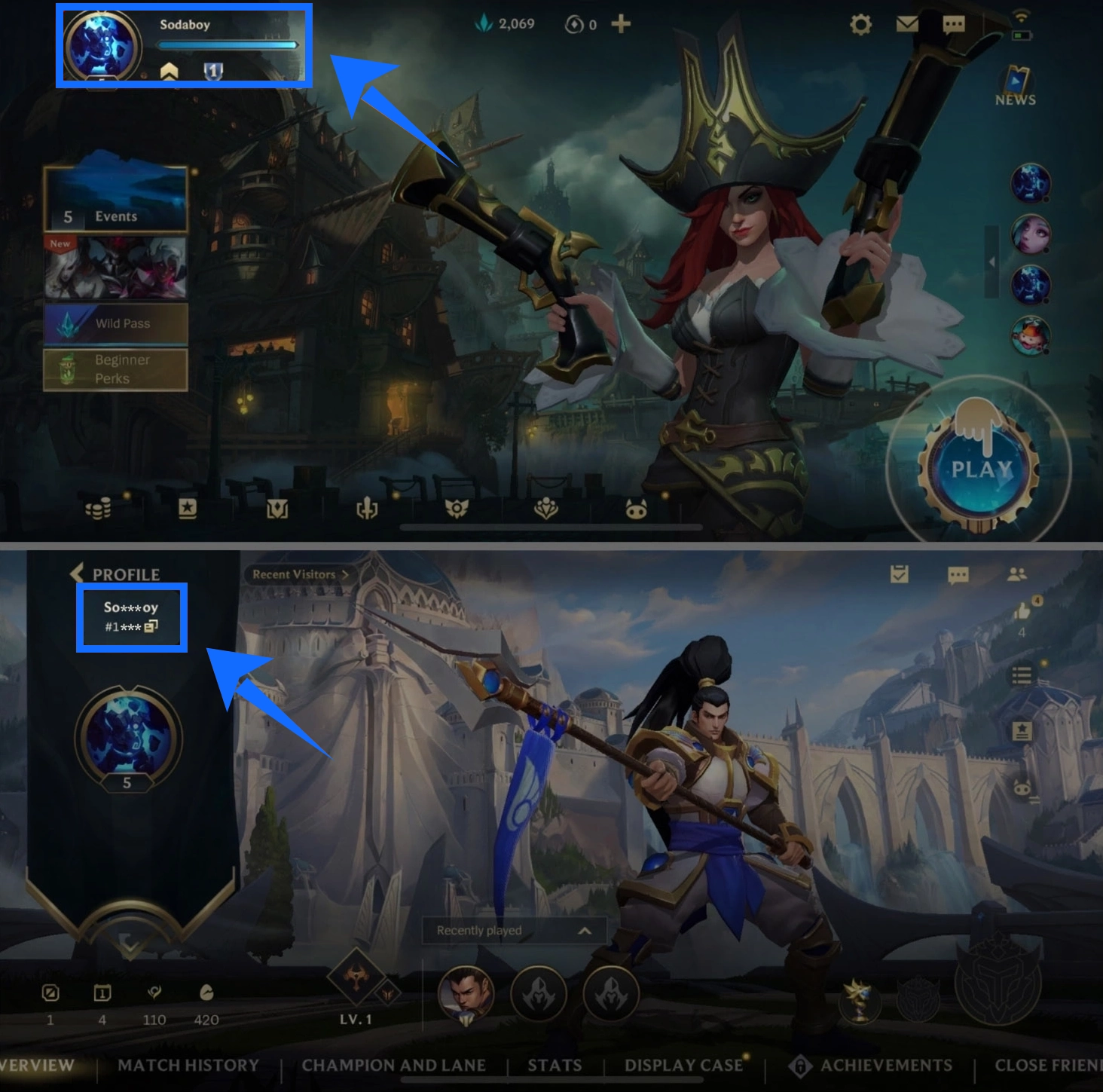
Supported Platform, Servers, and Processing Time
Your account's server or region can affect which products are available, in addition to the top-up method. Before payment, choose the product that matches the environment used by your target account.
Supported Platform
Mobile
Supported Servers / Regions
Multiple supported server and region options are available. Choose the product option that matches your League of Legends: Wild Rift account.
Typical Processing Time
Orders are usually processed within a few minutes. Account Login Top-Up may take longer depending on payment checks, order conditions, or other processing requirements. Actual processing times are not fixed.
Do not assume that a server matches based only on the account language, region, or name. Check the supported options on the product page and compare them with your account details.
Shop Wild Cores on TRADEE with a Clearer Checkout Process
Compare Prices Before Setting Your Budget
The product page displays the available Wild Cores options and their current prices. Eligible products may also have promotional offers. Prices and discounts can vary by denomination, so compare the final amount payable before choosing.
Flexible Payment Options
Check the payment methods available at checkout. Depending on the options displayed, you may be able to pay with PayPal or Visa. Review your selected product and total before completing payment. Available payment methods are subject to what appears on the checkout page.
Order Assistance and Transaction Support
TRADEE provides a secure website checkout environment where you can review product details and the amount payable before payment. If you have questions about payment, top-up information, or order progress, 24/7 customer support is available to help you find the right channel for assistance.
How to Complete a Wild Cores Top-Up
Once you have chosen your denomination and top-up method, submit the details required by the selected product. Requirements vary depending on the method, so follow the instructions shown in the product listing.
- Choose a Wild Cores Product
Visit the League of Legends: Wild Rift top-up page on TRADEE. Select your desired Wild Cores denomination and product option, then review the current price.
- Confirm the Top-Up Method and Server
Check whether the selected product uses Riot ID Top-Up or Account Login Top-Up. Choose a supported server or region that matches your target account.
- Enter the Required Details and Review Your Order
For Riot ID Top-Up, enter your complete GameName#Tagline. For Account Login Top-Up, provide the login method and account details requested on the product page. Check your information, denomination, and total before submitting.
- Pay and Check Your Wild Cores Balance
Choose a payment method available at checkout and complete the payment. Wait for the order to be processed. If you selected Account Login Top-Up, avoid logging into the game until processing is complete. Then sign in to the correct League of Legends: Wild Rift account and check whether your Wild Cores balance has been updated.
Wild Cores Top-Up FAQs
Can Wild Cores Be Used in the PC Version of League of Legends?
No. Wild Cores are the premium currency for League of Legends: Wild Rift, while the PC version of League of Legends uses RP. They belong to separate game currency systems and cannot be used interchangeably. Make sure you select a product for the game you intend to play.
What Should I Do If My Order Is Paid but My In-Game Balance Has Not Updated?
Allow a reasonable amount of time for order processing. Then make sure you are signed in to the account provided when placing the order and check your Wild Cores balance in-game. If the balance is still unchanged, contact TRADEE's 24/7 customer support to ask about your order status.
