





Brawl Stars Gems and Brawl Pass Top-Up Guide
Looking to unlock a new skin for your favorite Brawler, get more Gems, or access this season’s premium Brawl Pass rewards? Brawl Stars offers different types of in-game content through Gems, the Brawl Pass, and the Brawl Pass Plus. Before ordering, decide whether you need in-game currency, seasonal pass rewards, or a bundle containing multiple items, then choose the option that fits your budget and needs. Players who enjoy Supercell’s real-time card battles can also check out Clash Royale top-ups to prepare resources for deck upgrades and competitive matches.
TRADEE offers Brawl Stars Gems, the Brawl Pass, the Brawl Pass Plus, and selected in-game bundles through a manual top-up service using your Supercell ID account. After payment, submit the required account details and login verification information as instructed in your order. A service representative will then complete the corresponding in-game purchase. Make sure your account information is correct before placing an order, and check each product’s contents and requirements.
What Is the Difference Between Gems, the Brawl Pass, and the Brawl Pass Plus?
Gems are suitable for players who want more flexibility over their in-game spending. The in-game Shop offers skins, special deals, and other purchasable content, and some features can also require Gems.
The Brawl Pass provides additional seasonal rewards, including resources and other pass-exclusive content. The Brawl Pass Plus offers further rewards and progression benefits. The rewards may change with each season, so check the current reward track in the game before purchasing.
If you are interested in a specific in-game bundle, compare the Gems, resources, skins, and other items included in that bundle. Contents and eligibility requirements may vary, so refer to the product page and the information shown in the game when making your choice.
Brawl Stars Manual Top-Up Service and How to Order
TRADEE offers different Gem amounts, passes, and selected bundles, making it easier to compare products based on your needs. Some products may have eligible discounts. Before ordering, check the product price, contents, and checkout total to find an option that fits your budget. Players who also enjoy other hero-based team battle games can explore Mobile Legends: Bang Bang top-ups to prepare resources for hero selection and team battles.
- Supported platforms: Mobile (iOS / Android)
- Supported server: Global server
- Top-up method: Manual top-up via Supercell ID login
- Estimated processing time: Approximately 15 minutes. Actual processing time may vary depending on order volume, account verification, and game system conditions.
- Payment methods: Choose from the available options shown at checkout, such as PayPal and credit cards.
- Customer support: If you encounter login, order processing, or delivery issues, contact TRADEE’s 24/7 customer support team.
Before Placing an Order
- Make sure your Supercell ID is linked to the Brawl Stars account that should receive the purchase.
- Submit the required details according to the order page. Different orders may require different login verification information.
- While the manual top-up is being processed, avoid logging into the same game account or switching accounts, as this may affect the process.
- Submit login details and verification codes only through the process specified in your order. Do not share account information with unrelated third parties.
What Account Information Is Required for a Manual Top-Up?
To help the service representative identify the correct game account and complete the purchase, prepare the following information before ordering and enter it according to the requirements shown on the order page.
- Supercell ID email address: Provide the email address linked to the game account you want to top up.
- In-game player name: Enter the player name displayed in Brawl Stars so the account can be verified.
- Email verification code: Provide the latest valid verification code required for login, as instructed in your order.
- Other required login details: If the order process explicitly requests additional account information, submit it through the specified method.
Your Supercell ID email address and in-game player name are two different pieces of information. Do not rely on the email address alone to identify your account. Check the player name again before submitting your order to make sure the purchase goes to the intended game account.
How to Find Your Supercell ID Email Address and Player Name
If you are unsure which email address or player name to enter, check your account details in Brawl Stars first, then use the images below as a reference.
Find Your Supercell ID Email Address
Open the in-game settings and find the Supercell ID information to check the email address currently linked to your account. Use the email address associated with the Brawl Stars account that should receive the purchase.
Find Your In-Game Player Name
Open your player profile from the main screen and check the name displayed in the game. Pay attention to capitalization, special characters, and spelling to avoid confusing your account with another player or game account.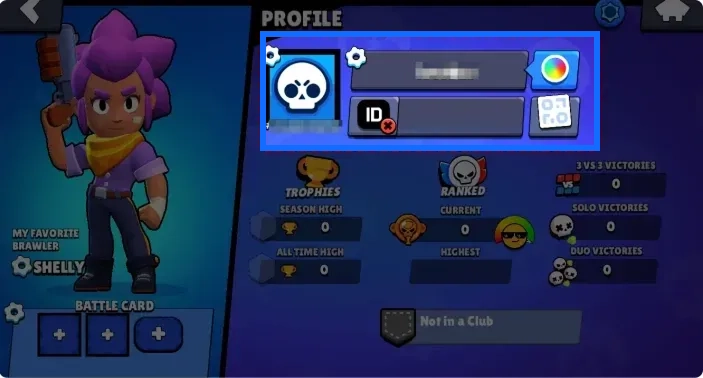
Verify Your Supercell ID and Player Details
If you have multiple game accounts, check both the Supercell ID email address and player name to make sure they belong to the same account. 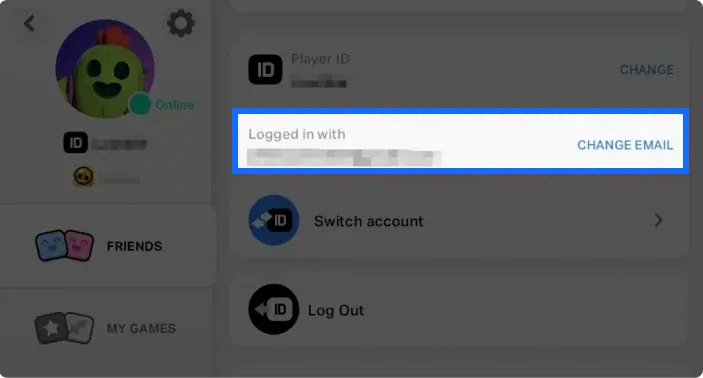
How to Link and Check Your Supercell ID
Manual top-ups require logging into the corresponding game account through Supercell ID. If your account is not linked yet, set up Supercell ID in the game and make sure the email address you use can receive verification codes.
- Open the game menu and select Connect: Go to the Brawl Stars main screen, tap the menu icon in the upper-right corner, and select “Connect” on the screen.
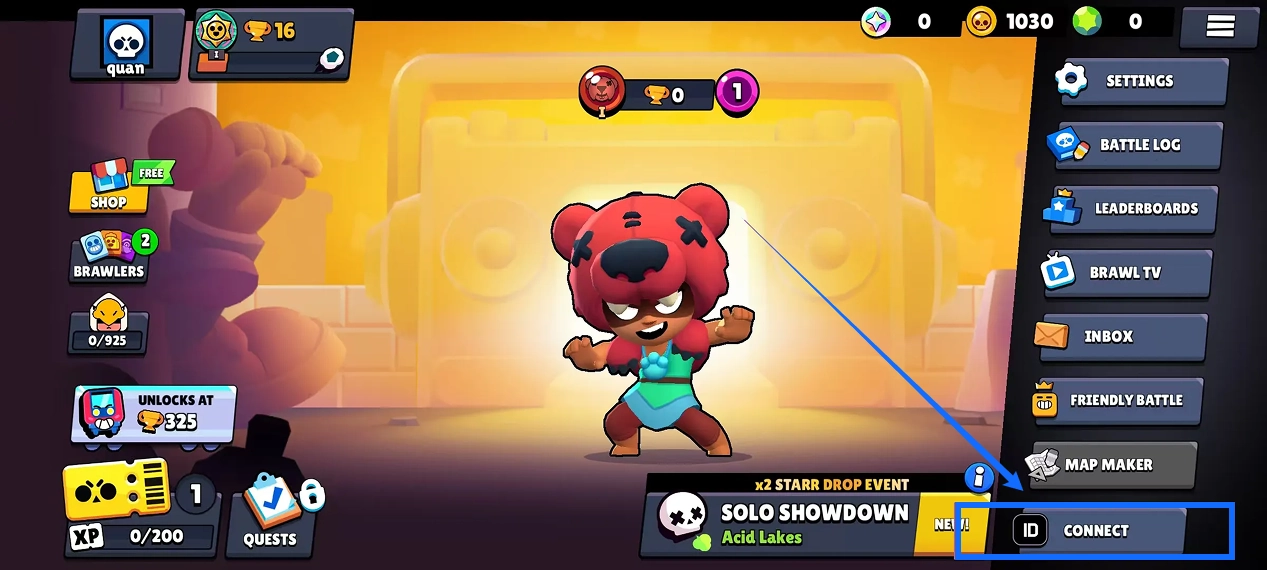
- Choose to create an account or log in: If you do not have a Supercell ID yet, follow the on-screen instructions to create one. If you already have a Supercell ID, select “Yes, log in” and use your existing account.
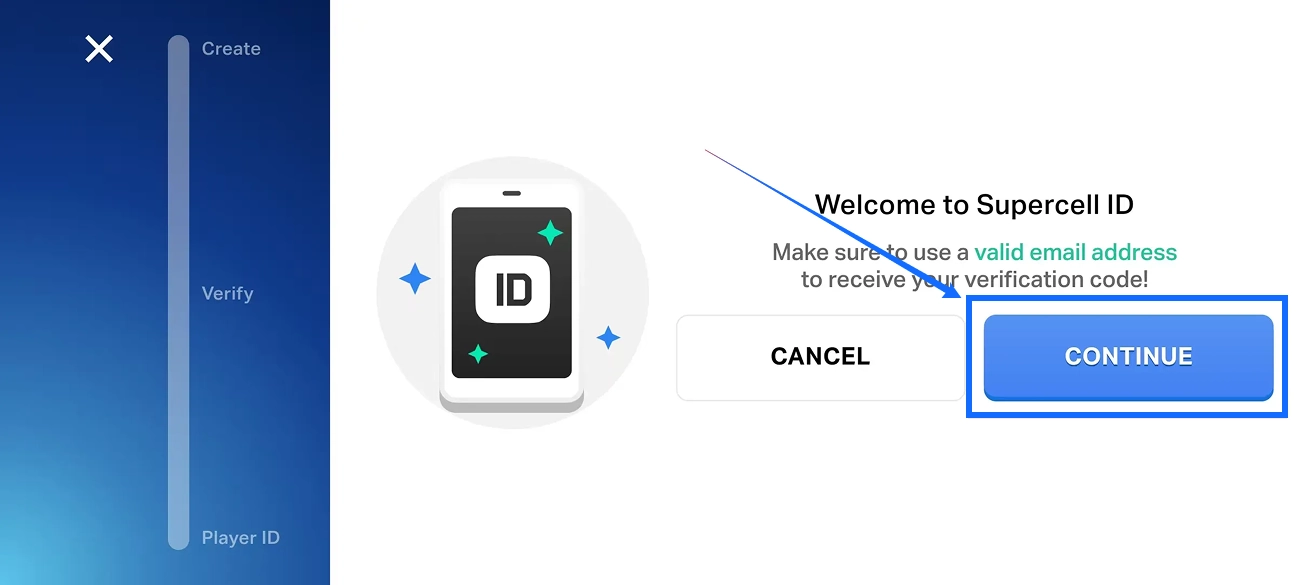
- Enter your email address: Enter the email address you want to link to your game account, then follow the on-screen instructions to continue logging in or creating your account.
- Complete email verification: Check your inbox for the latest verification code and follow the in-game instructions to complete verification.
- Finish setup and verify your account: Follow the on-screen instructions to finish setting up Supercell ID. Return to the game and check the connection status, email address, and player name to make sure the correct game account is linked.
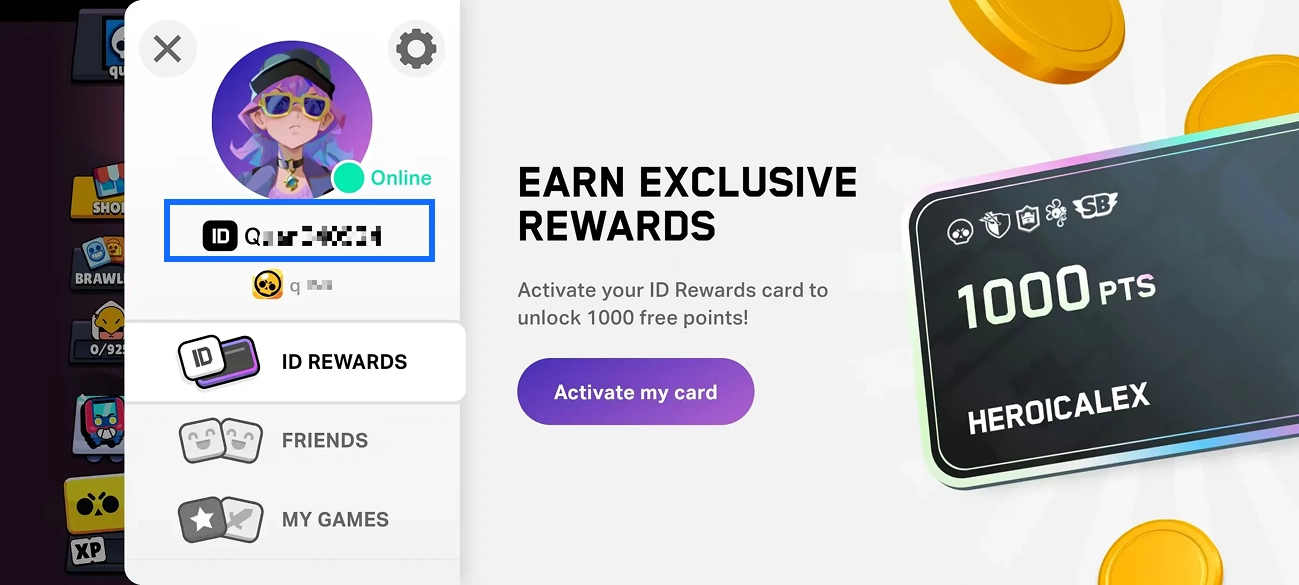
After Linking Your Account
Verification codes may expire, and requesting multiple codes within a short period may be restricted. Follow the in-game prompts and avoid repeatedly submitting an old code. If your game account is already linked to Supercell ID, you do not need to create another game account for a top-up.
Brawl Stars Manual Top-Up Process
After verifying your account details, you can choose a product on TRADEE. A service representative will log in to the specified account and complete the purchase. After payment, submit the required information and check your order status as instructed on the order page.
- Select a product and place your order: Choose the Gem amount, Brawl Pass, Brawl Pass Plus, or selected bundle you need on TRADEE. Check the product contents, supported platform, and price before submitting your order.
- Choose a payment method and complete payment: Select an available payment method and any applicable offer shown at checkout. Review the order total before completing payment.
- Select manual top-up: After placing and paying for your order, open the corresponding order page, select “Manual Top-Up” as instructed, and check which account details you need to submit.
- Enter your account information and submit: Provide your Supercell ID email address, in-game player name, verification code, and any other required login details. Check that the information is correct and follow the page instructions to continue.
- Wait for processing and check your order status: A service representative will use the information submitted with your order to log in to the corresponding account and complete the purchase. Processing usually takes around 15 minutes, but the actual time may vary depending on verification and system conditions. Do not log in to the same game account during processing. You can check the latest status in the TRADEE Order Center.
- Confirm that the product has arrived: Once the order status shows as completed, log in to Brawl Stars and check your Gem balance, Brawl Pass benefits, or bundle contents. If the product has not arrived, keep your order number and contact TRADEE customer support.
Check delivery according to the product you purchased: verify your Gem balance for a Gem order, the relevant paid benefits for a pass order, or the listed items for a bundle order. If the order is marked as completed but the product is not visible in the game, review your order details and contact customer support for assistance before placing another order. Players who prefer winning through hero abilities and team compositions can also browse Honor of Kings top-up products on TRADEE.
Brawl Stars Gems Top-Up FAQ
Can I Use Gems to Buy the Brawl Pass or Brawl Pass Plus Directly?
No. You cannot use your existing Gem balance to purchase either of these paid passes directly. To unlock the current season’s paid rewards, choose the corresponding Brawl Pass or Brawl Pass Plus product. However, some pass progression tiers may be unlocked with Gems. Check the current in-game options for details.
Does Changing My Brawl Stars Player Name Cost Gems?
Your first player name change is free. Further name changes require Gems, and you must wait at least three days between changes. The actual cost depends on how many times you have changed your name, so check the price displayed in the game before confirming.
Can I Transfer Purchased Gems to Another Brawl Stars Account?
No. Gems and other in-game virtual items are associated with the game account that receives them and cannot be freely transferred to another account. Check your Supercell ID email address and in-game player name carefully before ordering to avoid purchasing for the wrong account.
What Should I Do If a Manual Top-Up Is Delayed or the Product Does Not Arrive?
First, check the processing status in the TRADEE Order Center and see whether you have received an order completion notification. If the order is marked as completed but the product is still missing in the game, keep your order number and contact TRADEE’s 24/7 customer support team for assistance with checking the order.
