




Clash Royale Gems Top Up: Prepare Resources for Card Upgrades and Arena Challenges
Need a little more Gold or a few extra cards to upgrade your go-to deck? Or are you getting ready for a Challenge or aiming to unlock the seasonal rewards in Pass Royale? Gems in Clash Royale can be used to make up for certain upgrade resources, purchase items from the Shop, enter selected Challenges, and unlock additional Pass Royale rewards. They give you more flexibility when planning your deck progression and managing in-game resources. If you enjoy competitive Supercell games, you can also check out Brawl Stars top-ups to get resources for another real-time multiplayer battle game.
TRADEE offers Clash Royale Gems, Pass Royale, and selected in-game bundles. Before ordering, compare the contents, denominations, and applicable offers, then provide the account information and login verification details requested for your order. Our service team will complete the corresponding in-game purchase. Please do not log in to the game while your order is being processed, as this may affect its progress. If you also enjoy building a village and upgrading structures, visit Clash of Clans top-ups to browse Gems, the Gold Pass, and selected bundles.
What Account Information Is Required for a Manual Clash Royale Top Up?
TRADEE provides manual top-up services for the international mobile version of Clash Royale. After payment, our service team will use the order details to log in to the designated account and purchase Gems, Pass Royale, or the selected bundle. Before placing an order, make sure your Supercell ID is linked to the correct game account and prepare the required login verification details.
- Supported platform: Mobile (iOS / Android)
- Supported server: International server
- Top-up method: Manual top-up via Supercell ID account login
- Supercell ID email: Provide the email address linked to the target game account.
- Player name: Enter the player name displayed in the game so the correct account can be verified.
- Verification code: Provide the latest email verification code required for login according to the order process.
Important Notes Before Ordering
- This product uses a manual login top-up process. Please provide the required account information and login verification details according to the instructions on the order page.
- Do not log in to the game, switch accounts, or change login settings while the top-up is being processed, as this may cause login conflicts or delays.
- Enter your email address, player name, and other required details accurately to avoid problems caused by incorrect information.
- Make sure the Supercell ID belongs to the game account that should receive the purchase, not another account or game profile.
Choose Clash Royale Products That Match Your Deck's Needs on TRADEE
You do not necessarily need the largest Gem bundle when upgrading your deck or preparing for an Arena Challenge. TRADEE offers different Gem amounts, Pass Royale options, and selected bundles, so you can compare them based on the resources you need, seasonal rewards, and product contents. Some products may have applicable offers; check the product and checkout pages for the actual prices and discount conditions. If you enjoy more than card battles and prefer collecting resources while gradually expanding your territory, you can also explore Kingshot top-up products.
All orders are processed manually. Our service team uses the information submitted with your order to complete the corresponding in-game purchase. Standard processing takes approximately 30 minutes, although the actual time may vary depending on order volume, account verification, and game system conditions. At checkout, you can choose from the available payment methods shown on the page, such as PayPal and credit cards.
If you encounter a Supercell ID login issue, an order delay, or a problem receiving your purchase, contact TRADEE's 24/7 customer support team and provide your order number for assistance. If the product has not yet been delivered, check your order status and follow the support team's instructions to avoid placing a duplicate order.
How to Link and Check Your Supercell ID
Before using the manual top-up service, make sure your game account is linked to a Supercell ID. Supercell ID helps save your game progress and lets you log in to your account. If your account is already linked, you do not need to create another one for the top-up. Just make sure the email address you use belongs to the correct game profile.
- Open the game settings: Launch Clash Royale, open the game settings, and find the Supercell ID option to check your current account connection status.
- Choose to register or log in: If you do not have a Supercell ID yet, follow the on-screen instructions to create one. If you already have an ID, select the login option and use your existing account.
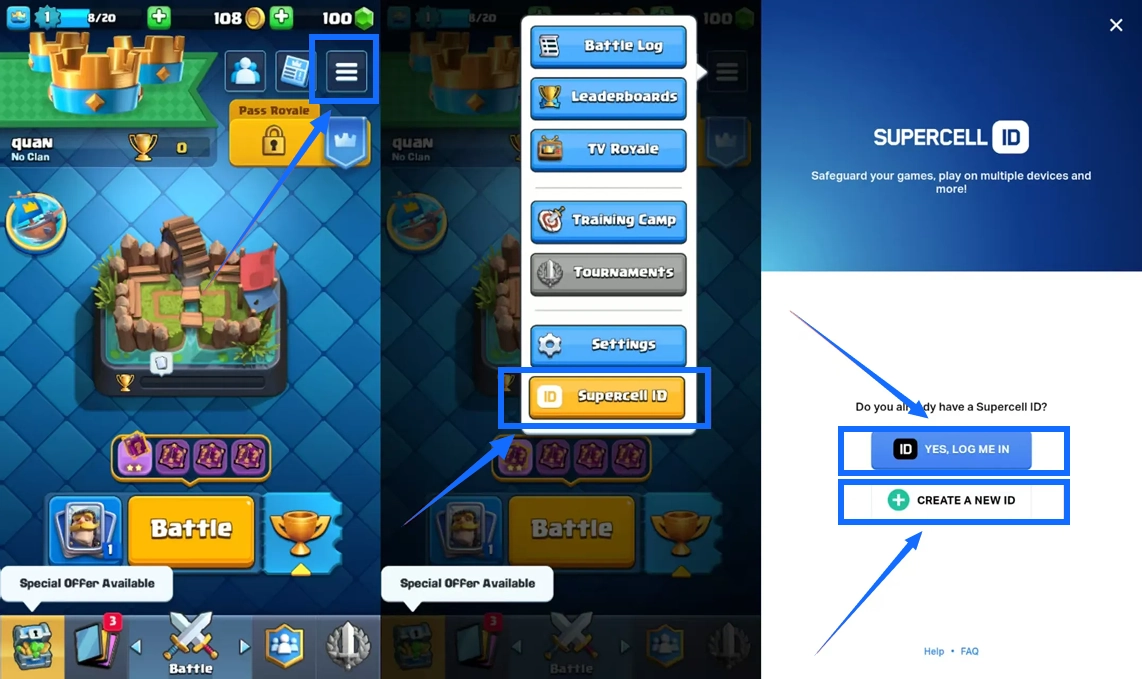
- Enter your email address: Enter the email address you want to link as instructed in the game, and make sure the inbox can receive emails.
- Complete email verification: Check your inbox for the latest verification code and follow the on-screen instructions to finish logging in or creating your account.
- Verify your game account: Return to the game settings and confirm that your Supercell ID is linked successfully. Check your in-game player name and progress to make sure this is the account that should receive the purchase.
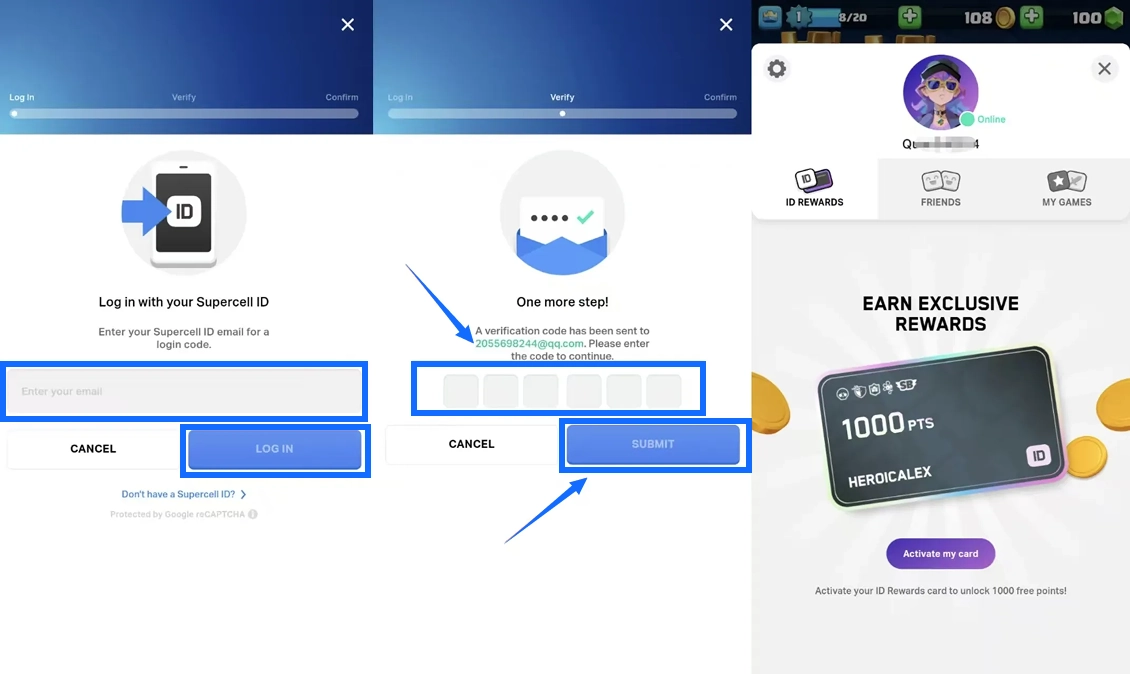
If you have multiple game accounts, pay close attention to which Supercell ID is currently logged in. Cards, Gold, and game progress are separate for each account, so check that the player name matches your intended account before submitting your order.
Clash Royale Manual Top-Up Process
Once you have confirmed that your Supercell ID is linked to the correct game account, you can select the products you need on TRADEE. After payment and submission of the required details, our service team will log in to the account using the order information and purchase the corresponding Gems, Pass Royale, or selected bundle.
- Choose a product: Select the Gem amount, Pass Royale option, or selected bundle you need on TRADEE. Check the product contents, price, and applicable offers.
- Submit your account details and pay: Provide your Supercell ID email, player name, and required login verification details according to the order page. Review your order, select an available payment method, and complete the payment.
- Wait for manual processing: Our service team will use the information submitted with your order to log in to the game and complete the purchase. Do not log in to the same game account or switch accounts during processing, as this may interfere with the operation.
- Check your order status: Visit the TRADEE order center to follow the processing progress. Manual top-ups generally take around 30 minutes, but the actual time may vary depending on the order and verification status.
- Confirm that the product has arrived: After receiving the order completion notification, log in to Clash Royale and check whether your Gem balance, Pass Royale benefits, or bundle contents have been received correctly.
Different products require different checks. For Gems, verify your Gem balance. For Pass Royale, make sure the paid reward track has been unlocked. For a selected bundle, check each item listed in the order. If your order is marked as completed but the product is still missing in the game, keep your order number and contact TRADEE customer support.
Clash Royale Gems Top-Up FAQ
Can a New Account Buy Pass Royale?
Pass Royale unlocks once you reach Arena 2. New accounts that have not met this requirement should progress through the Arenas first. Some Pass Royale rewards also have Arena requirements. Even if you select one of these rewards, you may need to reach the specified Arena before you can use it. Check the eligibility and product details displayed in the game before purchasing.
What Is the Difference Between Gems and Gold? Which Should I Choose for Card Upgrades?
Gold is an important resource for purchasing and upgrading cards. Gems can be used, when eligible, to make up for missing Gold or cards needed for an upgrade. If you already have enough Gold and cards, you may not need to buy more Gems. If you are short on resources, check the in-game cost first and decide whether a top-up is necessary.
Does Buying Gems Automatically Unlock Bonus Rewards in Global Tournaments?
No. Gems can be used to claim eligible bonus rewards, but you still need to participate in the relevant event and meet its rules and claim requirements. Simply topping up Gems does not complete a Global Tournament or automatically grant all bonus rewards.
