











Last Z: Survival Shooter Gold Bars and Pack Top-Up
Gold Bars in Last Z: Survival Shooter are an in-game virtual currency used to redeem packs in the store. When shopping on TRADEE, you can choose Gold Bars or a specific pack denomination based on your needs, then select either Self-Service Top-Up or Login Top-Up. The two methods have different procedures and information requirements, so choosing the right option before placing an order can help make the process smoother. If you also enjoy games that combine post-apocalyptic survival, base building, and resource management, you can also browse top-up services for Last War: Survival Game, Whiteout Survival, Dark War: Survival, and State of Survival on TRADEE.
Choose Your Top-Up Method: Self-Service or Assisted Login
TRADEE offers two top-up methods for Last Z: Survival Shooter. In most cases, Self-Service Top-Up is a good option to consider first. If the self-service system is temporarily unavailable due to maintenance or an upgrade, you can choose Login Top-Up instead.
The two methods have different information requirements and procedures. Prepare your details according to the top-up method you selected.
How to Choose Between Gold Bars and Packs
Gold Bars in Last Z: Survival Shooter can be used to redeem eligible packs in the in-game store. If you have not decided which pack to get, you can choose a Gold Bars amount based on how many you expect to use. If you already have a specific pack in mind, check its in-game price and select the corresponding denomination. Before redeeming, make sure to review the pack contents and the required amount.
How Each Top-Up Method Works
Self-Service Top-Up: Complete the In-Game Purchase Yourself After Payment
- Select an Item and Complete Payment
Choose the Gold Bars amount or pack denomination you need. Check the item option and order total before completing payment.
- Open Self-Service Top-Up from Your Order Details
After payment, go to your order details and select “Self-Service Top-Up” to open the dedicated top-up interface.
- Log In to the Correct Game Account
Use the login method linked to your Last Z: Survival Shooter account. If your account is linked to Google or Facebook, select the corresponding login option.
- Select Gold Bars or a Pack
Open the in-game store and choose an item that matches the quantity or denomination you purchased. Check the item name, listed price, and contents before confirming the redemption.
- Return to the Game and Check the Result
Once the system indicates that processing is complete, return to the correct game account and check your Gold Bars balance or the pack you purchased.
Login Top-Up: Submit Your Account Details for Assisted Processing
- Select a Login Top-Up Item
Choose the Gold Bars amount or pack denomination you need. Check the item details and order total before completing payment.
- Submit Your Account and Verification Details
Provide the game registration email, Player ID, account login method, and any required verification information as requested on the order page. If you are purchasing a specific pack, you may also need to provide a screenshot of the target pack when requested.
- Wait for Login Top-Up Processing
After submitting your details, the system will direct you to a waiting page. You may need to complete a login verification when the top-up specialist starts processing your order. Do not log in to the same Last Z account during processing, as this may interfere with the ongoing operation.
- Check Your Order and In-Game Result
After completion, you will be directed to the top-up success page. You can also check the latest order status under Purchase History. Then log in to the game to confirm that your Gold Bars balance or selected pack has been updated correctly.
What Account Details Are Required for Login Top-Up?
Self-Service Top-Up uses the login method already linked to your game account. Login Top-Up, on the other hand, requires account identification and verification details according to the order instructions. Follow the items listed on the order page. These may include:
- Registration Email (GameUID): The email address used to register your game account.
- Player ID (UserID): The player number used to identify your character or account.
- Login Method: Confirm which login method your game account originally uses.
- Verification Information: If additional verification is required during login, provide the information requested on the order page.
- Target Pack Screenshot: If required on the order page when purchasing a specific pack, provide a screenshot showing the pack in the game.
How to Find Your Player ID and Registration Email
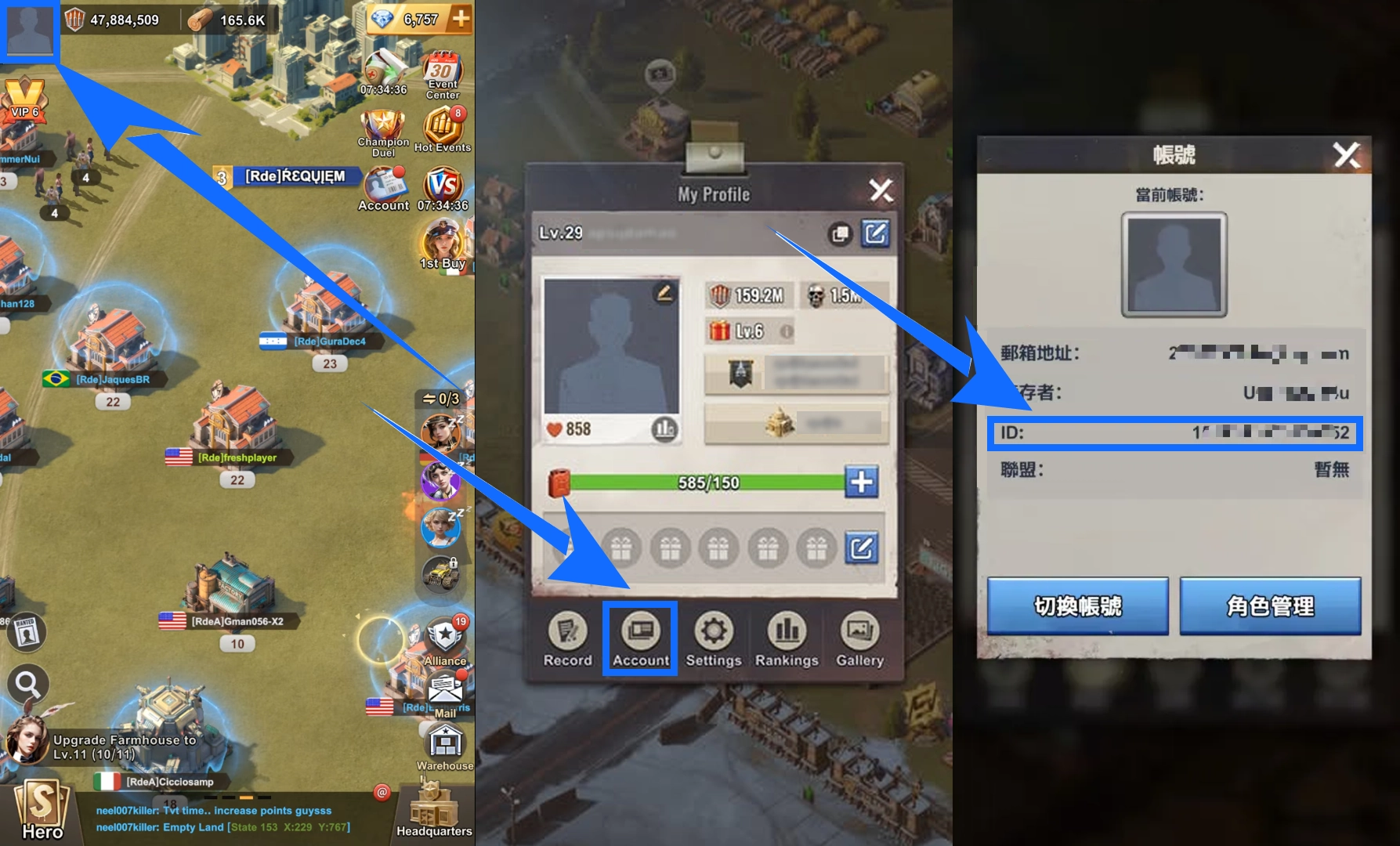
- Open the main screen of Last Z: Survival Shooter and tap your profile avatar in the upper-left corner.
- Open the “Account” tab in the profile menu.
- Find the registration email (GameUID) and Player ID (UserID) displayed on the page, then submit them as requested in your order.
Ordering and Payment Information
Before placing an order, confirm whether you need Gold Bars or a specific pack denomination, then check the item option and order total. Prices and applicable offers may vary by selection, so refer to the information displayed at checkout.
Available payment methods depend on your region and payment provider. Options may include Visa, Mastercard, PayPal, digital wallets, or locally supported payment methods. Some payment options may involve additional processing fees, so check the final amount before paying.
If you encounter payment issues, login verification problems, an interrupted top-up process, or questions about your order status, you can contact TRADEE customer support 24/7 for order-related assistance.
Account and Login Reminders Before Purchase
- Check the Receiving Account: Gold Bars cannot be transferred between characters with different UIDs. Make sure you are logged in to the correct account before starting the top-up.
- Avoid Simultaneous Logins: Do not log in to the same game account from another device while using Self-Service Top-Up or Login Top-Up, as this may interrupt the current process.
- Follow Login Verification Instructions: If an additional verification prompt appears during login, follow the instructions shown on the order page.
- Understand Login Data Handling: The current Self-Service Top-Up instructions state that the login records and related information used for that session will be cleared after the top-up session ends. Only provide the information required for your selected top-up method.
Last Z: Survival Shooter Gold Bars Top-Up FAQ
Can I pay again if my Self-Service Top-Up is interrupted halfway through?
It is not recommended to make another payment before checking the status of your original order, as this may result in duplicate orders. Keep the original order page open and follow the login or recovery instructions shown there first. If you still cannot complete the process, prepare your order details, registration email, and Player ID, then contact TRADEE customer support for assistance.
If my account already has Gold Bars, which amount will be used first when redeeming a pack?
When redeeming an eligible pack, the game prioritizes using the Gold Bars already in your account. Before purchasing, check your current balance and the amount required for the target pack to avoid an unexpected redemption result.
Do purchased Gold Bars count toward VIP points or event progress if I have not used them?
According to the game's Gold Bars usage rules, only Gold Bars actually spent in the game count toward related VIP points and event participation records. Simply purchasing Gold Bars and keeping them in your balance does not count as an in-game purchase.
