








Last War:Survival Top-Up Service
In Last War:Survival, building your base, recruiting heroes, and researching technology all require a steady supply of resources. Whether you need Diamonds, want to purchase Gold Bricks, or are looking for a specific pack in the in-game store, choosing the right top-up option helps you manage resources according to your current progression goals. Players who enjoy post-apocalyptic survival and base-building games may also be interested in TRADEE's Whiteout Survival top-up service to support the development of their own survival settlement.
TRADEE offers top-up services for the global version of Last War:Survival, with options including Diamonds, Gold Bricks, standard packs, and Monthly Passes. Both self-service top-up and assisted login top-up are available. Choose the product and denomination you need first, then select the appropriate process based on your account and preferences.
What Is the Difference Between Diamonds, Gold Bricks, and In-Game Packs?
Last War:Survival offers several top-up options. Diamonds can be used for in-game store purchases and character progression, while Gold Bricks can be redeemed for eligible packs and special offers. You can also purchase standard packs, bundle packs, or a Monthly Pass directly to replenish resources based on your current needs. Players who prefer zombie-apocalypse themes and survival management may also want to explore Dark War:Survival top-up services.
- Diamonds: Premium in-game currency used for store purchases and other progression needs.
- Gold Bricks: Used to redeem eligible in-game packs and special offers.
- Standard Packs and Bundle Packs: Choose according to the contents and price of each product. For self-service top-ups, you must redeem an eligible pack with the same denomination as your order.
- Monthly Pass: Suitable for players who regularly purchase a monthly pass. Check the product details before placing your order.
Diamonds and Gold Bricks serve different purposes. Check which currency or pack you need before making a purchase.
Product Options and Prices
TRADEE offers different denominations and product options, and some products may have promotional prices. Availability and prices are subject to the information currently displayed on each product page. Please check your selected option before payment.
Self-Service Top-Up vs. Assisted Login Top-Up
| Comparison | Self-Service Top-Up | Assisted Login Top-Up |
|---|---|---|
| How It Works | You log in and redeem the pack yourself | A service agent completes the process for you |
| Required Information | Pack screenshot and order denomination | Account details, verification information, and pack details |
| Product Selection | Select an eligible pack with the same denomination | The purchase is completed according to your order |
If self-service top-up is temporarily unavailable due to system maintenance or an upgrade, you can choose assisted login top-up instead. This option requires the account details and verification information specified in your order. Please do not log in to the game yourself while the order is being processed, as this may interfere with the service.
What Account Information Should You Prepare?
This service supports the global version of Last War:Survival on mobile devices. Before the top-up begins, check your account information and selected product to make sure the purchase is credited to the correct game account. 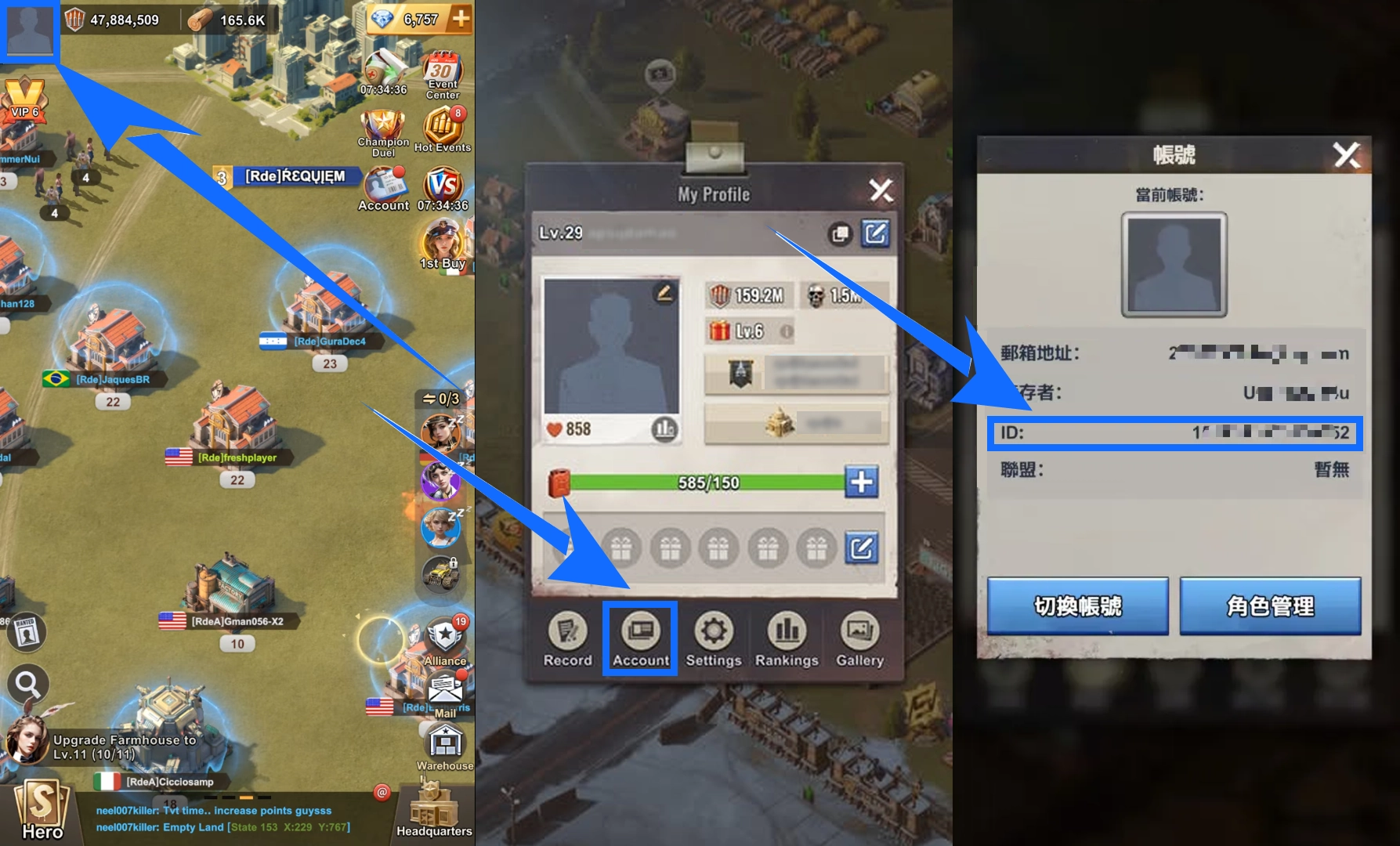
- Registered Email (GameUID): Tap your profile picture in the upper-left corner of the game screen, open the Account page, and check the registered email address.
- Target Product Screenshot: For self-service top-ups, provide a screenshot of the in-game pack you want to purchase so the product and denomination can be verified.
- Login Details: For assisted login top-ups, provide the account details and verification information requested in your order.
Check your account details and selected product carefully before payment. For assisted login top-ups in particular, submit the required information only through the submission process specified in your order. Do not send account details through unrelated channels.
How to Complete Your Last War:Survival Top-Up After Payment
Self-Service Top-Up: Log In and Redeem the Pack Yourself
Self-service top-up is suitable for players who prefer to manage their own game accounts and choose their own packs. After payment, open the corresponding self-service process from your order history.
- Select a Product and Complete Payment
Prepare a screenshot of the in-game pack you want to purchase, select the matching denomination on the TRADEE product page, and complete payment.
- Open the Game from Your Order Page
Go to your order details, select the self-service top-up option, and use the dedicated link to open the game and log in. Do not click the START button, as this may affect the next steps.
- Select an In-Game Pack with the Same Denomination
Open the in-game store and find an eligible pack that matches your purchased denomination. Check that the displayed price is the same as your order amount and that the pack meets the redemption requirements before completing the in-game purchase.
- Wait for the System to Log You Out Automatically
After the redemption is complete, the system will automatically log out of the game account and clear the login information used during the self-service process. You can then reopen the game to check your purchase.
Assisted Login Top-Up: Submit Your Details for Processing
If you choose assisted login top-up, submit your game account details and any required verification information as instructed on the order page. A service agent will access the account and purchase the specified product according to your order.
- Select an Assisted Login Top-Up Product
Choose the required pack, Monthly Pass, or top-up denomination on the product page. Check the product details and complete payment.
- Submit Your Account and Verification Information
Provide the required login details, verification information, target pack name, and relevant screenshots in the order fields.
- Wait for Order Processing
Once your information has been submitted, the order will enter the processing queue. A service agent will complete the purchase according to your order. Do not log in to the game account during this period, as this may interrupt the ongoing process.
- Check Your Order Status and Confirm the Purchase
Once the order is completed, check the latest status in your order history. Then log back into the game and confirm that the purchased currency or pack has been credited correctly.
Top-Up Processing and Account Use Guidelines
- Avoid logging in to the same game account on another device while either self-service or assisted login top-up is in progress. Multiple active sessions may interfere with the process.
- For self-service top-ups, access the game through the dedicated link in your order and follow the instructions. Do not click the START button.
- For self-service top-ups, select an eligible in-game pack that matches the purchased denomination. Packs with a different price cannot be used.
- Do not log in to your account yourself while an assisted login top-up is being processed. Wait until the order is marked as completed before checking the result in-game.
- Except where otherwise required by applicable terms, completed virtual item orders are generally not eligible for cancellation, refunds, or exchanges. Check your account details, product screenshot, and denomination carefully before payment.
Self-service top-ups are usually faster than assisted login top-ups, although actual processing times may vary depending on payment verification, login operations, and order volume. Assisted login top-ups generally take around 15–30 minutes, but some orders may require more time. Contact TRADEE's 24/7 customer support for updates on your order. Players who enjoy zombie-themed survival shooters can also explore State of Survival top-up services.
Last War:Survival Top-Up FAQ
Can I choose a pack with a different price during a self-service top-up?
No. You must select an eligible pack with the same denomination as your purchased order. If the in-game pack price does not match your order amount, do not complete the redemption yourself.
Can Gold Bricks be used directly as Diamonds?
No. Gold Bricks and Diamonds are different in-game currencies with different uses. Gold Bricks are mainly used to redeem eligible in-game packs, while Diamonds are used for other in-game purchases.
Why can't I log in to the game during an assisted login top-up?
A service agent needs to access your account to complete the order. Logging in yourself during processing may interfere with the account operations, so wait until the order is marked as completed before returning to the game.
Do I need to log out manually after a self-service top-up?
No. After you complete the pack redemption, the system automatically logs out of the account and clears the login information used during the self-service process. You can then reopen the game to check the purchased items.
