




Top Heroes Gold Blocks, Diamonds and Packs: Top Up for Your Kingdom’s Needs
Whether you want to strengthen your heroes, expand your territory, or prepare resources for Kingdom Showdown, Guild Armaments and other events, Top Heroes: Kingdom Saga offers several currencies and paid packs for different progression goals. Players who enjoy hero development and territory expansion can also browse the top-up options for Kingshot and keep building their kingdom in a different strategy game.
TRADEE offers Gold Blocks, Diamonds and selected packs for the international server, using manual login top-up. After payment and submission of the required account details, a staff member logs in to the game and purchases the selected item. Compare the contents, prices and available promotions before choosing the top-up option that suits your current needs.
How to Choose Top-Up Products Based on Your Event Goals and Budget
If you are preparing for Kingdom Showdown, Guild Armaments or another limited-time event, check which resources you need before deciding between Gold Blocks, Diamonds and a specific pack. This makes it easier to plan your budget and avoid spending on items that do not support your current goals. Players who prefer base building, survival management and resource planning can also explore the top-up options for Whiteout Survival for a different kingdom-building experience in a frozen world.
When you already know which hero shards or upgrade materials you need, compare the contents and prices of the relevant packs. If you want more flexibility to purchase different paid items in the game, Gold Blocks may be a better fit for your spending plan. If your main priority is Diamonds for everyday purchases or events, compare the available Diamond top-up options first.
TRADEE offers different denominations of Gold Blocks and Diamonds, along with a range of selected packs, so you can choose according to your needs. Some products may come with discounts or eligible coupons. Check the product and checkout pages for the actual price and promotion terms.
Payment methods available at checkout include options such as PayPal and Visa. TRADEE also provides 24/7 customer support to help with payment, account login and order-status questions.
What Information Do You Need for a Top Heroes Login Top-Up?
Manual login top-up requires a staff member to access the correct game account and purchase the items specified in your order. Before placing an order, make sure you can log in to your account and prepare the information below to avoid delays caused by missing details. Medieval kingdom building and territory management are also central to King of Avalon. You can find its available products on the King of Avalon top-up page.
- Supported platforms: iOS, Android
- Supported version: Top Heroes: Kingdom Saga international server
- Top-up method: Manual login top-up
- Supported login methods: Email (recommended), Google and Facebook. Choose an available method based on how your game account is linked.
- Game account details: Provide your game account and password or verification code as requested by the order.
- Server ID and UID: Provide the server ID and UID of the game account that should receive the purchase. Make sure both match the target account.
- Screenshot of the selected pack: If requested, provide an in-game screenshot that clearly shows the product name and contents.
- Estimated processing time: Usually around 30 minutes. Actual processing time may vary depending on login status, order volume and the completeness of the information provided.
How to Find Your Server ID and UID
Open the main screen of Top Heroes and tap your character avatar in the upper-left corner to view your profile. Check the server ID and UID shown on the screen, then verify both again before submitting your order. This helps prevent purchases from being delivered to the wrong account or character.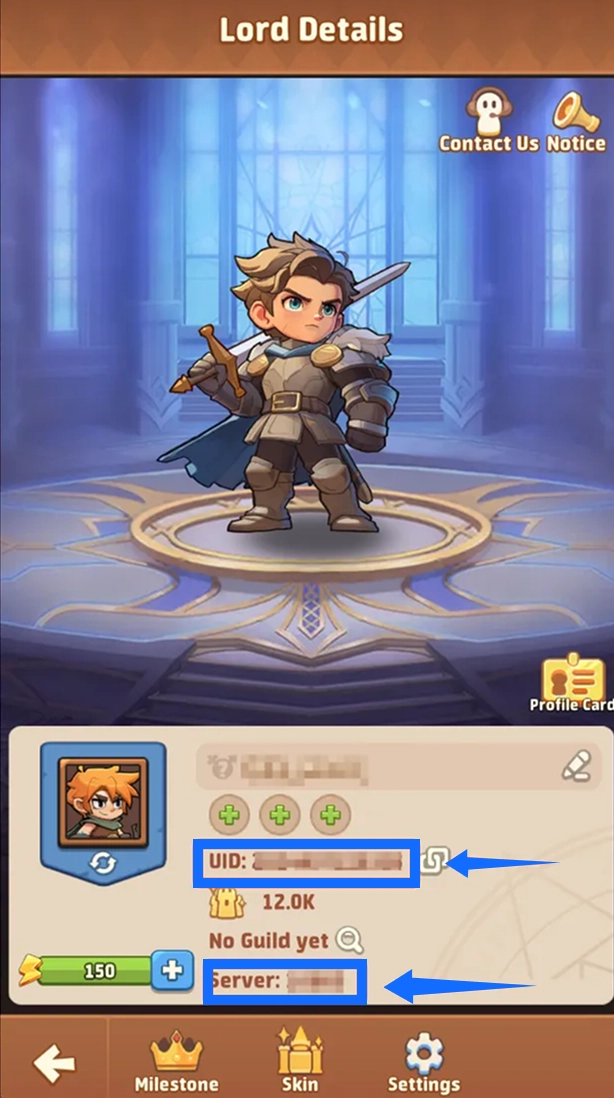
Account security reminder: Submit your login details only through the designated secure channel specified in the TRADEE order process or by customer support. Do not share your account password or verification code in public comments or through unofficial channels. Please avoid logging in to the same game account while the top-up is being processed to prevent login conflicts.
How to Top Up Gold Blocks, Diamonds and Packs in Top Heroes
After choosing a product, follow the steps below to complete payment, submit your account details and verify delivery. When purchasing Gold Blocks, Diamonds or a selected pack, always follow the product details and processing requirements shown in your order.
- Choose a product and complete payment: Select the Gold Block denomination, Diamond amount or specific pack you need from the Top Heroes product page on TRADEE. Review the product contents, eligible promotions and final payable amount before completing payment.
- Submit your account login details: Provide your login method, game account, password or verification code, server ID and UID as requested by the order. If a screenshot of a specific pack is required, submit it as well. Email is the recommended login method, but the available options depend on your account's linked login methods.
- Wait for the purchase to be completed: A staff member will use the submitted account details to log in to the game and purchase the items specified in your order. Do not log in to the same game account while the order is being processed, as this may interrupt the operation.
- Check your order status: Once processing is complete, check your order status or Purchase History to confirm that the order has been completed.
- Log in and verify the items: After the order is marked as completed, log in to the correct game account. Check whether your Gold Block or Diamond balance has been updated, or confirm that the items in the selected pack have been received.
Manual login top-ups usually take around 30 minutes. This is an estimate under normal conditions, not a guaranteed delivery deadline. Login verification, high order volume or additional information checks may affect the actual processing time.
What If There Is a Problem with Order Processing or Item Delivery?
If you encounter an issue during a login top-up, or your order is marked as completed but the items have not appeared in the game, first make sure you are logged in to the correct account and server. Then check the order status and the relevant Gold Block or Diamond balance, or review the contents of the selected pack.
If the issue persists, contact TRADEE customer support and provide your order number and product details so the team can check the progress. TRADEE offers 24/7 customer support for payment, login and order-related questions.
Top Heroes Top-Up FAQ
Why Is the Currency Shown for In-Game Pack Prices Different from the Currency on TRADEE?
The in-game store may display pack prices in euros depending on your current currency settings. If your order uses another currency, tap the Gold Block icon on the game’s main screen and switch the displayed currency to euros to compare the corresponding pack price. When purchasing, follow the order instructions to verify the equivalent amount and product contents.
My Order Is Completed, but I Haven’t Received the Gold Blocks, Diamonds or Pack. What Should I Do?
First, check that you are using the correct game account, server ID and UID. Then review the relevant currency balance or pack contents. If the items are still missing, keep your order number and screenshots or other relevant records, and contact TRADEE customer support. The team can use your order details to check the processing status. If you are also interested in resource planning, civilization development and army progression on a larger scale, Rise of Kingdoms is another strategy game worth exploring.
