










King of Avalon Diamonds Top-Up: Choose a Recharge Method for Your Kingdom's Growth
In King of Avalon, castle construction, technology research, troop training, and army development all require a steady investment of resources. Diamonds are the game's premium currency and can be used for eligible speed-ups and other in-game purchases. Whether you're planning your next castle upgrade or saving resources for future development, start by estimating how many Diamonds you need and choosing a suitable top-up option.
TRADEE offers Diamonds top-ups for the mobile version of King of Avalon, with support for User ID Recharge and Login Recharge. The main difference between these methods is the account information required and how the top-up is processed. With User ID Recharge, you only need to provide your in-game User ID. Login Recharge requires the account login details requested during the process. Review the differences and choose the method that best suits your needs.
King of Avalon Top-Up Methods and Buying Tips
Diamonds can be used for in-game speed-ups, construction, and other paid features. Before purchasing, consider your upcoming development plans, compare the available Diamond amounts with your budget, and choose the top-up method that works best for you.
| Comparison | User ID Recharge | Login Recharge |
|---|---|---|
| Required information | The King of Avalon User ID of the account receiving the Diamonds | The account login details requested during the top-up process |
| Is the game password required? | No | Provide the information required by the Login Recharge process |
| What to check before ordering | Make sure the User ID belongs to the correct game account. | Check that the account details are correct and complete any required verification. |
| After the top-up | Log in to the corresponding game account and check whether the Diamond balance has been updated. | |
If you prefer not to share your game account password, choose User ID Recharge. If you select Login Recharge, provide the requested login details and avoid signing in to the same account from another device while the order is being processed.
TRADEE offers different Diamond denominations and top-up options. Check the product page for current prices and applicable promotions. You can choose from the payment methods available at checkout and access 24/7 customer support. After payment and information submission, wait for the order to be processed. The actual processing time depends on the order.
How to Find Your King of Avalon User ID
If you choose User ID Recharge, you'll need to enter the User ID associated with the game account receiving the Diamonds. You can find this identifier in your in-game account profile by following these steps.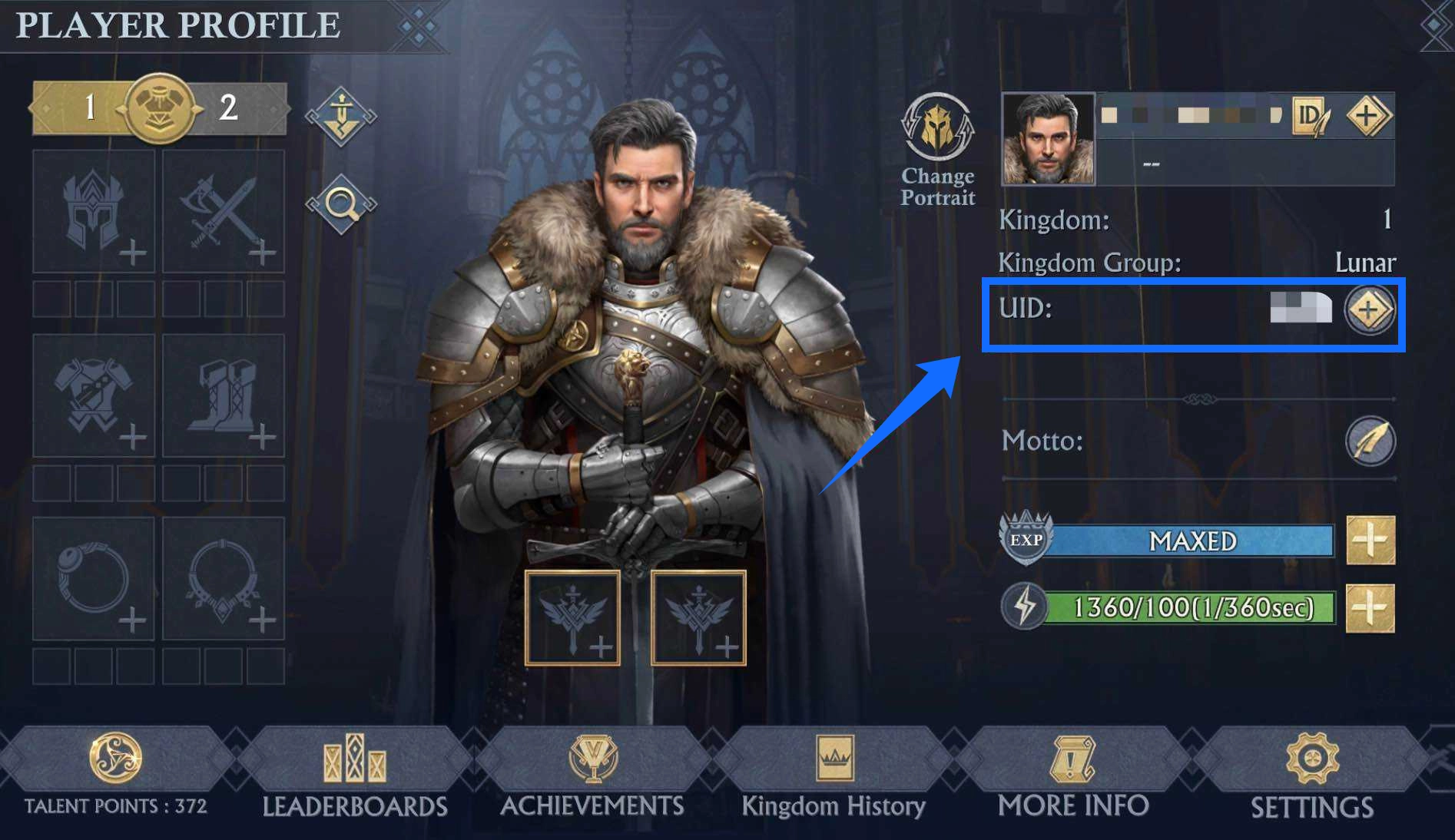
- Open King of Avalon and log in to the game account that will receive the Diamonds.
- Go to your in-game profile.
- Find the displayed User ID in your account information.
- Copy the User ID and enter it in the relevant field when placing your order.
Before submitting: Double-check the User ID to make sure it is correct. An incorrect ID may cause the Diamonds to be credited to the wrong account.
King of Avalon Diamonds Top-Up Steps
User ID Recharge: Top Up with Your In-Game Identifier
- Choose a product: Visit the King of Avalon top-up page on TRADEE, select User ID Recharge, and choose the Diamond package you need.
- Enter your User ID: Provide the User ID of the game account receiving the Diamonds and check that the information is correct.
- Complete payment: Choose a payment method available at checkout, review the order details and total, and complete the transaction.
- Check the top-up: Wait for the top-up to be processed, then log in to the relevant game account and check your Diamond balance.
Login Recharge: Top Up by Logging In to Your Account
- Choose a top-up option: Find the King of Avalon Login Recharge product and select the Diamond package you need.
- Complete payment: Review the product and order total, choose an available payment method, and complete the transaction.
- Submit your account details: Provide the account login information requested by the top-up process and complete any required verification.
- Wait for processing: After submitting your details, avoid logging in to the same game account from another device or location while the order is being processed. This helps prevent interference with the active login session.
- Confirm the Diamonds: Once the top-up is complete, log back in to the game and check your Diamond balance or in-game mail to confirm the purchase.
King of Avalon Diamonds Top-Up FAQ
Can User ID Recharge send Diamonds to another player's account?
User ID Recharge uses the King of Avalon User ID of the receiving account. Make sure the ID belongs to the account that should receive the Diamonds, and check it carefully before making payment.
Will buying Diamonds give me a specific piece of equipment directly?
Buying Diamonds adds to your available in-game Diamond balance. It does not directly grant a specific piece of equipment or item. Whether you can use Diamonds to purchase a particular item depends on the offers currently available in the game and their requirements.
What should I do if my Diamonds do not appear after the top-up?
First, check the order status, then review your in-game Diamond balance and mail. If the Diamonds are still missing, verify the User ID or account details submitted with the order and contact TRADEE customer support with the relevant order information for assistance.
