





Buy MLB The Show 26 Packs to Expand Your Diamond Dynasty Collection
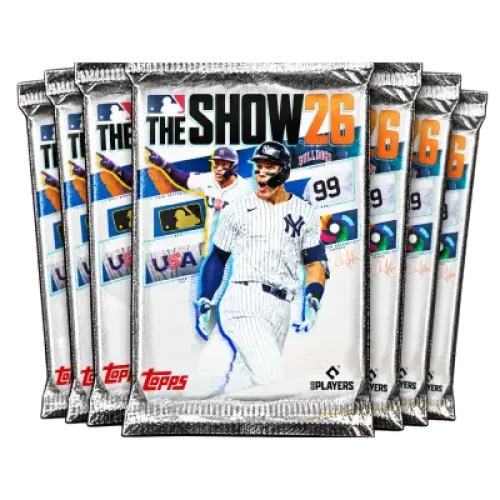
Looking to add more player cards to your Diamond Dynasty lineup or try your luck with special packs? TRADEE offers MLB The Show 26 Packs, including standard The Show Packs, Headliners Packs, and Spotlight Monthly Packs. Choose the pack type and quantity that match your collection goals. Other baseball and sports titles also offer pack and team-building resources, including EA SPORTS FC 27 Packs, eFootball top-ups, and Madden NFL 27 Coins.
MLB The Show 26 Packs may contain player cards, equipment, and other in-game items, depending on the pack type. The purpose of this product is to deliver packs of the specified type and quantity. It is not a direct purchase of a particular player, nor does it guarantee a high-rated or Diamond player card.
MLB 26 Pack Types and Buying Tips
TRADEE offers standard packs and special-series packs, so you can choose according to your collection goals, pack quantity, and budget. For basketball team-building resources, NBA 2K27 MT is another option for players working on their MyTEAM lineups and player-card collections.
| Pack Product | Quantity per Bundle | What to Consider |
|---|---|---|
| The Show Packs Bundle | 10, 20, or 50 packs | A standard pack bundle for more openings and a broader player collection. |
| Headliners Pack 27 | 5 packs | The 27th special pack series, offering a chance to obtain featured players. |
| September Spotlight Monthly Pack | 5 packs | A September Spotlight monthly pack series for players interested in collecting cards from this release. |
“5 Packs” means that each bundle contains five packs, not five selected player cards. Each pack type has its own rewards and odds. Buying multiple bundles does not guarantee a particular player. Check the pack series, quantity, and in-game reward details before choosing an option.
Competitive Prices and a Smooth Order Process
TRADEE offers competitive pack prices and available promotions. Compare the cost per pack across different bundles to find an option that fits your budget. Clear product specifications and order details also help you confirm exactly what you are purchasing, whether you choose standard packs or a special series.
TRADEE also focuses on reliable order handling, payment security, and account information protection. Once the required details are confirmed, the team coordinates pack delivery efficiently to help reduce unnecessary waiting. For payment, login, or delivery questions, 24/7 customer support is available to assist with your order. Supported payment methods include PayPal and credit cards.
How Are MLB The Show 26 Packs Delivered?
TRADEE's pack service supports PS5, Xbox Series X|S, and Nintendo Switch through a Comfort Trade process. The delivery team needs to log in to your platform account and complete the agreed in-game process to deliver the packs. This is not a direct item exchange between two players.
Before delivery, make sure you meet the following requirements:
- At least 5,000 Stubs in your account: This is the starting requirement for this account-assisted trade service, not a minimum balance set by the game for all pack purchases.
- Provide the login details for your platform: Your account must be able to access the relevant in-game features, and you may need to complete the required login verification.
- Stay logged out during delivery: Before the trade begins, exit the game on your console and the MLB The Show companion app to avoid conflicts caused by simultaneous account activity.
The delivery target is the pack name and quantity specified in your order. The service does not include opening packs on your behalf to obtain a particular player. Unless explicitly stated in the product terms, pack opening and receiving a specific player card are not part of the delivery service.
Trading notice: Third-party account-assisted trading may involve account access and risks related to the game's official rules. Violations may result in account penalties. TRADEE is not an official game store. Please review the relevant rules before purchasing.
How to Buy MLB The Show 26 Packs and Confirm Delivery
-
Choose Your Platform and Pack Bundle
Select PS5, Xbox Series X|S, or Nintendo Switch, then choose the The Show Packs, Headliners Pack 27, or Spotlight Monthly Pack you want.
Check the quantity per bundle and the number of bundles you plan to buy. For example, one 20 The Show Packs Bundle contains 20 packs, while two bundles contain 40 packs. Confirm the product name and final order amount before payment.
-
Check Your Account and Complete Checkout
Make sure the receiving account has at least 5,000 Stubs. Prepare the login details for your selected platform and any required contact information according to the trade instructions.
Complete your order using a payment method available at checkout and keep your order number. This service involves third-party account access, so review the associated risks and provide only the information required through the confirmed order process.
-
Log Out and Allow Pack Delivery
Follow the delivery instructions to exit the console game and companion app. Avoid logging back in or using the account while delivery is in progress. The delivery team will process the selected packs through the agreed account-assisted trade method.
-
Check Your Pack Inventory and Confirm the Quantity
Once you receive the completion notice, log back in on your platform and open Diamond Dynasty to check your pack inventory. Confirm the pack series, release, and quantity specified in your order, and distinguish the newly delivered packs from those you already owned.
If the order specifies unopened packs, verify the quantity before opening them. If any packs are missing or belong to a different series, keep your order number and relevant screenshots, then contact TRADEE customer support.
MLB The Show 26 Packs FAQ
Can I choose which player I get from a Spotlight Monthly Pack?
You should not assume that you can select a specific player. Spotlight Packs follow their own reward pool and pack-opening rules; they do not let you freely choose any player after purchase. A pack associated with a particular month does not necessarily include every player released during that month.
Can I sell every player card obtained from packs?
No. Whether a player card can be sold depends on its trade status and whether it has been locked into your collection. If you plan to sell duplicate cards for Stubs, check the in-game trade status first. Not every item obtained from a pack can be listed on the marketplace.
Does buying multiple packs guarantee a specific high-rated player?
No. Buying more packs gives you more opening opportunities, but each opening still follows the pack's reward mechanics. Unless the product or in-game description explicitly states a guaranteed reward, multiple packs should not be treated as a guarantee of receiving a particular high-rated player card.
