







Top Up eFootball Coins to Prepare for Your Dream Team’s Next Signing
Ready to strengthen your Dream Team but short on Coins for the players you want to sign? eFootball™ Coins are the premium in-game currency in eFootball, used to sign players from eligible player lists and purchase other qualifying in-game products. Whether you want to take part in a new Special Player List or save up for an upcoming pack, check the Coin requirements in the game first and plan your top-up budget accordingly. Players who enjoy football simulations can also explore TRADEE’s EA SPORTS FC 27 top-up service to add resources to another dream squad.
TRADEE offers eFootball mobile Coin top-ups for international accounts on iOS and Android. Orders are fulfilled manually through account login. Choose the Coin amount you need, complete your payment, and submit the required KONAMI account details so the order team can process the top-up.
About eFootball Coin Products
TRADEE offers a range of eFootball Coin denominations for players who need more resources to sign players for their Dream Team or purchase eligible in-game products. Whether you only need a small amount or want to add a larger balance at once, choose a package based on your current Coin balance and spending goals. The purchase provides the corresponding amount of in-game Coins; it does not directly grant a specific player or other in-game items.
Account Login Top-Up: Prepare Your Account Details Before Paying
Unlike top-up services that only require a player UID, TRADEE processes eFootball orders through manual account login. The order team needs to log in to the designated mobile account, so you must provide the correct login details rather than just your in-game User ID.
- Supported version: eFootball mobile (iOS / Android)
- Supported server: International server
- Delivery method: Manual top-up via account login
- Required details: KONAMI account or email address, password, and in-game User ID
If your account has not been linked yet, complete the relevant setup first and make sure the login details match the correct game progress. When submitting your account information, be aware of the account security risks associated with third-party login access. Never use incorrect login details or information that does not belong to you.
How to Find Your eFootball User ID and Link a KONAMI ID
Your User ID identifies your in-game account, while your KONAMI ID is used for account login and data linking. They are two different pieces of information, so make sure you check both before placing a manual top-up order.
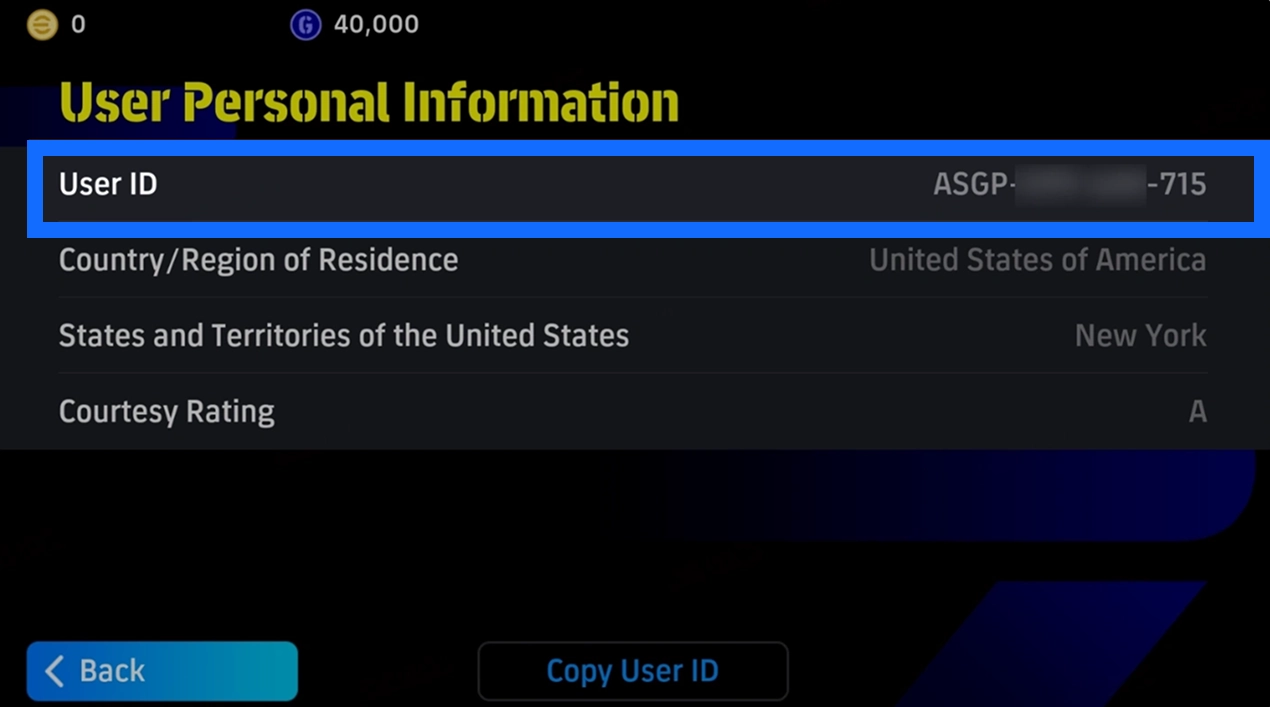
Find Your In-Game User ID
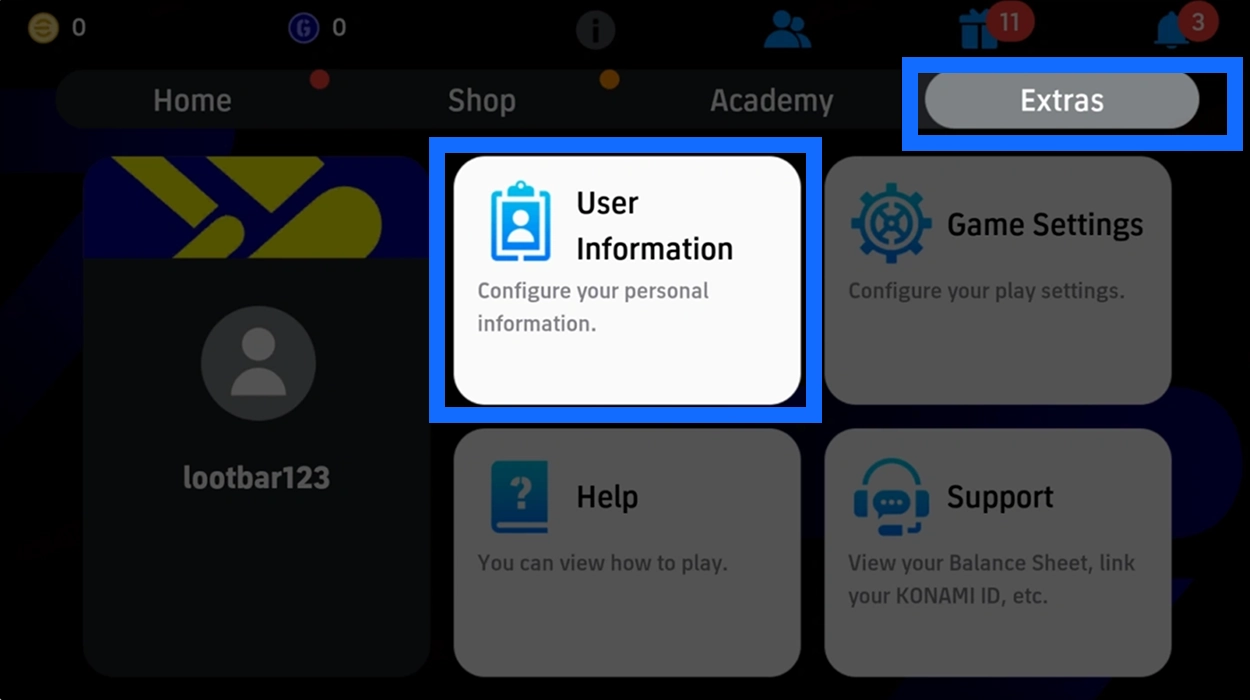
- Open Extras: Log in to eFootball mobile, select "Extras" from the home screen, and then open "User Information."
- Open User Details: Select "User Details" under User Information.
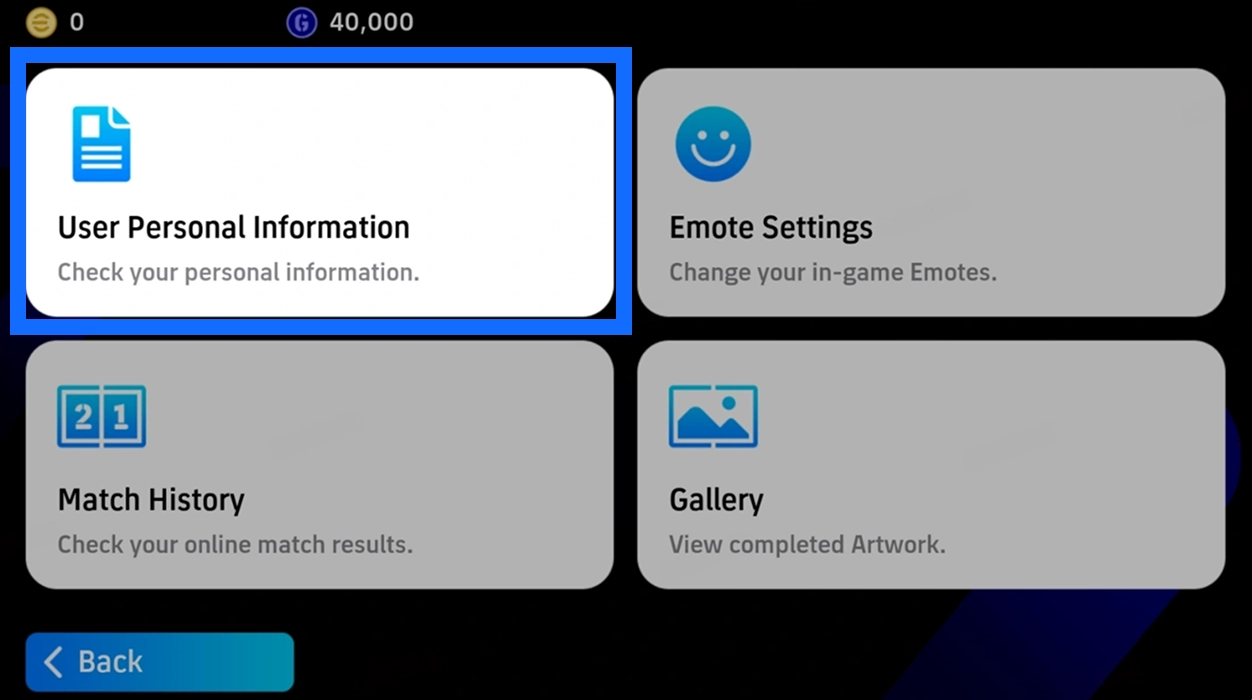
- Copy Your User ID: Find your User ID on the User Details screen and record the full number for your order.
Check That Your Data Is Linked to a KONAMI ID
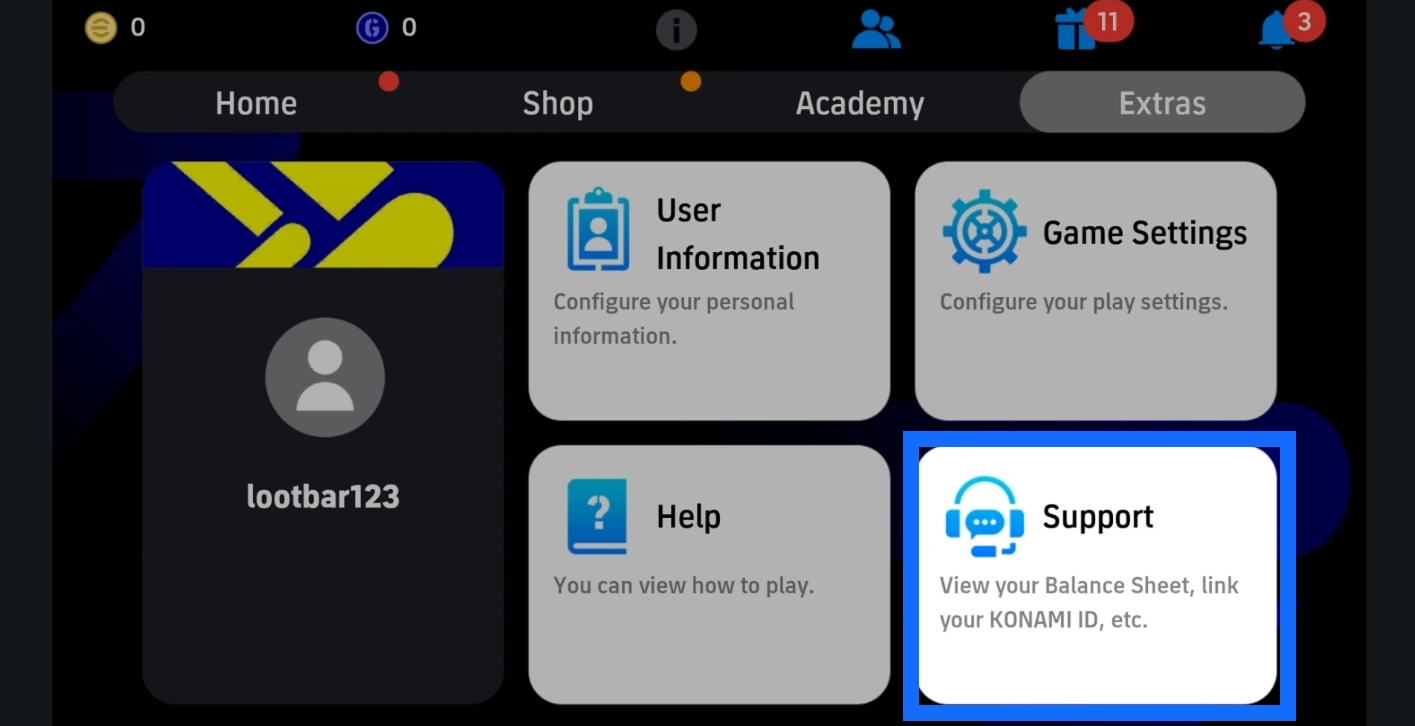
If you have not linked a KONAMI ID yet, you can do so through the in-game data-linking feature:
- Select "Support" from the "Extras" menu.
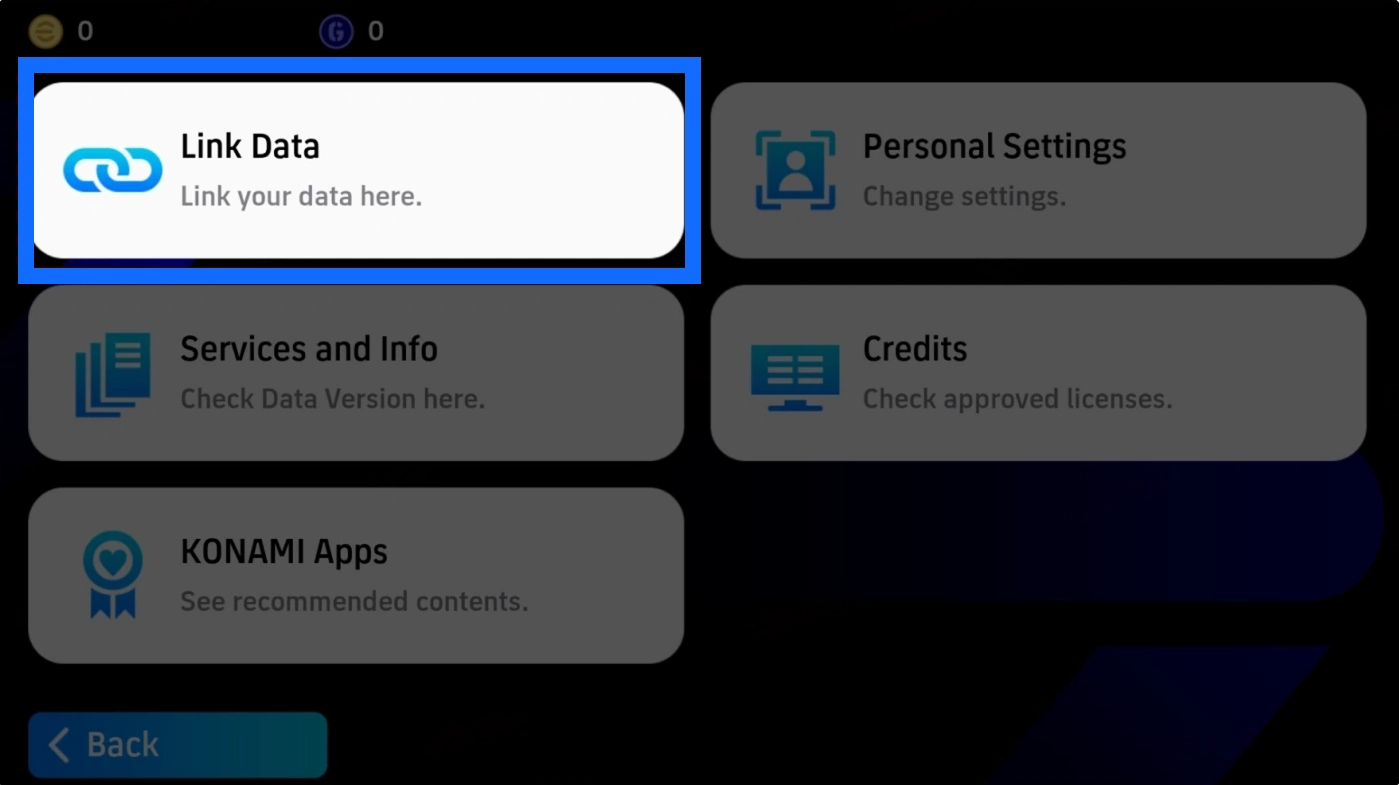
- Select "Link Data" to open the account-linking screen.
- Select "Link KONAMI ID" and follow the on-screen instructions to complete login and verification.
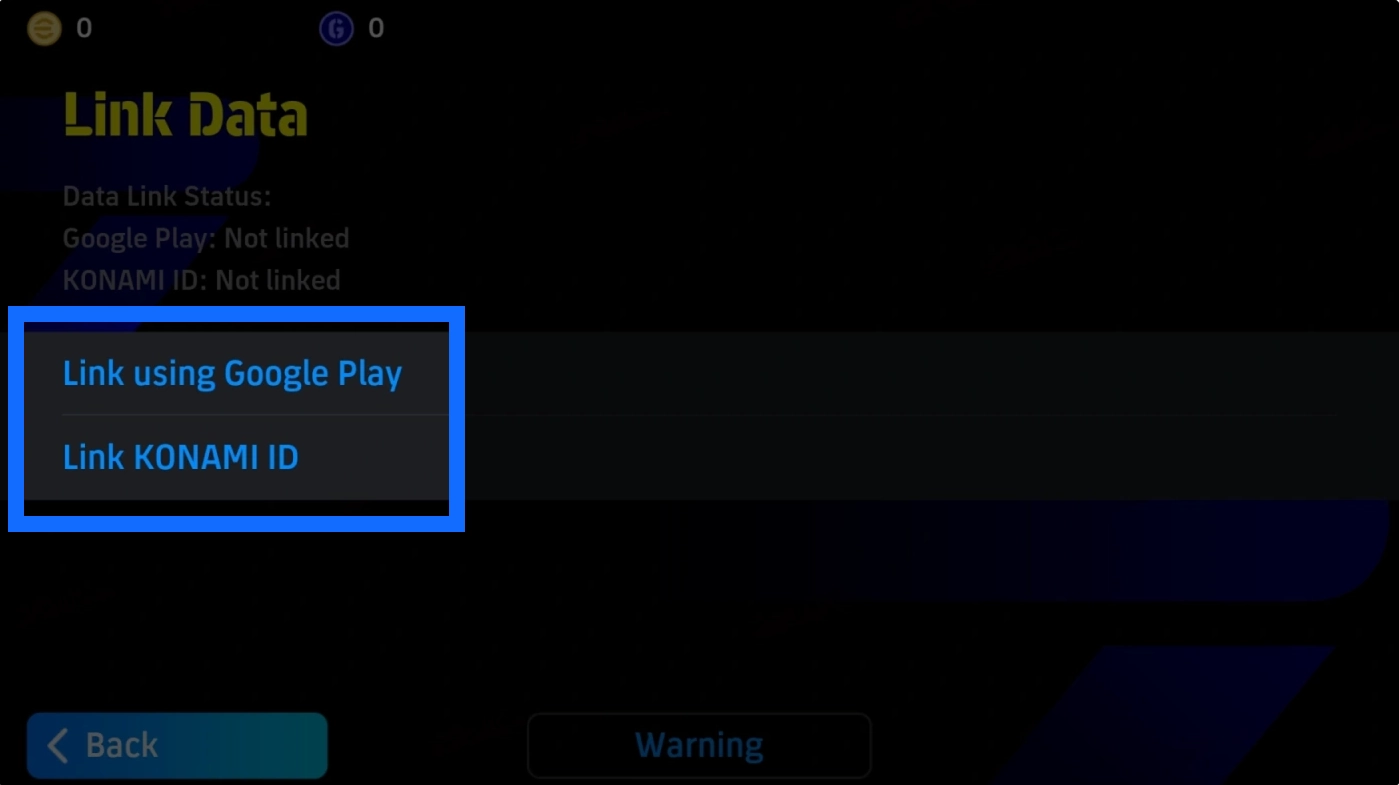
After linking, confirm that your current game progress is connected to the KONAMI ID you intend to use for the order. Do not link your account to someone else's KONAMI ID just to complete a top-up, as this may affect future account management.
Plan Your Squad Budget Before Buying Coins from TRADEE
Most players have a specific goal in mind before signing a new player: accessing a particular Special Player List, purchasing a selected pack, or simply topping up their Coin balance. TRADEE offers competitive prices on eFootball Coins, and some denominations may be available with discounts. Compare your current balance with the listed prices and choose a package that fits your budget. There is no need to buy a much larger denomination just to cover a small Coin shortage. Players who also enjoy building basketball lineups can check out NBA 2K27 VC to get more resources for their MyTEAM squad.
TRADEE checkout supports several payment options, including PayPal and credit cards. Choose from the methods available on the checkout page to complete your purchase. Since eFootball top-ups require manual account login, the order team will use the account details you submit to carry out the transaction. The 24/7 customer support team can also help with login details, product questions, and order progress. Make sure you understand the steps involved in an account-login top-up before proceeding. American football fans can also browse Madden NFL 27 Coins to add more resources to their team.
How to Buy eFootball Coins: From Selecting a Package to Completing the Top-Up
After choosing the Coin amount you need, TRADEE will process the top-up through account login. The process includes selecting a product, making payment, submitting your login details, and waiting for manual processing. Please wait until the order is complete before logging back into the game to check the result.
- Choose a Coin Package: Select the mobile Coin amount you need on TRADEE’s eFootball top-up page. Check the product details, current price, and applicable offers.
- Complete Checkout: Choose an available payment method, review the order total, and complete the payment.
- Submit Your Login Details: Enter your KONAMI account or email address, password, and User ID as requested. Customer support may ask for additional in-game screenshots if a particular product requires further confirmation.
- Wait for Manual Processing: Once your details have been submitted, the order team will log in to your account and complete the purchase. Do not log in to eFootball yourself or open the same account on another device during this period, as this may interfere with the process.
- Check Your Coin Balance: After the order is complete, log back into the game and check that your eFootball Coin balance has increased by the expected amount. If you purchased another specified product, verify that the corresponding content has been added.
Processing time: Manual top-ups require a service representative to complete the transaction. Processing may be affected by login verification, the accuracy of the account details, order volume, or product confirmation requirements. No fixed delivery time is guaranteed on this page. Contact TRADEE customer support if you encounter any issues during processing.
