





There is more to Grow a Garden than planting and harvesting. From pets that can trigger special crop mutations to other in-game items, each product has its own use and collection value. Once you know what you are looking for, comparing item names and options is a more focused way to find the right choice.
TRADEE’s current listing focuses on in-game items, with pets among the available products. Featured options include Disco Bee, Kitsune, and Corrupted Kitsune. The page is not limited to pets; other items depend on the products currently listed.
Start with featured pets in the garden
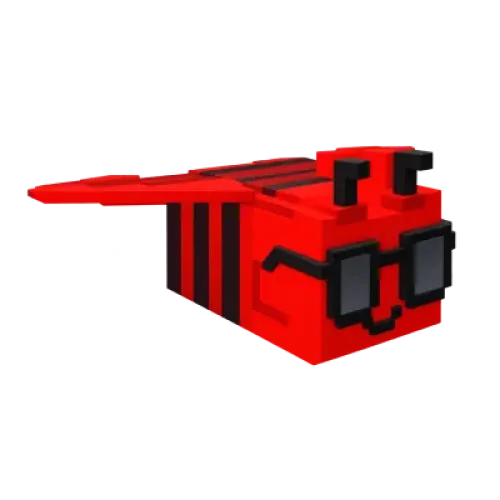
Disco Bee|For the Disco mutation
Disco Bee has a special ability related to the Disco crop mutation. It is worth considering if you are interested in harvests with this effect. The ability still follows the game’s mechanics, so it does not mean that every harvest will produce the specified mutation.
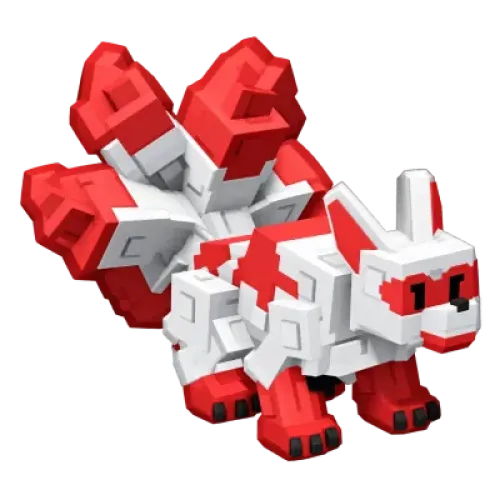
Kitsune|Explore Chakra mutations
Kitsune’s ability involves crops in other players’ gardens, as well as the Chakra mutation series and crop duplication mechanics. It may interest players who want to explore special pet abilities and plan their garden strategy around them. When ordering, check the full Kitsune name to avoid confusing it with pets that have similar names or appearances.
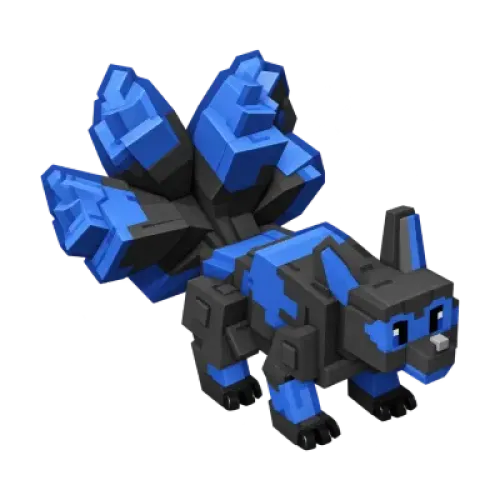
Corrupted Kitsune|Look for Corrupted Chakra mutations
Corrupted Kitsune has abilities that differ from those of the regular Kitsune. It can apply Corrupted Chakra-type mutations to multiple crops in your garden and may trigger rarer related effects. If this is the pet you want, select the matching product rather than relying on the word Kitsune alone.
These pets are examples of products currently listed and do not represent the full range of Grow a Garden items. Check the TRADEE product page for the available items, specifications, and quantities.
What to check before buying Grow a Garden items
Players look for Grow a Garden items for different reasons. Some focus on pet abilities, others want to complete a collection, and some are looking for a specific item. Rather than choosing based only on rarity or appearance, check these details first:
- Check the item: Confirm the full product name, especially when pets have similar names but different abilities. Identify other items by their listed names rather than relying only on pictures or abbreviations.
- Check the specifications: If a product offers different versions, attributes, or included extras, choose the option that matches your needs. Age, weight, appearance mutations, or additional items should not be assumed unless they are clearly listed.
- Check quantity and budget: Compare the displayed prices and available quantities, then review the final order total. If you plan to buy several items, prioritizing what you need can help keep spending under control.
From choosing an item to confirming delivery
-
Choose your item
Visit the Grow a Garden Items product page, select Main Server, and review the currently available items. If you are buying a pet, check its full name, such as Disco Bee, Kitsune, or Corrupted Kitsune, before selecting the quantity.
-
Review your order and payment
Check the product name, specifications, quantity, and order total. Enter the required information according to the checkout page. If your Roblox username is requested, make sure it is correct and do not confuse it with your display name.
-
Follow the delivery arrangements
After payment, follow the arrangements provided for your order. If delivery requires joining the game or completing an in-game action, make sure you can access Grow a Garden and check the relevant delivery instructions. The actual method depends on the product.
-
Verify the items received
After delivery, check the item name, quantity, and listed specifications. For pets, confirm that the species matches your order. For other items, verify the contents against the product listing. If anything is missing or incorrect, keep your order number and contact TRADEE support.
Grow a Garden Items FAQ
What is the difference between Grow a Garden items and pets?
Items refers to the overall category of in-game products, while pets are just one type of item. This page focuses on item selection, with currently listed products including pets such as Disco Bee, Kitsune, and Corrupted Kitsune. Other items depend on the current listing.
What if the item I want is not listed?
Only products shown on the page are currently available for direct purchase. If you cannot find a specific item, do not substitute a similarly named product or assume that an unlisted item is available.
Does buying a pet guarantee all of its ability effects?
No. Buying a specific pet is different from guaranteeing that a particular ability effect will occur. Ability triggers, cooldowns, and crop mutation results depend on the game’s mechanics. A pet should not be treated as a guarantee of fixed returns.
Do I need to provide my Roblox account password when ordering?
Provide only the order and delivery details actually requested at checkout. Do not share your account password or verification codes. If anyone asks for this sensitive information, stop and verify whether the request is legitimate before proceeding.
