





Where Winds Meet Echo Beads Top-Up — Get the Look You Want with TRADEE
The right outfit, a distinctive weapon appearance, or a mount and special effect you have been eyeing can add a personal touch to your journey in Where Winds Meet. If you already have a shop item in mind, check how many Echo Beads it costs and choose a top-up amount that covers your needs. You do not have to buy the largest bundle every time.
TRADEE offers Where Winds Meet Echo Beads top-ups, along with products such as the Monthly Fund, Elite Battle Pass, and Premium Battle Pass. Choose according to the cosmetics you want to collect or the Battle Pass rewards you are aiming for, then compare the listed prices and available offers to make each purchase count.
Echo Beads, Monthly Fund, or Battle Pass: Which Should You Choose?
Echo Beads are the game's premium currency. They can be used to purchase selected cosmetics and other paid content in the in-game shop. The Monthly Fund and Battle Pass offer their own rewards and benefits, making them suitable for different play and collection goals.
| Product | Main Use | Best For |
|---|---|---|
| Echo Beads | Purchasing selected shop outfits, weapon appearances, mounts, effects, other eligible items, and certain cosmetic draws. | Players who have a specific shop item in mind and need premium currency. |
| Monthly Fund | Claiming the applicable rewards throughout its active period, subject to in-game rules. | Players who log in regularly and want a steady stream of Monthly Fund rewards. |
| Elite Battle Pass | Unlocking additional rewards and benefits from the current paid Battle Pass. | Players who want the exclusive rewards included in the current Elite Battle Pass. |
| Premium Battle Pass | Includes Elite Battle Pass benefits, additional premium rewards, and an immediate 10-level Battle Pass boost. | Players who want the more complete Battle Pass package and a head start on its progression. |
If your main goal is to buy shop cosmetics, choose an Echo Beads bundle based on the amount you need. If you are after Battle Pass rewards, compare the Elite and Premium versions. The Premium Battle Pass already includes Elite benefits, so there is no need to purchase both tiers. Keep in mind that rewards are still subject to the current Battle Pass level and claiming requirements. Buying a pass does not instantly unlock every level reward.
Top Up Only What You Need with TRADEE
Maybe you are comparing two outfits in the shop, or you are just short of the Echo Beads needed for a weapon appearance. In either case, the key is knowing how much currency you still need and which bundle fits your budget. TRADEE offers different Echo Beads denominations so you can choose according to your actual purchase plans.
Compare Prices and Available Discounts
TRADEE offers competitive Echo Beads pricing, and selected products may have current discounts. Compare the bundle size, listed price, and applicable offers before ordering to find an option that suits your purchase.
Flexible Payment Options and Top-Up Methods
TRADEE supports multiple checkout options, including PayPal and Visa, so you can use an available payment method to complete your purchase. Before checkout, review the product details, total amount, and required account information. Then follow the instructions for your selected top-up method to help avoid issues caused by choosing the wrong product or entering incorrect details.
If you have questions about payment, character details, or the status of an order, TRADEE customer support is available 24/7.
UID Direct Top-Up or Login Top-Up?
TRADEE offers two Where Winds Meet top-up methods, depending on the product selected: Direct ID Top-Up (UID Direct Top-Up) and Login Top-Up. Both methods are used to process eligible game products, but they require different information and follow different procedures.
UID Direct Top-Up: Identify Your Character with a Role ID
For UID Direct Top-Up, you need to provide the Role ID (UID) of the character receiving the product. The order is processed using the character details you submit, so it is best to copy the complete ID directly from your in-game profile. This method does not require your game login credentials.
Login Top-Up: Provide the Details Required for the Selected Product
Login Top-Up follows a different process. Depending on the product, you may need to provide an email or social account login method and the corresponding credentials. If your selected order requires account access, submit the information requested on that product page. Avoid logging into the same game account while the order is being processed to prevent login conflicts.
Supported platforms: PC, mobile, and home consoles.
Supported regions: Global servers and the corresponding regional server options currently listed on the product page.
Typical processing time: UID Direct Top-Up usually takes around 5 minutes, depending on the order. Login Top-Up follows its own processing procedure.
Choose the game server and top-up method that match the account receiving the product. Using the same platform does not necessarily mean the character details are the same. If you have multiple characters or progress on different servers, verify the recipient character before submitting your information.
Where to Find Your Role ID
Before using UID Direct Top-Up, log in to the Where Winds Meet character that will receive the product and locate the Role ID on the profile page. This ID identifies your in-game character and should not be replaced with your character name.
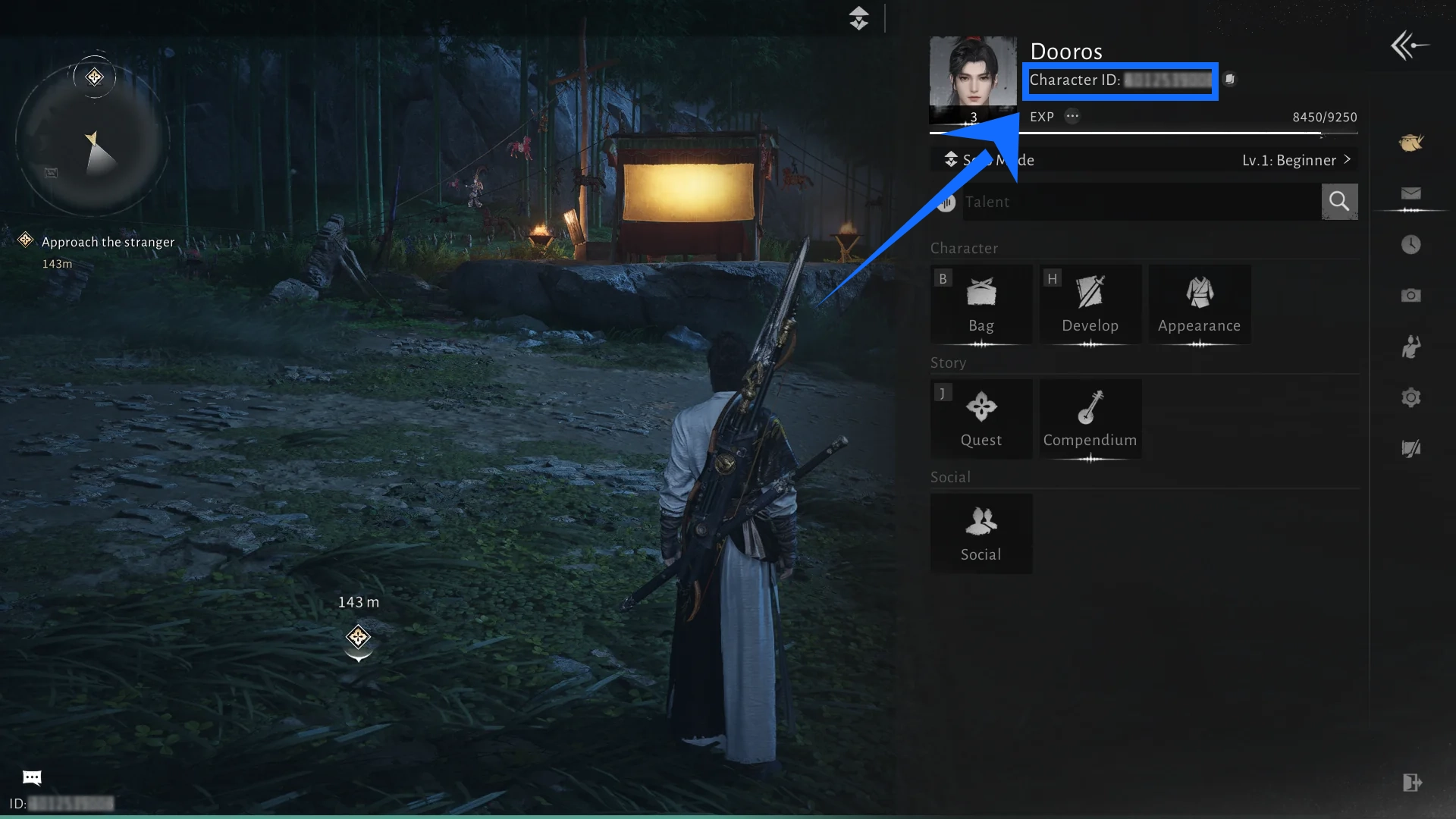
- Open Your Character Profile
On PC, press ESC to open the game menu, or use the character avatar entry in the interface to access your profile. The exact menu entry may vary by platform.
- Find and Copy Your Role ID
Locate the field labeled Role ID in your profile. If the interface provides a copy option, use it to copy the full number and reduce the chance of missing or mistyping a digit.
How Echo Beads Are Delivered: From Product Selection to Payment Confirmation
Follow these steps when purchasing Echo Beads through UID Direct Top-Up.
- Choose Your Product
Visit the TRADEE Where Winds Meet top-up page and select the Echo Beads denomination you need, or choose an available Monthly Fund, Elite Battle Pass, or Premium Battle Pass.
- Enter Your Character Details
After selecting a UID Direct Top-Up product, enter the Role ID copied from the game and check that the character and server are correct.
- Complete Payment
Review the selected product, price, and final amount due, then complete the transaction using one of the payment methods available at checkout.
- Log In and Check Your Purchase
Wait for the order to be processed, then enter the relevant character and check whether your Echo Beads balance has been updated. For a Monthly Fund or Battle Pass purchase, check the corresponding product status and unlocked benefits instead.
If you choose Login Top-Up, submit the details required by that order and follow its login-based procedure. Once processing is complete, return to the game to check the result. Do not use the UID Direct Top-Up information requirements for a Login Top-Up order.
Where Winds Meet Echo Beads Top-Up FAQ
Can I buy Echo Beads for a friend's character?
Yes. For UID Direct Top-Up, enter the Role ID of the character receiving the product and select the correct server. You do not need your friend's game login details. Before paying, make sure the Role ID and server information they provided are correct. If you choose Login Top-Up, follow the account login procedure specified for that product instead.
What should I do if my payment is successful but the order is still processing?
Check the latest status on your TRADEE order page and confirm that the payment was successful. If the order is still being processed, do not pay again or submit another identical order. If the status does not update after waiting, contact TRADEE customer support with your order number and payment transaction details so the team can check its progress.
Can I change or cancel an order if I selected the wrong product or denomination?
Whether an order can be changed or canceled depends on its processing status and whether the product has already been delivered. If you notice the mistake shortly after payment, contact TRADEE customer support as soon as possible and provide your order number and the correct product details. Once a top-up has been completed, the virtual product may not be reversible or transferable to another character. The available options depend on the actual order status.
What should I do if I entered the wrong Role ID?
If you notice an incorrect Role ID after submitting your order, contact TRADEE customer support promptly and provide the order details so the current status can be checked. If the product has already been delivered using the incorrect information, it may not be possible to reassign it to another character. To avoid this, copy and verify the complete Role ID before payment.
