












In Watcher of Realms, W-Gold is a premium in-game currency that can be purchased with real money. It gives you more flexibility when planning in-game purchases. Rather than buying a specific hero or item directly, you can top up W-Gold first and decide how to spend it based on the items and offers currently available in the game.
TRADEE offers W-Gold top-ups for the mobile Global Server version of Watcher of Realms. The service uses your Player ID and Zone ID to identify the receiving account, so you do not need to provide your game password. Check both details before choosing a denomination to help ensure your order is processed correctly.
What Can You Use W-Gold For?
W-Gold is a premium in-game currency in Watcher of Realms, not a hero, piece of equipment, or bundle itself. Once the top-up is complete, you can use it according to the items and purchase conditions available in the game.
- Hero-related offers: Purchase eligible hero-related items based on the options currently available in the game.
- In-game items and resources: Buy eligible items or resources from the in-game shop to support your current progression plans.
- In-game bundles: If the shop currently offers bundles purchasable with W-Gold, you can choose one based on its contents and your needs.
Purchase requirements may vary between offers. If you are topping up for a particular hero, item, or event offer, check its details in the game first. A W-Gold top-up adds currency to your account; it does not directly grant a specific reward.
Which Accounts Are Eligible for This W-Gold Top-Up?
This product is for the mobile Global Server version of Watcher of Realms. You must enter both your Player ID and Zone ID when placing an order. These details work together to identify the receiving game account and its region.
- Game: Watcher of Realms
- Platform: Mobile
- Server: International Server (Global Server)
- Top-up currency: W-Gold
- Required details: Player ID and Zone ID
- Game password: Not required
- Typical processing time: Approximately 10–30 minutes; some cases may take longer
Where Can You Find Your Player ID and Zone ID?
You can find both details on your in-game profile page. You do not need to share your account login information.
- Open Watcher of Realms on your mobile device and log in to the account that will receive the W-Gold.
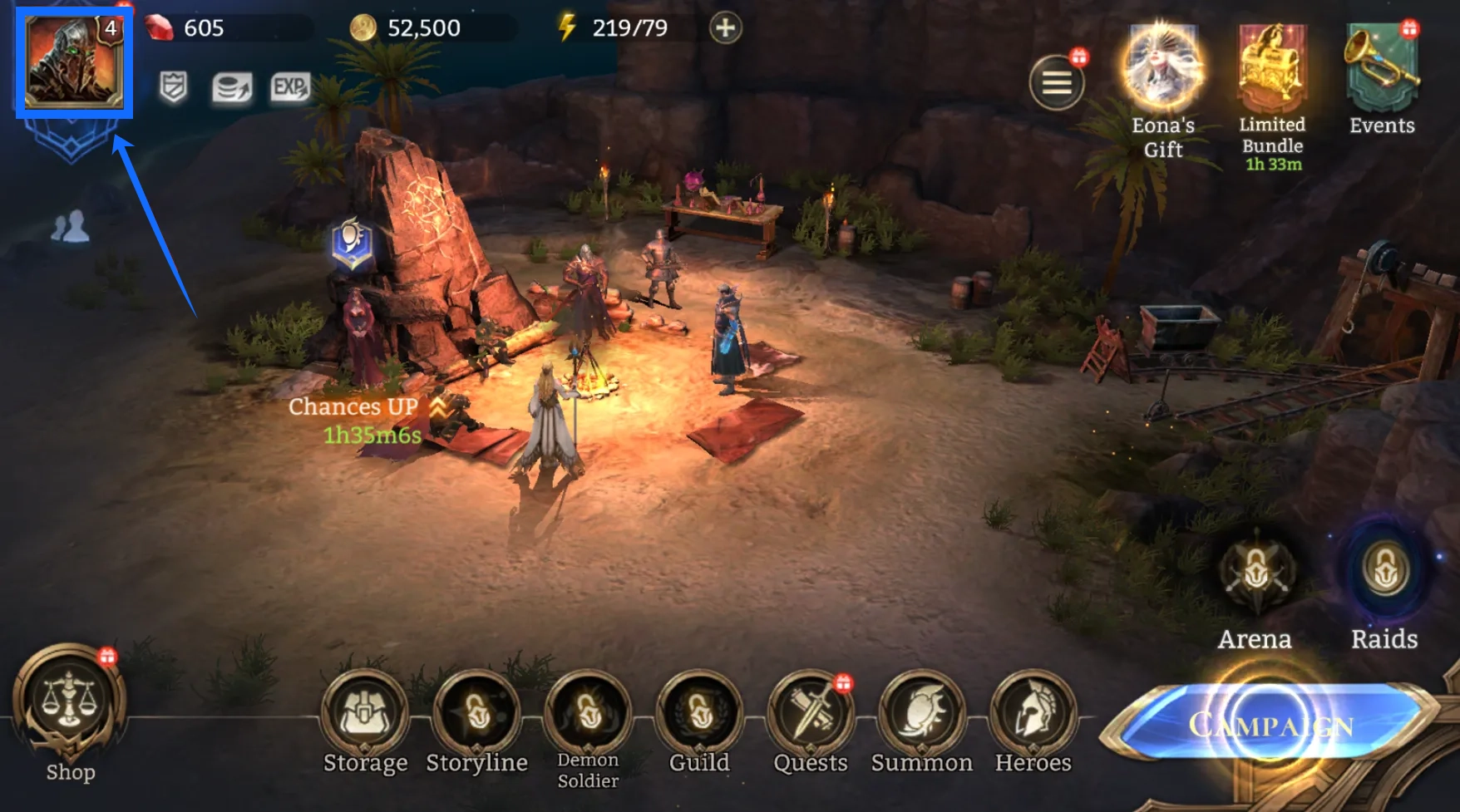
- Tap your avatar in the upper-left corner of the game screen to open your profile.
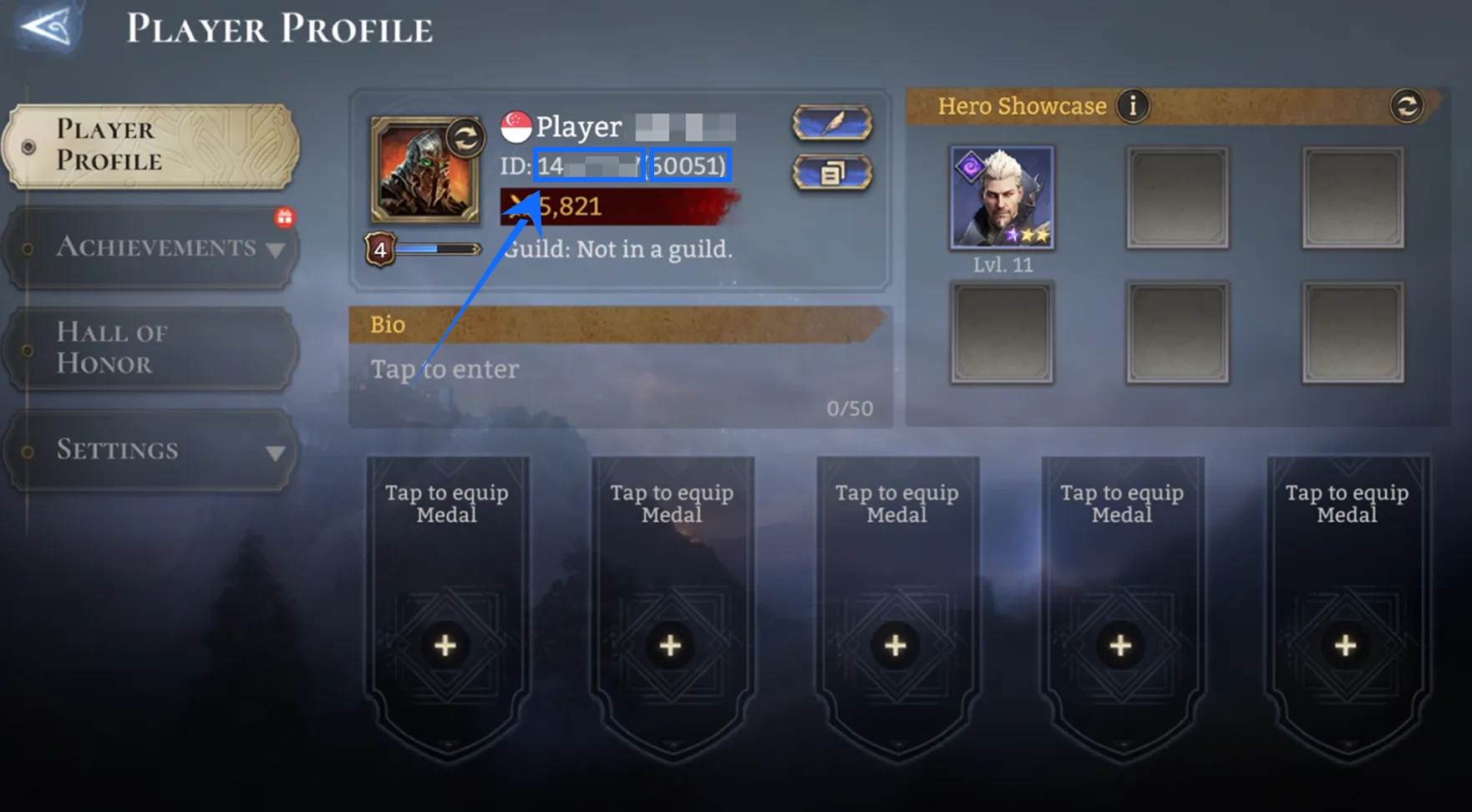
- Locate your Player ID and Zone ID, then enter each one in the corresponding field on your TRADEE order.
Use the details displayed in the game and make sure both IDs belong to the same receiving account. Do not mix information from different characters or servers, as this may affect order processing.
How Much W-Gold Should You Choose?
Before selecting a top-up amount, consider what you plan to purchase in the near future and choose a denomination that fits your budget. A larger package is not necessarily the better option if you do not need that much currency.
- If you only need a small amount: Compare the lower denominations and choose one that is close to your actual needs.
- If you have a specific purchase in mind: Check the target item's price and purchase requirements first, then estimate how much W-Gold you will need.
- If you plan to top up a larger amount: Compare the listed prices of different denominations. You can also factor in any discounts or applicable offers shown on the product page.
TRADEE lists the available packages and prices on the product page. Check your selected denomination and order total before paying so you can keep your spending plan clear.
How to Top Up W-Gold and Check Your In-Game Balance
- Open the TRADEE product page: Visit the website and select the Watcher of Realms W-Gold top-up product.
- Choose a top-up amount: Review the available W-Gold denominations, prices, and applicable offers, then select the package that suits your needs.
- Enter your Player ID and Zone ID: Fill in both details from the game and check that they identify the correct receiving account.
- Review your order and pay: Check the selected package, account details, and total amount. Complete payment using one of the methods available at checkout.
- Return to the game and check your balance: Once the order has been processed, log in to the relevant account and confirm that your W-Gold balance has increased.
W-Gold orders typically take around 10–30 minutes to process, although exceptional circumstances may cause delays. Available payment options at checkout may include PayPal, Visa, and credit cards; the options shown on the checkout page are the ones that apply to your order. TRADEE also provides 24/7 customer support for order status enquiries and top-up issues.
W-Gold Top-Up FAQs
Does topping up W-Gold grant a specific hero directly?
No. This product adds W-Gold to your account; it does not directly deliver a specific hero or piece of equipment. You will need to use the currency to make purchases according to the items and requirements available in the game.
Can W-Gold be used to purchase every in-game bundle?
Not necessarily. Eligible bundles, items, and other offers depend on what is currently available in the game and their individual purchase requirements. Check the target item's price and payment options before topping up.
Can this product be used on other versions or servers?
This product is intended for the mobile Global Server version of Watcher of Realms. If you play on a different version or server, do not use this product's top-up details without confirming compatibility first.
What should I do if my W-Gold has not arrived?
First, check your payment status and verify the Player ID and Zone ID submitted with your order. If the details are correct but your W-Gold balance has not increased after the usual processing time, contact TRADEE customer support with your order information so the top-up status can be checked.
