





Lineage2M Diamond Top-Up: Check Equipment Prices Before Choosing How Many Diamonds to Buy
In the world of Aden in Lineage2M, character progression is about more than hunting and dungeons. When the Exchange lists equipment suited to your class or the Diamond Shop features an item you need, having enough Diamonds can affect how you plan your next steps.
TRADEE offers Lineage2M Diamond top-ups. Choose a denomination based on your current in-game needs and receive the Diamonds directly through your Character ID and server details. Whether you are preparing to buy equipment, replenishing your shop currency, or setting aside resources for future character progression, you can compare the available prices before deciding how many Diamonds to purchase.
How Can You Use Diamonds? The Shop and Exchange Serve Different Purposes
Diamonds are an important premium currency in Lineage2M. They can be used to purchase eligible equipment, materials, and other items through the Exchange, as well as selected products and bundles in the Diamond Shop. Available tradeable items and shop inventory may vary according to game rules and current listings. After purchasing Diamonds, you will still need to select the items you want in-game.
Why Buy Lineage2M Diamonds from TRADEE?
TRADEE offers competitive Diamond prices, with selected denominations potentially available at promotional or event prices.
Flexible Payment Options
After choosing your Diamond amount, you can pay using the methods available at TRADEE checkout, including PayPal and Visa. The checkout page displays your selected product and the amount due, making it easy to review your order before payment.
Direct Character Top-Up Without Sharing Your Login
This Lineage2M service uses direct Character ID top-up. You only need to provide the target character's Character ID and server name; your game account password is not required. This keeps the order details straightforward and avoids the need to arrange a separate account login.
Direct top-up orders usually take around 3–5 minutes to process. Actual processing times may vary depending on payment checks, server conditions, and order volume. If you have questions about character details, payment issues, or order status, TRADEE customer support is available 24/7 to help you check the situation.
Which Lineage2M Accounts Are Supported?
This service supports Lineage2M accounts on the Global and Southeast Asia servers listed on the product page. It covers iOS and Android mobile devices, as well as PC players using PURPLE.
You will need to provide two key details when placing an order: Character ID and server name. These details identify the character that will receive the Diamonds. A character nickname alone is not sufficient, and details from another server cannot be used instead.
If you have characters on multiple servers, make sure to enter the details for the character that should receive the Diamonds. Characters with similar names on different servers are treated as separate recipients.
Find Your Character ID in Game Settings Before Topping Up
If this is your first Lineage2M direct character top-up, find the recipient details in-game before placing your order on TRADEE. The steps below explain how to locate your details and complete your purchase.
Find Your Character ID and Server Name
-
Log in to Lineage2M and switch to the character that should receive the Diamonds.
-
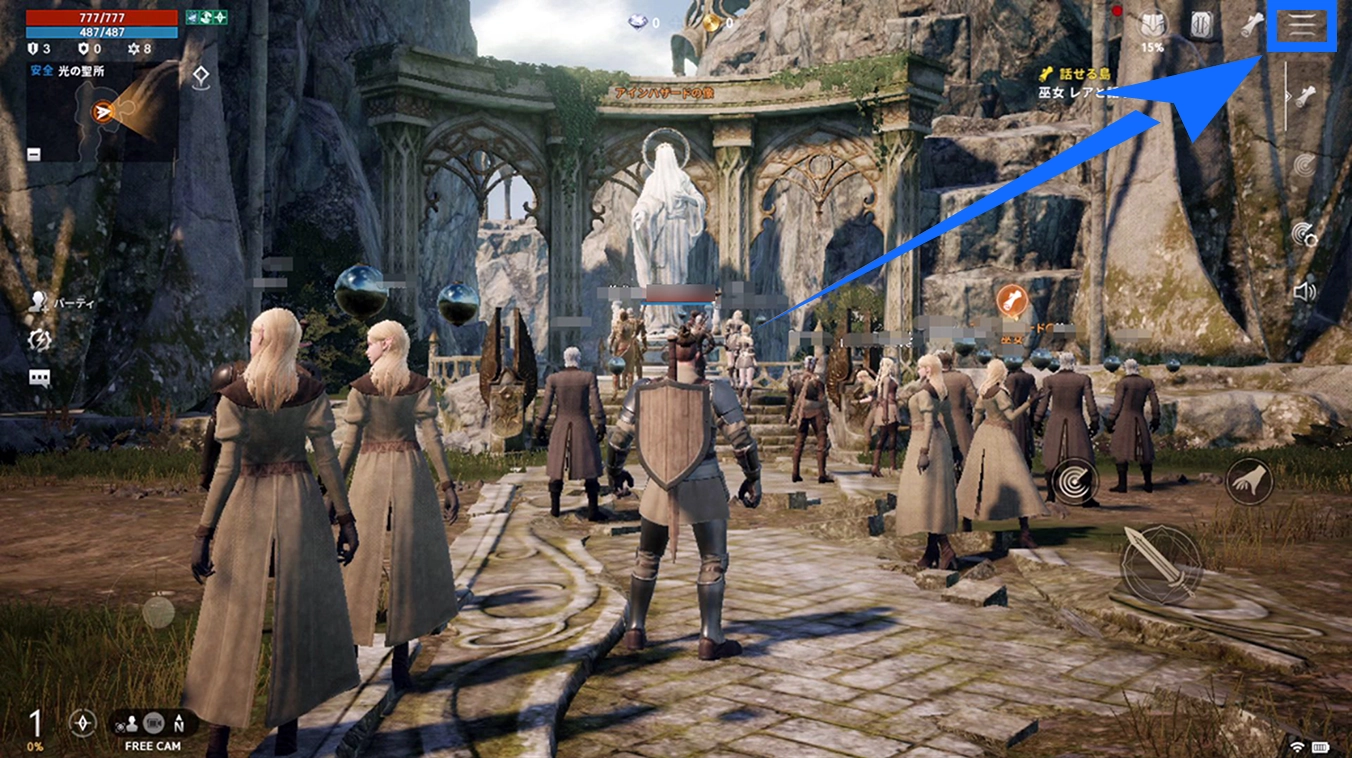
Open the Settings menu in the upper-right corner of the main game screen.
-
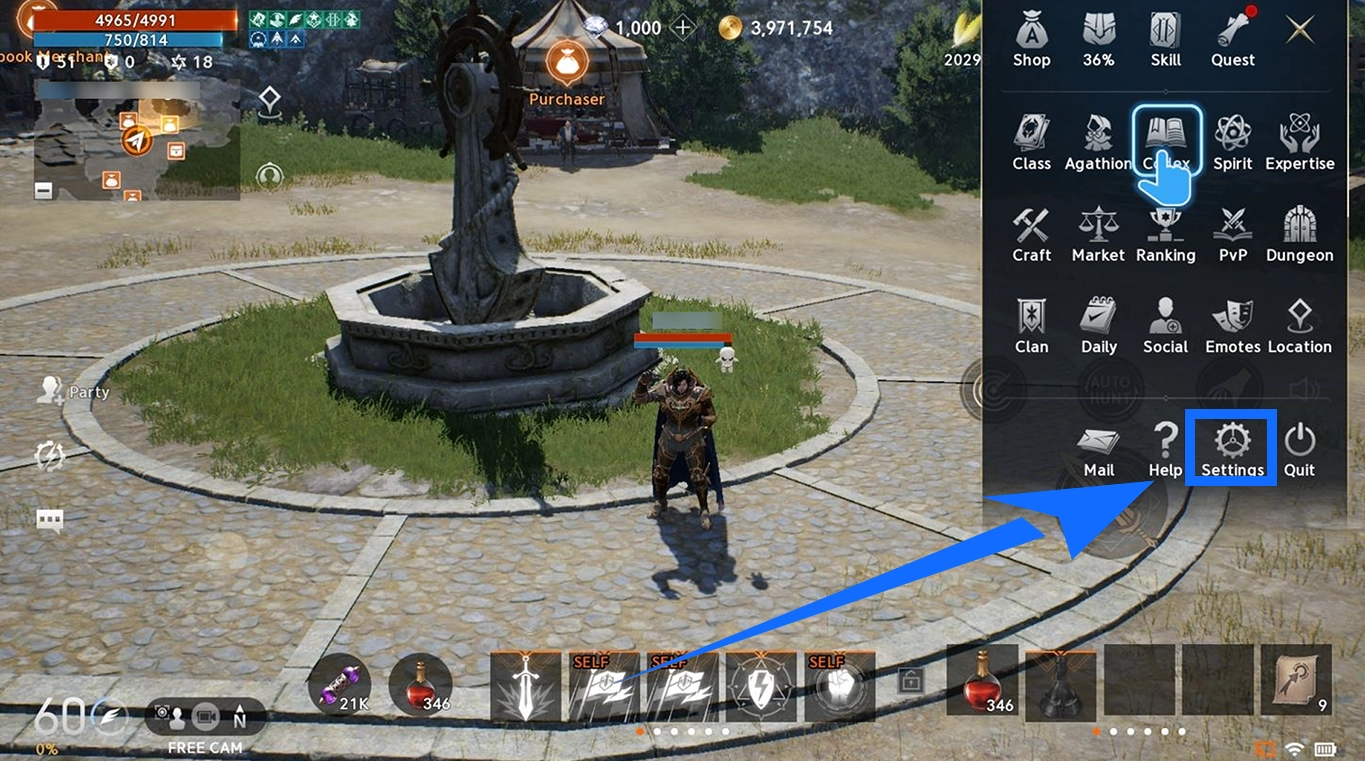
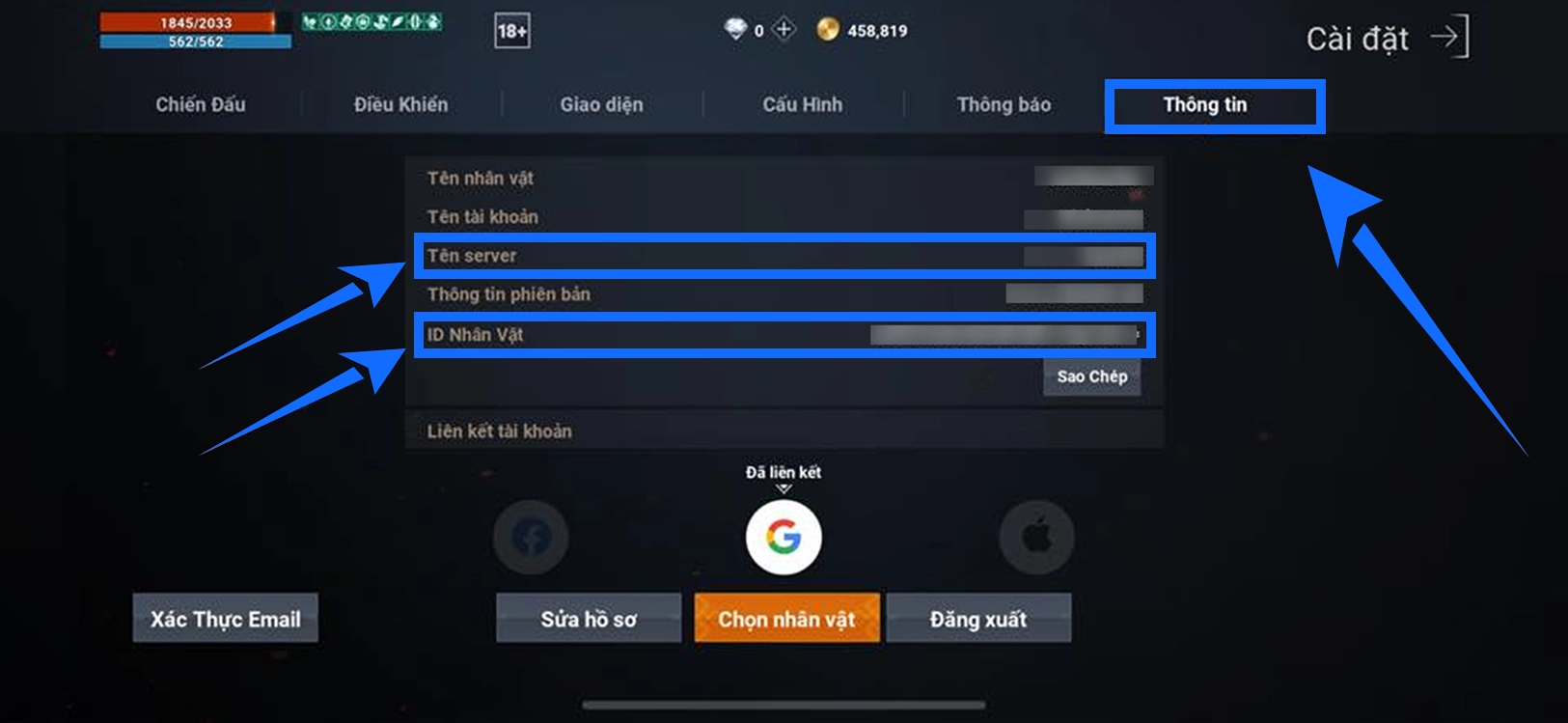
On the Settings page, find your Character ID and the server your character is currently on.
-
Copy or carefully record the details so you can enter them when placing your order.
Copying your Character ID directly is recommended to avoid typos or missing characters. Enter the full server name as well, especially if the same server group contains multiple server numbers.
Buy Lineage2M Diamonds on TRADEE
- Choose a Diamond denomination
Visit the Lineage2M Diamond top-up page on TRADEE, review the available amounts and current prices, and select the denomination that fits your budget.
- Enter your character details
Provide your Character ID and server name, then check that both match the information shown in-game.
- Review the total and pay
Check the Diamond amount, any applicable offers, and the final total. Then complete the payment using one of the methods available at checkout.
- Check that the Diamonds have arrived
Once the order has been processed, log in to the corresponding Lineage2M character and check whether the Diamond balance has been updated with the purchased amount.
Delivery reminder: Successful payment and delivery of Diamonds are separate steps. Check your in-game balance after the order has been processed rather than relying only on the payment confirmation.
Lineage2M Diamond Top-Up FAQ
Can I buy every piece of equipment in the Exchange with Diamonds?
No. Only items that meet the Exchange's trading requirements can be listed. Under Lineage2M's game rules, items with certain attributes, such as Bound, Event, or Shop, cannot be traded. Having enough Diamonds does not mean every piece of equipment will be available for purchase through the Exchange.
What is the difference between Diamonds and Adena in Lineage2M?
Adena is a common in-game currency earned through hunting, quests, and other activities. It is used for certain everyday purchases and character progression systems. Diamonds are a premium currency used for eligible Diamond Shop products, Exchange purchases, and other designated features. The two currencies serve different purposes, so buying Diamonds will not increase your Adena balance.
What should I do if I entered the wrong Character ID or server after placing an order?
Contact TRADEE customer support as soon as possible and provide your order details along with the correct character information so the current order status can be checked. If the Diamonds have already been delivered using the details submitted with the order, transferring them to another character may not be possible. Be sure to verify your information before paying.
What should I do if the order is marked as completed but my in-game Diamond balance has not changed?
First, make sure you are logged in to the character and server specified in your order, then check your Diamond balance again. If the order is marked as completed but the Diamonds are still missing, contact TRADEE customer support with your order details so they can check the top-up status.
