










Candy Crush Saga Gold Bars Top-Up: More Options for Your Next Level
One of the most frustrating moments in Candy Crush Saga is running out of moves just when you are a few steps away from clearing the last jelly. That is where Gold Bars can come in handy. You can use them for options such as extra moves, more lives, or boosters to help with a level, depending on what the game currently offers.
TRADEE offers Candy Crush Saga Gold Bars top-ups in different quantities, so you can choose an amount that matches your needs. This product uses a manual top-up service with account login for the mobile version of Candy Crush Saga. The top-up is completed through a linked King or Facebook account rather than by entering a Player ID for a direct top-up.
How Can Gold Bars Help You Get Through Difficult Levels?
Gold Bars are the game's premium currency. They do not clear levels for you, but they unlock additional purchase options when you need a little extra help.
Get Extra Moves When You Run Out
When you are close to completing a level but do not have enough moves left, you may be able to spend Gold Bars on extra moves if the game offers the option to continue. This is one of the most direct ways to use Gold Bars when a level is only a few matches away from completion.
Keep Playing When You Run Out of Lives
Normally, each failed attempt uses a life. Once you run out, you need to wait for lives to refill or ask friends for more. If you want to keep playing, you may also be able to use Gold Bars to purchase extra lives instead of relying only on the refill timer.
Get Boosters for Challenging Levels
Levels with dense blockers or tricky match requirements can be easier with in-game boosters. Gold Bars can be used to purchase eligible boosters, although the available types and quantities depend on the current in-game shop.
You do not need to spend Gold Bars on every level. For occasional extra moves, a smaller top-up may be enough. If you regularly use Gold Bars to purchase boosters, compare the price and quantity of larger bundles as well. Checking your current Gold Bars balance and the in-game cost before buying can help you choose the right package. For another casual mobile game, take a look at MONOPOLY GO! top-ups and enjoy moving around the board with dice rolls.
Candy Crush Saga Uses Account Login for Top-Ups: What Do You Need?
Unlike top-ups that only require a Player ID, TRADEE's Candy Crush Saga Gold Bars service is processed manually through a game account login. The key preparation is therefore not finding your Player UID, but making sure your current game progress is linked to an account you can access.
- Product: Candy Crush Saga Gold Bars
- Supported platforms: Mobile (iOS and Android)
- Server: Global server
- Delivery method: Manual top-up with account login
- Supported login methods: King account or Facebook account
- Required information: Email address or username and password for the linked account, plus any verification code requested during login
- Estimated processing time: Manual top-ups usually take around 15 minutes. Actual processing time may vary depending on the order and handling conditions.
Don't Have a King Account Yet? Link Your Game Progress First
If you have been playing with an unlinked game profile, create a King account and save your current progress before placing a top-up order.
- Open Candy Crush Saga and find the "Retrieve My Progress" option or the relevant account management menu in the game.
- Select "Register with Email". If you already have a King account, choose the email login option instead.
- Follow the on-screen instructions to enter your email address, name, and password, then complete the account setup.
- Make sure your game progress is linked to the correct King account, and keep the login details for later use.
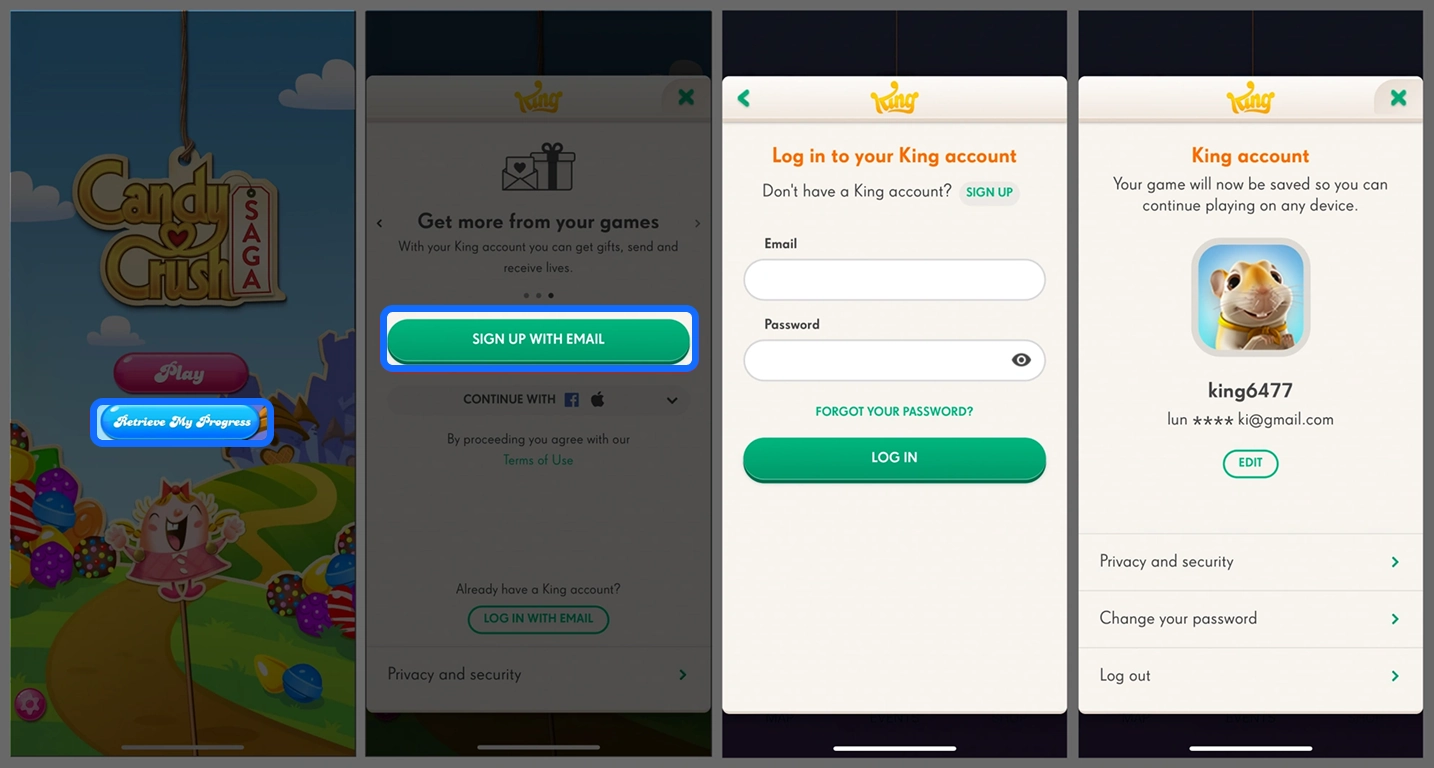
If your game progress is already saved through Facebook, you can use the corresponding Facebook login details. Do not switch to a new account without your existing progress just to place a top-up order, as you may end up accessing the wrong save.
Important: This product requires account login details and is not a password-free top-up. Before submitting your information, make sure it belongs to the account that should receive the Gold Bars. If additional verification is required during login, follow the order instructions to complete it.
From Choosing Gold Bars to Completion: How Does TRADEE Process Your Order?
TRADEE processes Gold Bars orders manually through account login. Choose a package based on the amount you need, then check the current price and any applicable offers. TRADEE offers competitive product prices and supports payment methods such as PayPal and credit cards. The available options are shown at checkout. For a different type of mobile game, you can also explore Tiles Survive! top-ups to replenish resources for another style of gameplay.
Since the top-up requires access to your game account, submitting the correct details and following the account-use instructions during processing are important parts of the order.
-
Choose a Gold Bars Package and Pay
Find the Candy Crush Saga Gold Bars product on TRADEE and select the amount you want. Check the package, current price, and final payment amount before completing checkout with one of the available payment methods.
-
Submit Your Game Account Login Details
Provide the details for the King or Facebook account linked to your game progress, including the email address or username and password used to log in. If a verification code is required, you will also need to complete the corresponding verification step.
-
Wait for the Manual Top-Up to Finish
After you submit the required details, the top-up team will process the order using the corresponding account. Please do not log in to Candy Crush Saga or switch to the same account on another device while the top-up is in progress. Simultaneous logins may interfere with the process and extend the processing time.
Manual top-ups usually take around 15 minutes. This is an estimate, not a guaranteed completion time for every order. Actual processing speed may vary depending on the order.
-
Log Back In and Check Your Gold Bars Balance
Once the order is marked as complete, log back in to your original Candy Crush Saga account. Check your Gold Bars balance to confirm that the purchased amount has been added correctly. If the Gold Bars do not appear, first make sure you are using the account submitted with the order, then contact TRADEE customer support for assistance.
For orders that require manual processing, providing the correct product quantity and login details, as well as following the account-use instructions during processing, can help avoid unnecessary delays. TRADEE offers 24/7 customer support for questions about payments, order progress, and top-ups.
Candy Crush Saga Gold Bars Top-Up: Frequently Asked Questions
Will Gold Bars Sync Between My Phone and Tablet on the Same Candy Crush Saga Account?
If both devices are logged in to the same game account linked to King or Facebook, Gold Bars will generally sync through that account. However, some boosters may work differently across devices, so Gold Bars syncing does not necessarily mean every item will sync in the same way.
Can I Use This Manual Top-Up if My Game Account Only Uses Apple Login?
This product supports King account and Facebook account login. If you only use Apple login and have not linked a usable King or Facebook account, you do not meet the login requirements listed for this manual top-up service. Apple login and other login methods may be connected to different game accounts, so they should not automatically be treated as the same save.
Should I Change My King or Facebook Password After the Manual Top-Up?
After the top-up is complete, you can log in to the game and check your Gold Bars balance before deciding whether to update your password. Changing your password is not required to receive the Gold Bars, but you can do so after confirming that the order is complete if you want to manage your login credentials again.
