












Apex Legends Top Up and Apex Coins Purchase
Apex Legends is a squad-based battle royale shooter built around unique Legends, teamwork, and competitive combat. Whether you want to purchase skins and collectibles from the in-game store or set aside a budget for future purchases, Apex Coins are the premium currency used for many in-game items.
TRADEE offers Apex Legends top-up services, including Apex Coins and selected paid products, for global PC accounts and supported console platforms. This page describes an EA Account login top-up service. You can compare the available products and prices, then review the service requirements before placing an order.
Choose Apex Coins or Selected Products
If you want more flexibility for in-game purchases, Apex Coins are a convenient option. If you already know what you want, you can also browse the selected paid products listed on TRADEE.
Apex Coins
Apex Coins are the premium currency in Apex Legends. They can be used to purchase eligible items from the in-game store. Before buying, check your current coin balance and the prices of the items you plan to purchase to choose an appropriate amount.
Other Selected Paid Products
The TRADEE catalog may also include other selected paid content. These products are delivered according to their individual descriptions and may not add to your Apex Coins balance. Before ordering, check the product name, quantity, price, and supported platform. The information currently displayed on the product page takes precedence.
Apex Legends Top-Up Prices and Payment Methods
TRADEE lists different Apex Coins denominations and selected paid products, so you can choose according to your budget and purchase plans. Some products may have current discounts or promotions. The final price is the one displayed on the product page.
Payment methods include PayPal and Visa, with a secure checkout environment. Available options may vary and are confirmed at checkout. Review the product details and total amount before paying. If you have questions about payment, account information, or order progress, TRADEE customer support is available 24/7.
What Should You Know Before Using an EA Account Login Top-Up?
This Apex Legends service is intended for global PC accounts and supported console accounts. The service is described as a Login Top-Up using an EA Account. Before choosing a product, make sure you understand how third-party account access works and which account is associated with the game progress that should receive the purchase.
If you play through the EA app, Steam, or a console platform, check how your platform account is linked to your EA Account. The player name shown on a platform may differ from the email address used to sign in to EA. Do not assume they are interchangeable.
Account Information and Security
- EA Account email: Use this to identify the EA Account associated with your game progress. Do not share it unless you have verified that the service and its process are trustworthy.
- EA Account password: Keep your password private. EA advises players never to share their passwords or login credentials with anyone.
- EA backup codes: These are sensitive, one-time-use security credentials. Keep them private and do not provide them to a third party.
These security details are different from the player ID information used by UID-based top-up services. Carefully review the product requirements and understand the risks of granting a third party access to your EA Account.
Account security notice: Third-party login services may involve account-access risks. Never share your password, verification codes, or backup codes. Review EA's official account security guidance before deciding how to proceed.
What Are EA Backup Codes and How Do They Work?
EA backup codes are part of the two-factor authentication system for EA Accounts. If you cannot use your usual verification method, a backup code may let you sign in under EA's security process. Each code can only be used once. Because these codes can provide access to your account, store them securely and never share them with anyone.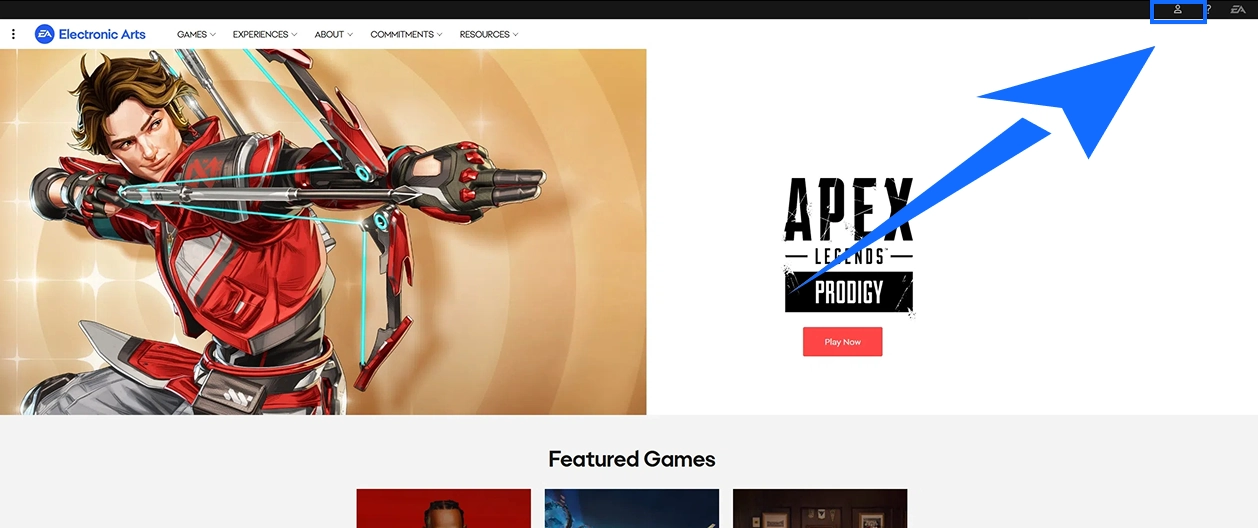
- Sign in to your EA Account
Visit the official EA Account website and sign in to manage your account settings.
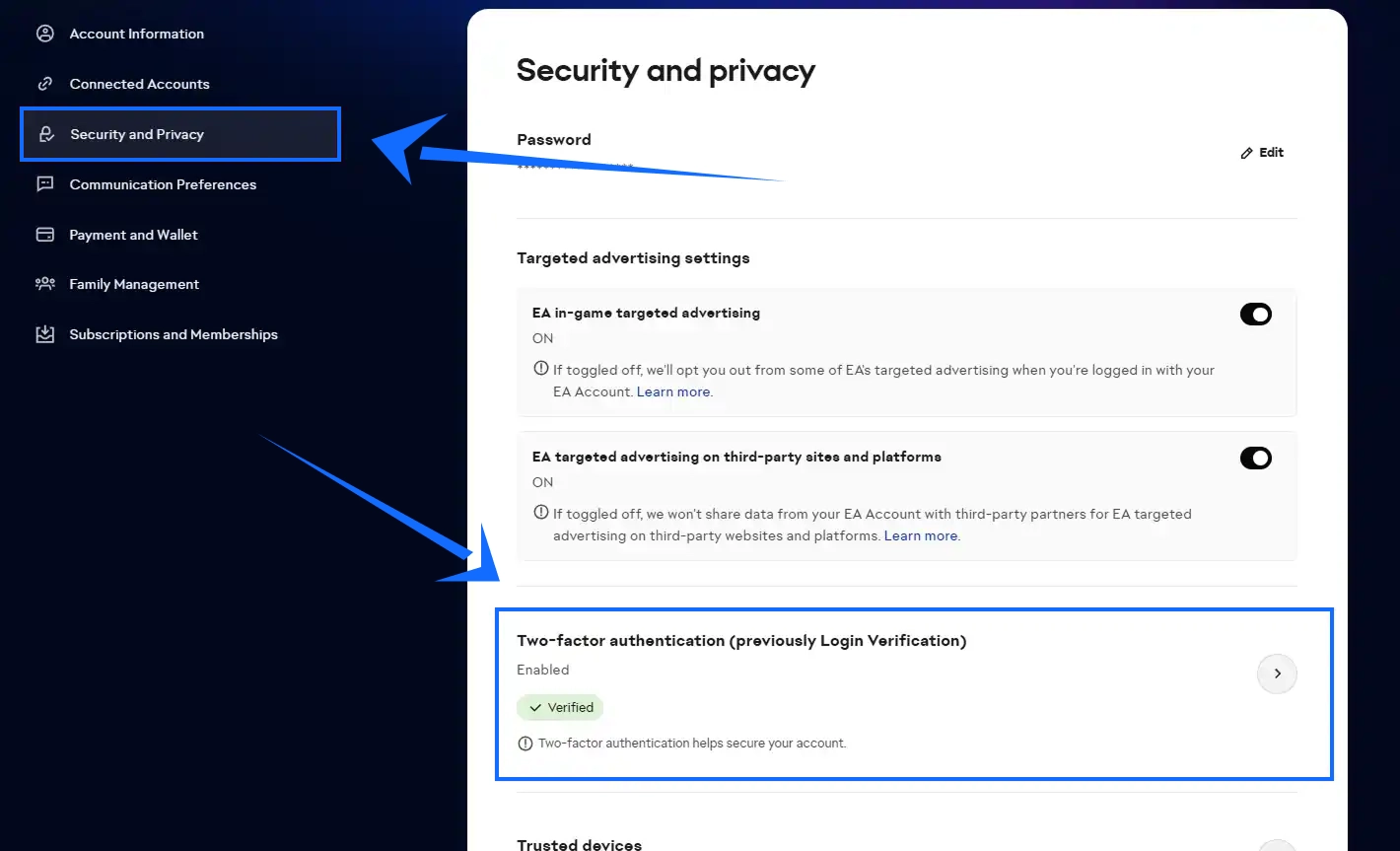
- Open Security Settings
Go to Security and Privacy and find the two-factor authentication settings.
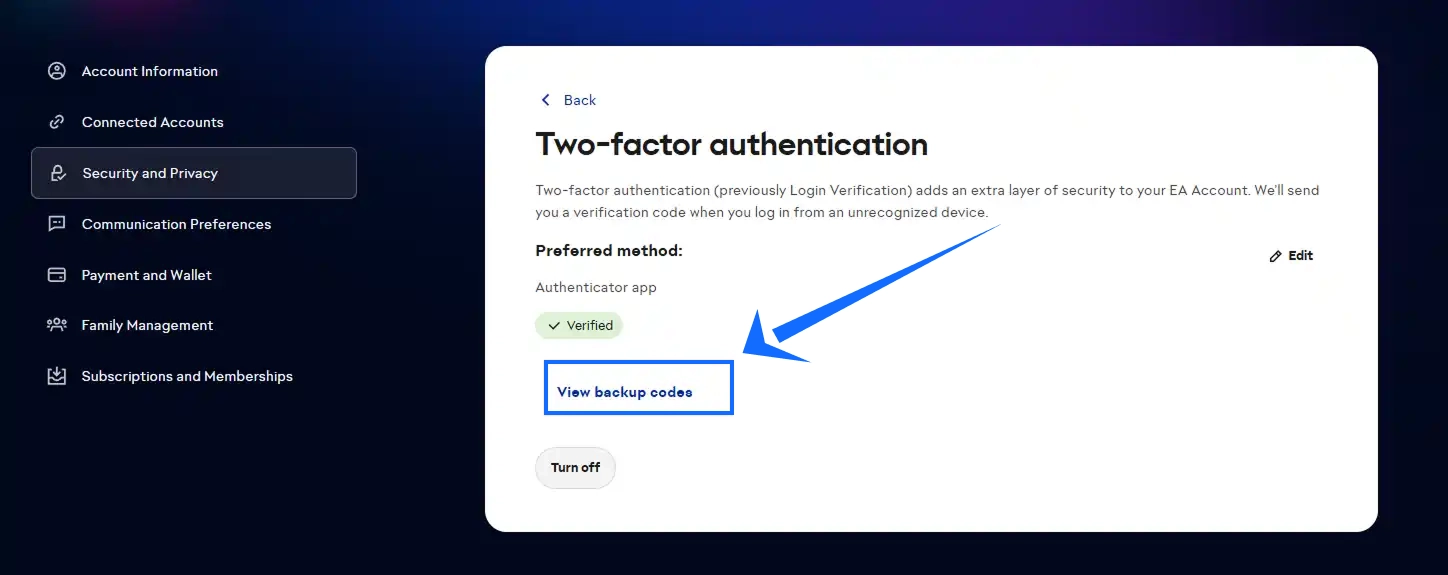
- Review Your Backup Codes
Use the account management options to view your backup codes and check their status. Keep the codes in a secure place and do not share them.
Backup codes are sensitive login credentials. If you are unsure whether a verification request is legitimate, check EA's official account security guidance before taking action.
Apex Coins Top-Up Process and Purchase Steps
Placing an Apex Legends order on TRADEE involves choosing a product, making payment, reviewing any account-related requirements, and waiting for order processing. Follow the instructions shown on the order page.
- Choose an Apex Coins Denomination or Selected Product
Visit the TRADEE Apex Legends product page and select the Apex Coins amount or another listed product. Check the product details, supported platform, and price before proceeding.
- Complete Payment
Review the product information, any applicable promotion, and the final amount due. Choose an available payment method at checkout to complete your purchase.
- Review the EA Account Requirements
After payment, follow the order instructions and review the information required for the selected service. Never submit your password, verification codes, or backup codes to an unverified third party. Make sure you understand the account-access process before proceeding.
- Wait for Order Processing
After the required order information has been submitted, the service team will process the selected product according to its instructions. Verification checks, payment review, and order volume may affect processing time. You can check your order status in your TRADEE purchase history.
During processing, avoid signing in to the same game account from another device if doing so could interfere with the ongoing operation.
- Check That the Product Has Been Delivered
When the order is marked as complete, launch Apex Legends and make sure you are using the correct EA Account and game platform. Then check your Apex Coins balance or the relevant purchased content, depending on the product.
If your order is still being processed, check its status before taking further action. Avoid paying for the same product again just because the in-game balance has not updated yet. After the order is complete, review your EA Account security settings and consider updating your password if necessary.
Apex Legends Top-Up and Apex Coins FAQ
Is this an Apex Legends UID top-up service?
No. The products described on this page use an EA Account login top-up process. They are not direct top-ups completed simply by entering a player UID.
Can Apex Coins balances be shared across PC and all console platforms?
Cross-platform progression and premium currency balances are subject to platform-specific rules. You should not assume that every platform shares the same Apex Coins balance. Before purchasing, check EA's current cross-progression rules and confirm that your platform is supported by the selected product.
What should I do if I entered the wrong EA Account for my Apex Legends order?
Contact TRADEE customer support as soon as possible and provide your order information so the current status can be checked. If the product has already been delivered, it may not be possible to transfer the content to another EA Account. Check your account details carefully before proceeding.
What should I do if my order is complete but my Apex Coins are missing in-game?
First, confirm that you are signed in to the EA Account and platform associated with the order. Then check your Apex Coins balance or the relevant product content. If the item still does not appear, contact TRADEE customer support with your order information to ask about the delivery status.
