








Age of Empires Mobile Currency Top-Up: Choose the Right Package for Your Kingdom
In Age of Empires Mobile, building your castle, researching technologies, developing heroes, and training troops all require resources. Empire Coins are an important premium currency used to increase your VIP level, purchase building and research speedups, unlock hero skills, and recruit higher-tier heroes. If you want to purchase other in-game items and bundles, you can also consider Apex Coins and choose the currency that best matches your needs.
TRADEE offers currency top-up services for Age of Empires Mobile on the Global Server. To place an order, you only need to provide the Player ID and Server ID of the account receiving the items. Your game account password is not required. Once you have these details, you can select a package and complete your payment.
What Is the Difference Between Empire Coins and Apex Coins?
These are two different premium currencies in Age of Empires Mobile, each with its own uses. Make sure you select the correct currency before purchasing.
Empire Coins
Empire Coins are mainly used for kingdom development. They can increase your VIP level, purchase building and research speedup items, unlock hero skills, recruit higher-tier heroes, and buy selected bundles in the in-game shop.
Apex Coins
Apex Coins can be used directly to purchase available in-game items and bundles, including some event and limited-time content. However, they cannot be used to top up Empire Coins. The two currencies serve different purposes and cannot be exchanged directly.
Before purchasing: Check the currency type, top-up amount, Player ID, Server ID, and order total before payment to avoid selecting the wrong product.
Make Your Age of Empires Mobile Top-Up Easier with TRADEE
TRADEE offers different Age of Empires Mobile currency packages, so you can choose an option that fits your kingdom's progress and spending plans.
- Multiple package options:
Browse the available Empire Coins and Apex Coins packages, then choose the amount that suits your needs and budget.
- No game password required:
Your receiving account is identified using your Player ID and Server ID. You do not need to submit your game account password.
- Flexible payment methods and 24/7 support:
Payment options shown at checkout include PayPal and Visa/credit card. Orders are usually processed within a few minutes after payment is confirmed, although actual processing time may vary depending on server response and other factors. If you have questions about an order or top-up, contact TRADEE customer support 24/7.
How to Find Your Age of Empires Mobile Player ID and Server ID
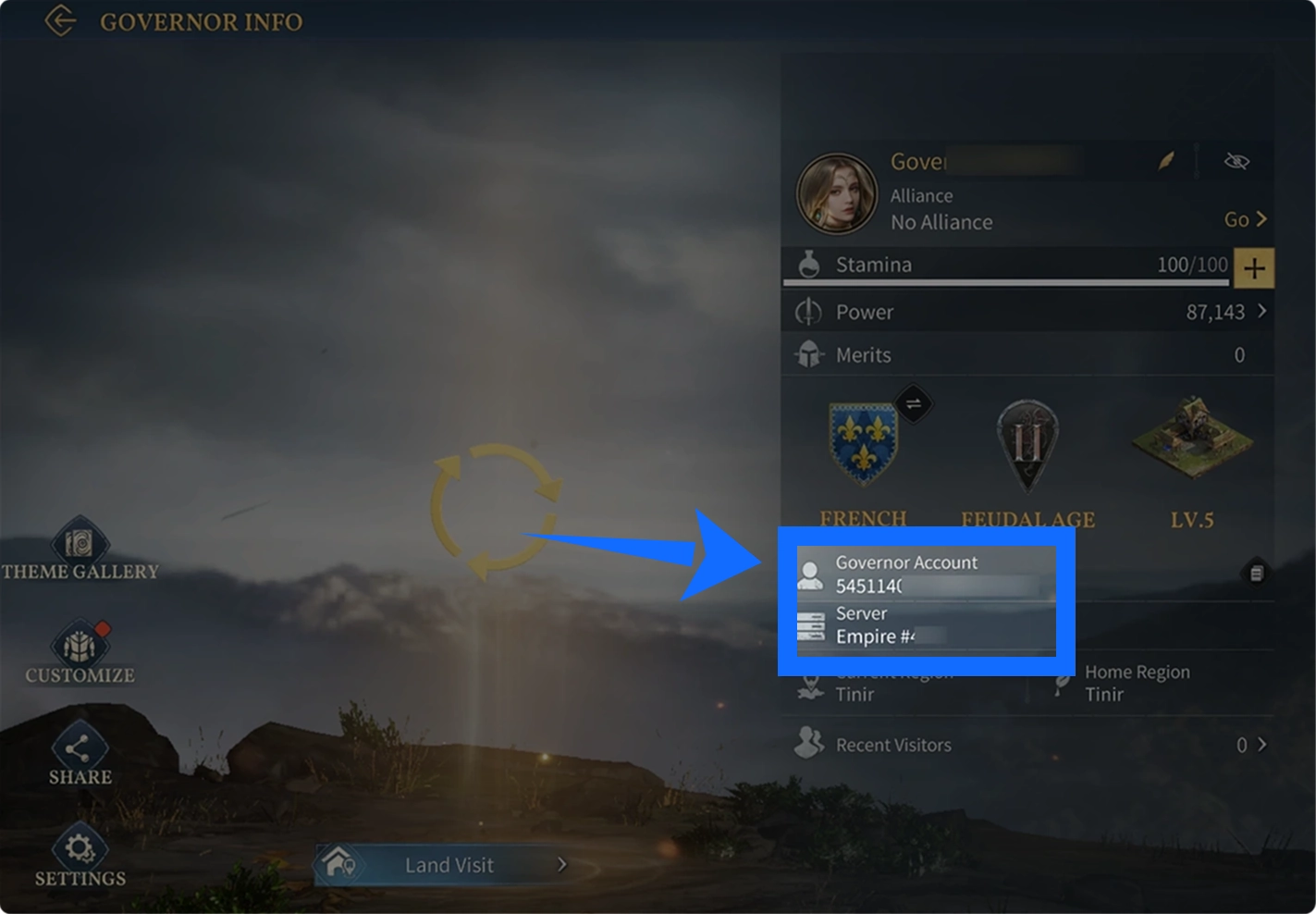
You need to provide your Player ID and Server ID when placing a top-up order through TRADEE. These details help ensure the product is delivered to the correct game account and server. You can find both IDs in the game.
Log in to the Age of Empires Mobile account that will receive the top-up, then tap your player avatar in the upper-left corner of the main screen to open your profile. Your Player ID and Server ID are displayed there.
- Log in to your game account
Open Age of Empires Mobile and make sure you are logged in to the account that will receive the top-up.
- Open your profile
Tap your player avatar in the upper-left corner of the main screen to access your profile.

- Find your Player ID and Server ID
Locate the Player ID and Server ID in your account information. Make sure both details belong to the account you are currently using.
- Copy and submit your details
Write down or copy both IDs, then enter them in the corresponding fields when placing your order on TRADEE. Check the information again before submitting.
Important: Both Player ID and Server ID are required. Do not mix IDs from different accounts. You do not need to provide your game account password.
How to Top Up Empire Coins and Apex Coins in Age of Empires Mobile
Once you have your game account details ready, follow these steps to complete your order.
- Choose your currency and top-up package
Visit the Age of Empires Mobile product page on TRADEE. Select the Empire Coins or Apex Coins package you need, then check the amount and product details.
- Enter your Player ID and Server ID
Provide the Player ID and Server ID of the account receiving the product. Make sure the details match the information displayed in the game.
- Review your order and complete payment
Check the selected currency, package amount, account details, and order total. Then choose one of the payment methods available at checkout to complete the transaction.
- Wait for delivery and check your balance
Once payment is confirmed, your order will enter the top-up process. After processing is complete, reopen Age of Empires Mobile and check the Empire Coins or Apex Coins balance on the relevant account to confirm delivery.
Age of Empires Mobile Top-Up FAQ
Can Empire Coins and Apex Coins be exchanged for each other?
No. Empire Coins and Apex Coins are two different premium currencies with different uses. Apex Coins cannot be used to top up Empire Coins, so make sure you select the currency you need before purchasing.
Will topping up Empire Coins automatically give me a specific hero or piece of equipment?
No. An Empire Coins top-up only adds the corresponding currency to your in-game balance. It does not directly grant a specific hero, piece of equipment, or bundle. You still need to use the coins to purchase eligible items in the game.
Do I need to provide my game account password when placing an order?
No. This product uses your Player ID and Server ID for delivery. You only need to provide the correct account identifiers; your game login password is not required.
What should I do if my Empire Coins or Apex Coins have not arrived after payment?
First, check whether your payment has been confirmed. Then verify the Player ID and Server ID you submitted and check the relevant currency balance in the game. If the currency is still missing, keep your TRADEE order number and contact customer support so the top-up status can be checked.
